

MaxC
Associate II
October 15, 2024
Solved

NanoEdge AI Studio updates

  • October 15, 2024
  • 1 reply
  • 1382 views

Dear STM,

is there a way to avoid the installation of a new version of NanoEdge AI when a new version is available ?

Or maybe to pospone the installation ?

When a new version is available I got a dialog Win like the one below, if I click on Exit then the app closes itself, if I click on Download then the application downloads the new version and it tries to install the new version. Unfortunately, based on specific company policies, I haven't the Admin priviledeges to install every new version when it becomes available.
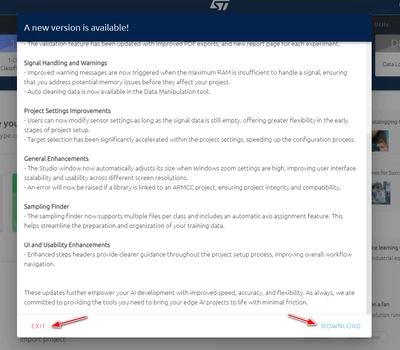
 

MaxC_0-1728993958617.png


thanks

   Max


Best answer by Julian E.

Hello @MaxC ,

I would answer that sadly you cannot skip an update.

But you can try to disconnect your pc from internet and click on Download. You should be able to use NanoEdge AI Studio normally (but it is still advised to do the update)


The option to postpone an update is planned and will be integrated in the next version.

Because it will be added in the next version, you will not be able to skip this one, but the ones after it.


Have a good day,

Julian


1 reply

Julian E.
Julian E.Best answer
Technical Moderator
October 15, 2024

Hello @MaxC ,

I would answer that sadly you cannot skip an update.

But you can try to disconnect your pc from internet and click on Download. You should be able to use NanoEdge AI Studio normally (but it is still advised to do the update)


The option to postpone an update is planned and will be integrated in the next version.

Because it will be added in the next version, you will not be able to skip this one, but the ones after it.


Have a good day,

Julian


​In order to give better visibility on the answered topics, please click on 'Accept as Solution' on the reply which solved your issue or answered your question.
MaxC
MaxCAuthor
Associate II
October 15, 2024

Hello Julian,

thank you for the feedback.

  Max