Hello @szxx,
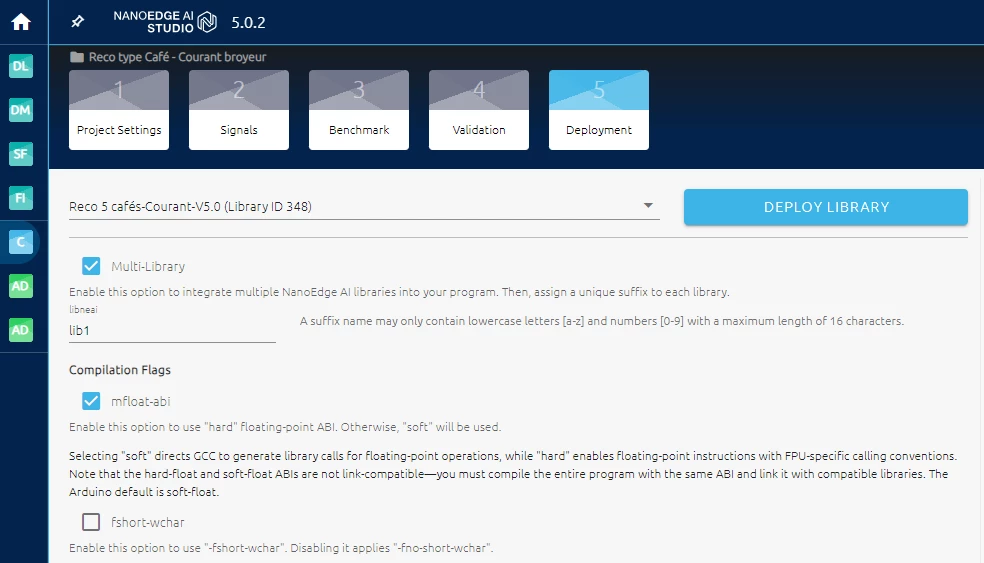
In the last step of NanoEdge AI Studio, the compilation, you can select the Multi-library option.
You need to enter a name to your library that will be used as a suffix for the files to include in your project and in the function names, for you to freely use each library.
For example, here is a classification project, where I call my library lib1:
Here is the zip that you get:
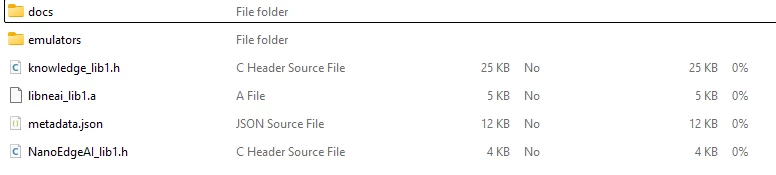
You can see that my knowledge, libneai and NanoEdgeAI files all have the suffix lib1.
We can also look at the function in the header file NanoedgeAI_lib1.h:
	/**
	 * @brief Initialization must be called at the beginning to load the knowledge.
	 * This buffer is defined in the header file knowledge.h provided in the .zip file
	 * @retval NEAI_OK in case of success.
	 */
	enum neai_state neai_classification_init_lib1(const float knowledge_buffer[]);

	/**
	 * @brief This function returns the class identified
	 * @param data_input[] [IN]: Signal to be classified AXIS_NUMBER * DATA_INPUT_USER
	 * @param output_buffer[] [OUT]: Contains the probabilities for all classes
	 * @param *id_class [OUT]: Variable that contains the class ID with the highest probabilities
	 * @retval NEAI_OK in case of success.
	 */
	enum neai_state neai_classification_lib1(float data_input[], float output_buffer[], uint16_t *id_class);
As you can see my functions also have the suffix lib1.
Now if you want to add another library, you will have to select multilibrary and set a name, like lib2.
Let's say, you have a classification library called lib1 and an anomaly detection called lib2. In your project, you need to:
- Include everything
- Initialise both libraries (for anomaly detection you either use a knowledge or retrain the library, or both)
- use the anomaly detection learn function to retrain (optional)
- Fill a buffer of data
- Do anomaly detection
- Do classification if similarity is low (if anomaly detection detected an anomaly)
For example, something like this:
#include "NanoEdgeAI_lib1.h"
#include "NanoEdgeAI_lib2.h"
#include "knowledge_lib1.h"
#include "knowledge_lib2.h"


int main(void) {
 // Initialize models
 neai_state1 = neai_classification_init_lib1(knowledge_buffer);
 neai_state2 = neai_anomalydetection_knowledge_lib2(knowledge_buffer);

 if (neai_state1 == NEAI_OK and neai_state2 == NEAI_OK ) {
 while (1) {
 // Fill data_inputwith sensor data here

 // Run Anomaly Detection
 neai_anomalydetection_detect_lib2(float data_input[], uint8_t *similarity);

 // If similarity is low, most likely an anomaly
 if (similarity <= 90) {
 neai_classification_lib1(float input_buffer[], float output_buffer[], uint16_t *id_class);
 }
 // Do something with the results
 }
 }
 //else error in init
}
Documentation about libraries function:
Anomaly detection: https://wiki.st.com/stm32mcu/wiki/AI:NanoEdge_AI_Library_for_anomaly_detection_(AD)
Classification: https://wiki.st.com/stm32mcu/wiki/AI:NanoEdge_AI_Library_for_n-class_classification_(nCC)
You can also find code example here:
stm32ai-nanoedge-datalogger/Drivers at main · stm32-hotspot/stm32ai-nanoedge-datalogger
These code are the datalogger generator source code. These code both include datalogging and using a library so you can take a look.
(be careful to use the command in the readme to clone the repository as it needs external ressources)
have a good day,
Julian
