Associate II
August 6, 2024
Solved

Old version of Nano Edge AI

  • August 6, 2024
  • 2 replies
  • 1541 views

Hi,

I want to download an old version 3.0.1 of Nano Edge AI studio but I could not find it from the website. It directly download the new version 4.5.0. How can I reach the version 3.0.1?

Best answer by Julian E.

If you are using this function pack: STEVAL-PROTEUS1 - Industrial sensor evaluation kit for condition monitoring based on the 2.4 GHz STM32WB5MMG module - STMicroelectronics2

You need to use the provided scripts to get data via serial


The easiest way to log data via USB with a proteus is to use the datalogger tool in NanoEdge:

* Open NanoEdge And go to the datalogger from the main page

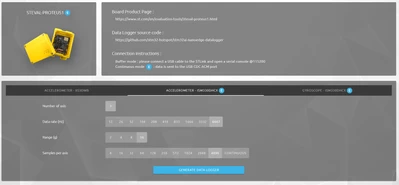
* Select the Proteus, the accelerometer that you want to use and the parameters (buffer size, sampling rate):
JulianE_0-1723449775680.png

* Click generate data logger

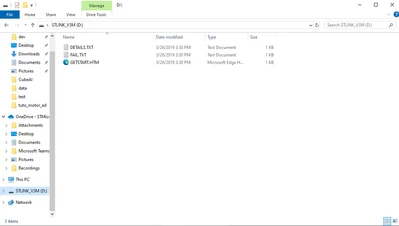
* Drag and drop the binary file to flash it (you need a ST link)
JulianE_1-1723449853674.png

You are can then import data in NanoEdge via serial.


Julian


2 replies

Julian E.
Technical Moderator
August 12, 2024

Hello @Batuhan35 ,


We do not support old version of NanoEdge AI Studio, so it is not possible to download old versions.

May I ask why you would like to have access to an old version? 


Have a good day,

Julian


​In order to give better visibility on the answered topics, please click on 'Accept as Solution' on the reply which solved your issue or answered your question.
Batuhan35Author
Associate II
August 12, 2024

Hi @Julian E. 

I am using the STEVAL-PROTEUS1 evaluation kit for anomaly detection. When I try to add a signal via USB, I am unable to receive any values from the accelerometer, even though I can see the data on the STBLE Sensor app. I've tried several troubleshooting steps and am considering whether using an older version of NanoEdge AI might resolve the issue, as most of the demo videos use the previous version. Do you have any ideas on what might be causing this problem?

Julian E.
Julian E.Best answer
Technical Moderator
August 12, 2024

If you are using this function pack: STEVAL-PROTEUS1 - Industrial sensor evaluation kit for condition monitoring based on the 2.4 GHz STM32WB5MMG module - STMicroelectronics2

You need to use the provided scripts to get data via serial


The easiest way to log data via USB with a proteus is to use the datalogger tool in NanoEdge:

* Open NanoEdge And go to the datalogger from the main page

* Select the Proteus, the accelerometer that you want to use and the parameters (buffer size, sampling rate):

JulianE_0-1723449775680.png

* Click generate data logger

* Drag and drop the binary file to flash it (you need a ST link)

JulianE_1-1723449853674.png

You are can then import data in NanoEdge via serial.


Julian


​In order to give better visibility on the answered topics, please click on 'Accept as Solution' on the reply which solved your issue or answered your question.