
ksale.1
Senior II
June 29, 2024
Solved

sampling finder

  • June 29, 2024
  • 2 replies
  • 2119 views

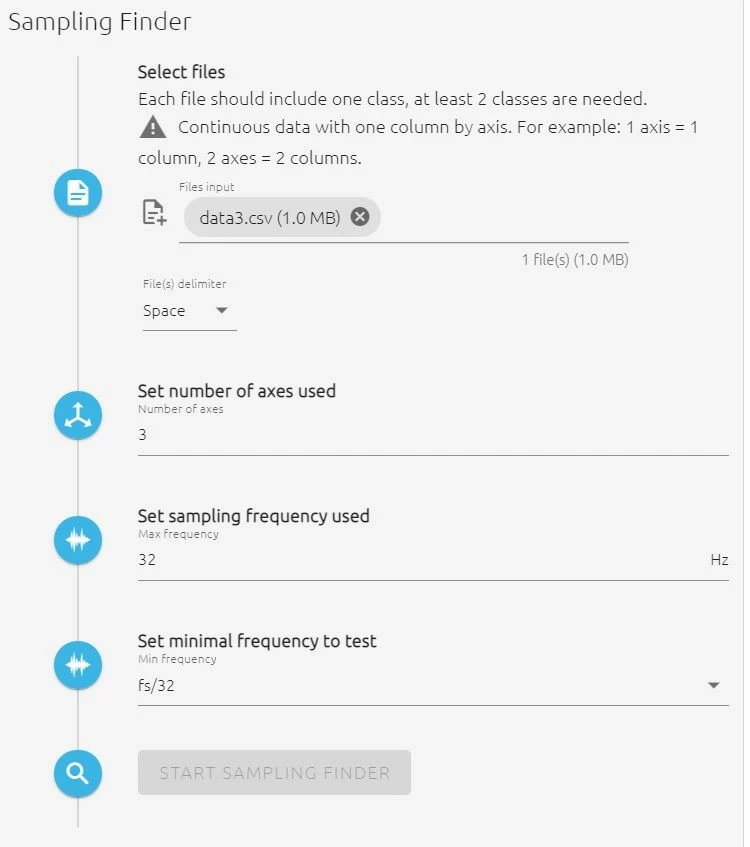
sampling finder (SF) for imported signal file is greyed out, please adviseSF.jpg
Best answer by Julian E.

Hello @ksale.1,

Thank you for reaching out,


You did well importing continuous data, but you need to import at least 2 files.


The sampling finder will try combinations of buffer sizes and sampling rates (by down sampling the initial sampling rate) and will estimate how well it can distinguish the files.


In your case, you seem to be doing Anomaly Detection (AD), so you should import a nominal file and an abnormal file (both with the same sampling rate).


You will get a matrix of results based on the buffer sizes and the sampling rates. The best combination is only recommendation, the real benchmark of the project may not give the same results. Do not hesitate to try other combinations (if it works not well, choose combinations with higher buffer sizes)
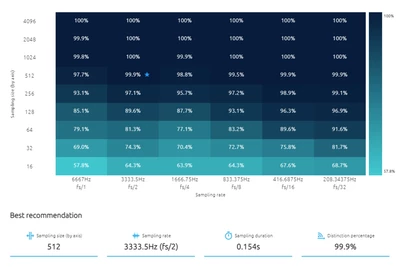
neai_sampling_finder_matrix.png

Here is the documentation about the sampling finder:

https://wiki.st.com/stm32mcu/wiki/AI:NanoEdge_AI_Studio#Sampling_finder


Please let me know if you have any other questions,

Julian

2 replies

ksale.1
ksale.1Author
Senior II
June 29, 2024

Please note lines in file = 51000, which should be enough as per documentation, but it complains !

SF.jpg

Julian E.
Julian E.Best answer
Technical Moderator
July 1, 2024

Hello @ksale.1,

Thank you for reaching out,


You did well importing continuous data, but you need to import at least 2 files.


The sampling finder will try combinations of buffer sizes and sampling rates (by down sampling the initial sampling rate) and will estimate how well it can distinguish the files.


In your case, you seem to be doing Anomaly Detection (AD), so you should import a nominal file and an abnormal file (both with the same sampling rate).


You will get a matrix of results based on the buffer sizes and the sampling rates. The best combination is only recommendation, the real benchmark of the project may not give the same results. Do not hesitate to try other combinations (if it works not well, choose combinations with higher buffer sizes)

neai_sampling_finder_matrix.png

Here is the documentation about the sampling finder:

https://wiki.st.com/stm32mcu/wiki/AI:NanoEdge_AI_Studio#Sampling_finder


Please let me know if you have any other questions,

Julian

​In order to give better visibility on the answered topics, please click on 'Accept as Solution' on the reply which solved your issue or answered your question.
