
ST Edge AI Core - Problems with MatMul on STM32MP25-DK
Hello,
I am trying to convert my Onnx model with the ST Edge AI Core tool to the .nb format for the STM32MP25-DK target.
Since the results were not matching I stripped down the model into the single operations and tried to debug them
It looks like the problem comes from the MatMul operation.
My model looks like this:
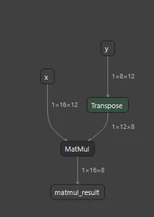
When I run my test script were I compare the Onnx model with the NB model, then I get the following results:
================================================================================
ONNX OUTPUTS
================================================================================
[ONNX] matmul_result
 shape=(1, 16, 8) dtype=float32
 min=-10.684526 max=7.463792 mean=-0.168686
 values=[3.1317086219787598, -0.7650761604309082, 0.822991132736206, -6.243682384490967, -1.3690400123596191, 0.5091162323951721, -3.2105088233947754, 3.2010514736175537, 1.773209571838379, -2.338696002960205]
================================================================================
NBG OUTPUTS
================================================================================
[NBG] output_0
 shape=(1, 16, 8) dtype=float32
 min=0.000000 max=0.000000 mean=0.000000
 values=[0.0, 0.0, 0.0, 0.0, 0.0, 0.0, 0.0, 0.0, 0.0, 0.0]
================================================================================
OUTPUT COMPARISON
================================================================================
[out 0] max_abs_diff=1.068453e+01 mean_abs_diff=2.640215e+00
============================================================
ONNX metadata: resources/backbones/op_tests/op_matmul.onnx
============================================================
INPUT: name=x shape=[1, 16, 12] type=tensor(float)
INPUT: name=y shape=[1, 8, 12] type=tensor(float)
OUTPUT: name=matmul_result shape=[1, 16, 8] type=tensor(float)
============================================================
Loading NBG model: resources/backbones/op_tests/op_matmul.nb
============================================================
**Input node: 0 -Input_name: -Input_dims:3 - input_type:float16 -Input_shape:(1, 16, 12)
**Input node: 1 -Input_name: -Input_dims:3 - input_type:float16 -Input_shape:(1, 8, 12)
**Output node: 0 -Output_name: -Output_dims:3 - Output_type:float16 -Output_shape:(1, 16, 8)So basically I am only getting 0's after the MatMul.
I already checked that the transpose worked. I verified that the transpose is working and even when I remove the batch dimension with the following model I am getting the same results.
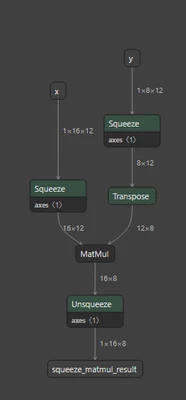
I am using the following command to convert the Onnx model:
~/STMicroelectronics/STEdgeAI/2.2/Utilities/linux/stedgeai generate -m op_matmul.onnx --target stm32mp25 --output ~/STMicroelectronics/STEdgeAI/output --workspace ~/STMicroelectronics/STEdgeAI/workspace/
ST Edge AI Core v2.2.0-20266 2adc00962

Model successfully compiled to NBG: /home/devuser/STMicroelectronics/STEdgeAI/output/op_matmul.nb
PASS: 100%
elapsed time (generate): 9.928s
I have attached the Onnx and NB models, if needed I can also provide the code that I used for testing but I don't think the problem is related to this since all of my other tests worked with other operations.
Like stated here (STM32MP2 NPU description - stm32mpu and ONNX toolbox support), the MatMul operation should be implemented on the GPU.
Did anyone had similar issues and know how to fix them? Or am i missing something with the constraints/dimensions?
Thank you in advance for your help.
Best regards
Nils