
Associate
June 20, 2025
Solved

ST Edge AI Developer Cloud Benchmark not working with STM32F746G-DISCO

  • June 20, 2025
  • 3 replies
  • 491 views

Hello! I am working with the developer cloud to benchmark some models' inference speed in a controlled environment. It was working well for the STM32F746G-DISCO board until a couple of days ago, when it just kept saying that my model has a measured inference time of "undefined ms." 
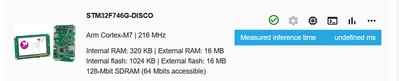
 

mimik_0-1750439169366.png


I was wondering if this issue was known and whether it was possible to benchmark the inference time of my model locally on my board with the same environment as the developer cloud. I am aware of the local benchmarking tool in the ModelZoo services, but it seems to only give the estimated memory footprints, not the inference time.

Thank you! 


Best answer by hamitiya

Hello,

Could you please retry  and see what happens on your end ? 

I was able to reproduce the issue and after an update it is now unstuck.


Best regards,

Yanis

3 replies

hamitiya
ST Employee
June 23, 2025

Hello,

Is it possible to share the version you used as well as the model ?


Best regards

Yanis

​In order to give better visibility on the answered topics, please click on 'Accept as Solution' on the reply which solved your issue or answered your question.
mimikAuthor
Associate
June 23, 2025

Thank you for the reply. This error has occurred to me for every model I've tried so far. A model that I have confirmed this error to happen with is the "st_yolo_x_nano_192_0.33_0.25_int8_object_detection_COCO_2017_Person.tflite" in the ModelZoo. The version of ST Edge AI that I used is 2.1.0-20194 329b0e98d, but I also tested it on 2.0.0-20049, and it also did the same thing. Everything was working with the same version 2.1.0-20194 329b0e98d for me on the 18th.

I get the following output from validation: 

ST Edge AI Core v2.1.0-20194 329b0e98d
Setting validation data...
 generating random data, size=1, seed=42, range=(0, 1)
 I[1]: (1, 192, 192, 3)/float32, min/max=[0.000006, 0.999992], mean/std=[0.499628, 0.288319]
 c/I[1] conversion [Q(0.00392157,0)]-> (1, 192, 192, 3)/uint8, min/max=[0, 255], mean/std=[127.405409, 73.521879]
 m/I[1] conversion [Q(0.00392157,0)]-> (1, 192, 192, 3)/uint8, min/max=[0, 255], mean/std=[127.405409, 73.521879]
 no output/reference samples are provided
Creating c (debug) info json file C:\Users\aiprod\AppData\Local\Temp\benchmark-ai-output-directory-c6e629df-136f-4317-a600-fa5198b4289c\network_c_info.json
 Exec/report summary (validate)
 ----------------------------------------------------------------------------------------------------------------------------------------------------------------------------------------------------------------------------
 model file : C:\Users\aiprod\AppData\Local\Temp\benchmark-ai-project-directory-6fd50282-ef8e-40db-906e-1e8bfffe007a\STM32F746G-DISCO\st_yolo_x_nano_192_0.33_0.25_int8_object_detection_COCO_2017_Person.tflite 
 type : tflite 
 c_name : network 
 compression : lossless 
 options : allocate-inputs, allocate-outputs, multi-heaps 
 optimization : balanced 
 target/series : stm32f7 
 memory pool : C:\Users\aiprod\AppData\Local\Temp\benchmark-ai-project-directory-6fd50282-ef8e-40db-906e-1e8bfffe007a\STM32F746G-DISCO\.ai\mempools-board.json 
 workspace dir : C:\Users\aiprod\AppData\Local\Temp\benchmark-ai-workspace-directory-56e8e5d6-0130-47f9-a2f7-d9ff14cc64c6 
 output dir : C:\Users\aiprod\AppData\Local\Temp\benchmark-ai-output-directory-c6e629df-136f-4317-a600-fa5198b4289c 
 model_fmt : sa/ua per tensor 
 model_name : st_yolo_x_nano_192_0_33_0_25_int8_object_detection_COCO_2017_Person 
 model_hash : 0xac32a7b489150a917c95ccf44349fb1f 
 params # : 889,394 items (891.18 KiB) 
 ----------------------------------------------------------------------------------------------------------------------------------------------------------------------------------------------------------------------------
 input 1/1 : 'serving_default_input_10', uint8(1x192x192x3), 108.00 KBytes, QLinear(0.003921569,0,uint8), activations 
 output 1/3 : 'conversion_145', f32(1x6x6x6), 864 Bytes, activations 
 output 2/3 : 'conversion_97', f32(1x24x24x6), 13.50 KBytes, activations 
 output 3/3 : 'conversion_121', f32(1x12x12x6), 3.38 KBytes, activations 
 outputs (total) : 0 Bytes 
 macc : 112,230,814 
 weights (ro) : 912,572 B (891.18 KiB) (1 segment) / -2,645,004(-74.3%) vs float model 
 activations (rw) : 166,316 B (162.42 KiB) (1 segment) * 
 ram (total) : 166,316 B (162.42 KiB) = 166,316 + 0 + 0 
 ----------------------------------------------------------------------------------------------------------------------------------------------------------------------------------------------------------------------------
 (*) 'input'/'output' buffers can be used from the activations buffer
 Memory-pools summary (activations/ domain)
 --------------------- -------- -------------------------- --------- 
 name id used buffer# 
 --------------------- -------- -------------------------- --------- 
 POOL_0_RAM 0 162.42 KiB (68.8%) 295 
 POOL_EXTERNAL_SDRAM unused - 0 
 weights_array 2 891.18 KiB (91257200.0%) 228 
 --------------------- -------- -------------------------- --------- 
 Warning: ['POOL_EXTERNAL_SDRAM'] memory pool is not used
Running the TFlite model...
Running the ST.AI c-model (AI RUNNER)...(name=network, mode=TARGET)

INFO: Created TensorFlow Lite XNNPACK delegate for CPU.
hamitiya
ST Employee
June 24, 2025

Hello,

Thanks for your reply.

This output seems incomplete, it looks like the execution failed unexpectedly at the end. Also, it does not happen on other boards

I am investigating the issue.


For your question:

> "whether it was possible to benchmark the inference time of my model locally on my board with the same environment as the developer cloud"

You can perform the same kind of action using X-CUBE-AI embedded in STM32CubeMX, using the action "Validate on target"


Best regards,

Yanis

​In order to give better visibility on the answered topics, please click on 'Accept as Solution' on the reply which solved your issue or answered your question.
hamitiya
hamitiyaBest answer
ST Employee
June 24, 2025

Hello,

Could you please retry  and see what happens on your end ? 

I was able to reproduce the issue and after an update it is now unstuck.


Best regards,

Yanis

​In order to give better visibility on the answered topics, please click on 'Accept as Solution' on the reply which solved your issue or answered your question.
mimikAuthor
Associate
June 24, 2025

Hi!

Yes, Ive tried it on some of my models and everything works now. Thank you so much!