Hello @FilipeLourenço
First did you already read README, Quick Start Guide, and User Manual? Those documents are essential to understand how FP-SNS_DATALOG2 works and how to install the Python SDK.
@FilipeLourenço wrote:
[...]
Then i discovered the hsdatalog_data_export.py but i am getting a lot of errors like this:
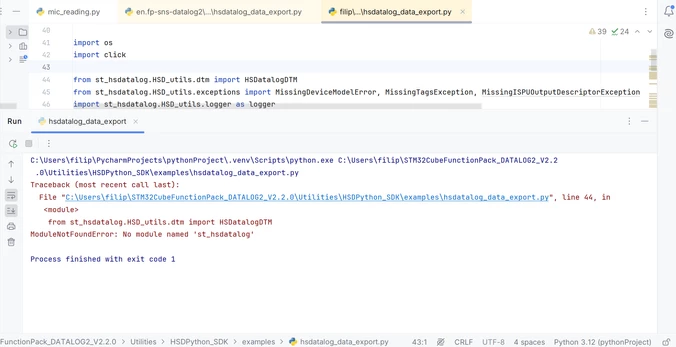
I already had the same problem with the module click, but i managed to install it on PyCharm and was fixed. But with this specific modules from Python SDK i don't know what to do.
The above errors mean that you didn't install the SDK. See the log in PyCharm: if the script you launched isn’t finding 'st_datalog', it means that you didn't install it.
Are you familiar with Python? I suggest you make this experiment and reinstall HSDPython_SDK from scratch:
- Download FP-SNS_DATALOG2 v2.3.0 and use the latest SDK.
- Unzip it and open a terminal in your HSDPython_SDK folder.
- If you don't like to do that, open a terminal in your HSDPython_SDK folder (from your log I guess the path is C:\Users\filip\STM32CubeFunctionPack_DATALOG2_V2.2.0\Utilities\HSDPython_SDK).
- Create a virtual environment (all references here).
- Launch programmatically HSDPython_SDK_install.bat (launch the command in the prompt by typing HSDPython_SDK_install.bat.
You'll see all dependencies automatically solved with no error messages and you should be able to use the HSDPython SDK.
Best regards,
Simone
