Hello @ishanpadaliya ,
Here is a detailed way to flash a pretrained model from model zoo, in this example, I describe how to replicate the FP-AI-VISION1
First, make sure to have the last version of the ST model zoo repository and have installed all the requirements, then, you need to install STM32CubeIDE and STM32CubeMX (we will use everything locally here)
Once both install, we need to install the package X-Cube-AI in cubeMX:
- Open cube MX
- Click INSTALL/REMOVE on the right main screen
- Then click on the STMicroelectronics tab and look for X-CUBE-AI
- Select the last version (9.0.0) and click install
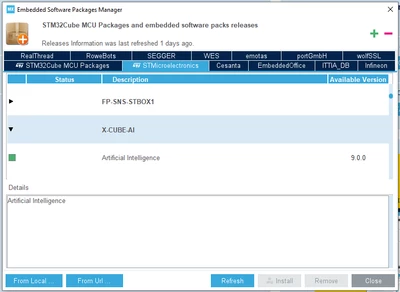
Then, we need to create a fake project, just to finish the install:
- Go back to the main screen
- Click ACCESS TO BOARD SELECTOR
- Select a random board by double clicking on its image:
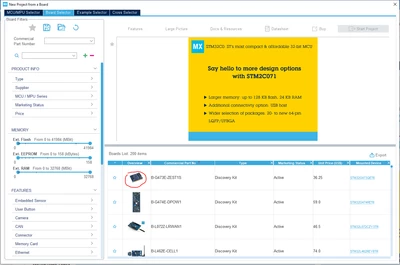
- Click yes on the pop up
- Then click on Middleware and software package -> X-Cube-AI -> check the core and select SystemPerfomance for the application
- Click OK
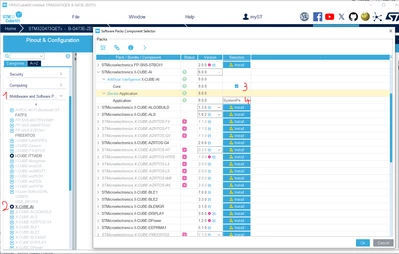
You should have a download of EdgeAI starting. It is what we wanted to get.
Once finish, you can quit STM32CubeMX without saving.
Now that we have the model zoo, to replicate the function pack, we want to deploy an object detection model trained to recognize persons.
Normally we would go through this: https://github.com/STMicroelectronics/stm32ai-modelzoo/blob/main/object_detection/deployment/README.md (which is what I explained in my community answer)
You can read it if you want, but here I will give you everything set correctly for you to just use it:
- In the model zoo folder, go to object_detection/src and replace the yaml file with the one attached in the .zip
- Open the yaml file and:
- Set on_cloud to False
- Change the stedgai path (it should be similar to this one)
- Change the cubeIDE path (same, it should be similar)
- Save

- Plug the camera to the board, the board to the pc with a micro usb cable where it is written ST Link V3E
- Open a cmd (make sure to also be in object_detection/src) and type: python stm32ai.py
Normally, everything should go well. Let me know if you have any questions.
The model that I put in the yaml file is one of the fastest. If you want to use another pretrained model in model zoo, you need to change these lines in the yaml:

The pretrained models are in object_detection/pretrained_models
All the information about the models are here: https://github.com/STMicroelectronics/stm32ai-modelzoo/tree/main/object_detection/pretrained_models
Have a good day,
Julian
