Associate III
December 19, 2023
Solved

STM32H747 Person Detect FP-AI-VISION1 Camera Problem

  • December 19, 2023
  • 4 replies
  • 2890 views

Hello,

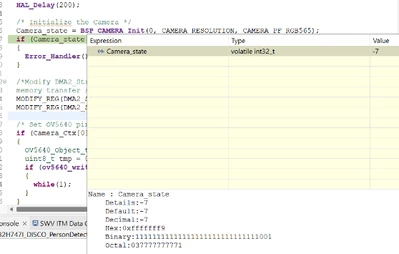
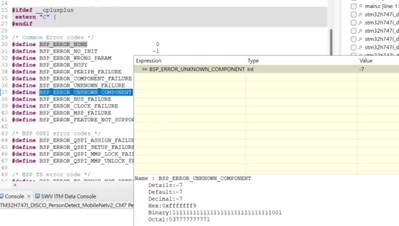
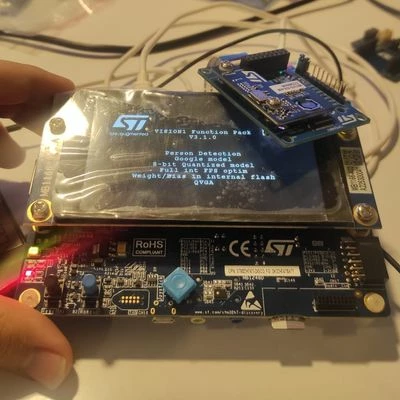
I'm working on artificial intelligence on STM32H747. I started my work with projects on FP-AI-VISION. First, I solved the display problem caused by NT35510 and tried the project again. When I tried it, I got the look in the first photo. At first I couldn't understand what was happening because I thought the problem would be solved when I fixed the screen. Afterwards, I debugged the code and saw that the BSP_CAMERA_INIT function branched to Error Handler. I looked into what error message I was getting and saw that I was getting the BSP_ERROW_UNKNOWN_COMPONENT error. How can I solve this problem? I just unpacked the camera so I hardly find the risk of the camera getting a hardware fault. Do I need any extra action to operate the camera?

Best Regards,

Bedirhan Köksoy
FP-AI-ST-COMMUNITY-QUESTION.jpgI

koksoybedirhan_4-1703060985558.png


koksoybedirhan_3-1703060956990.png


Best answer by koksoybedirhan

Update,

It didn't work only because we encountered a hardware problem with the camera. We replaced the camera and now we can continue our work properly. Thanks for all your answers.

4 replies

Associate III
December 20, 2023

@KDJEM.1 @Tesla DeLorean could you help me?

KDJEM.1
Technical Moderator
December 20, 2023

Hello @koksoybedirhan ,

Thank you for bringing this issue to our attention.

I reported this problem internally.

Internal ticket number: 169297 (This is an internal tracking number and is not accessible or usable by customers)" 

Thank you.

Kaouthar


To give better visibility on the answered topics, please click on Accept as Solution on the reply which solved your issue or answered your question.
Associate III
December 25, 2023

Could someone give any information?

Matthieu
ST Employee
December 25, 2023

Hello,

The BSP_ERROW_UNKNOWN_COMPONENT can happen if the camera is not detected. It might be due either to a wrong connection or a malfunction of the camera board.

Be sure to plug and unplug the camera board while the board is not powered. A short-circuit can happen otherwise.

You can check the LED status on the camera board too.

To double check the fix on the display, you can refer to the Wiki here:

AI:How to use transfer learning to perform image classification on STM32 - stm32mcu

or 

AI:How to use Teachable Machine to create an image classification application on STM32 - stm32mcu

koksoybedirhanAuthorBest answer
Associate III
January 26, 2024

Update,

It didn't work only because we encountered a hardware problem with the camera. We replaced the camera and now we can continue our work properly. Thanks for all your answers.