

MKiss
Associate
July 9, 2020
Solved

TOOL ERROR: Unknown layer type SHAPE, stopping.

  • July 9, 2020
  • 3 replies
  • 1766 views

Dear STM community,

I am trying to deploy a simple tflite model on my STM32, but I can't get through the analyze step. I got the following error:

TOOL ERROR: Unknown layer type SHAPE, stopping.

If I convert the model to Keras (model and topology), it works fine, I can run the generated code, but I want to use tflite model.

I attached the keras and the tflite files.

Thanks,

Titusz
This topic has been closed for replies.
Best answer by JChen.10

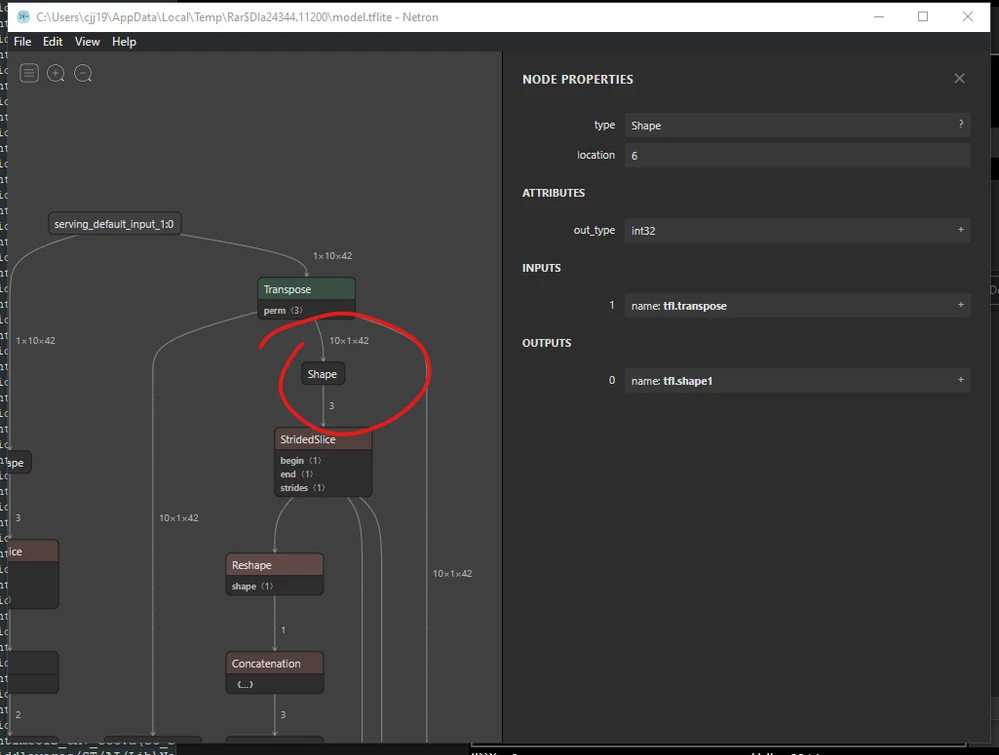
You have a SHAPE layer in your model, which is not currently supported in X-CUBE-AI. Shape layers extract the shape of tensors, so check your model if you use any .shape operation when building your model graph, and you can use Netron to exam your model graph.0693W000003CBCJQA4.png

You can look up supported layer types in official documents located in %USERPROFILE%/STM32Cube/Repository/Packs/STMicroelectronics/X-CUBE-AI/5.1.2/Documentation/layer-support.html

3 replies

JChen.10
JChen.10Best answer
Visitor II
August 5, 2020

You have a SHAPE layer in your model, which is not currently supported in X-CUBE-AI. Shape layers extract the shape of tensors, so check your model if you use any .shape operation when building your model graph, and you can use Netron to exam your model graph.0693W000003CBCJQA4.png

You can look up supported layer types in official documents located in %USERPROFILE%/STM32Cube/Repository/Packs/STMicroelectronics/X-CUBE-AI/5.1.2/Documentation/layer-support.html

MKiss
MKissAuthor
Associate
August 10, 2020

Thank you for your answer, it helps me a lot! ;)

AH.5
Visitor II
March 24, 2021

I was facing the same error, how did you get around it? Is there any alternative to .shape?

MKiss
MKissAuthor
Associate
March 24, 2021

I'm so sorry, I can't help you, because it wasn't a top priority project and we stopped working on it.

AH.5
Visitor II
March 24, 2021

Sure, thanks for the reply.