
Associate III
November 4, 2024
Solved

Undefined reference from AI model generation with X-CUBE-AI

  • November 4, 2024
  • 6 replies
  • 3310 views

Hi,

I am following this tutorial to use my own image recognition model with the STM32H747I-DISCO board. I have already ran the demos and they seem to work fine.

I first configure the model in CUBE-MX successfully and then copy the required files to the demo project.
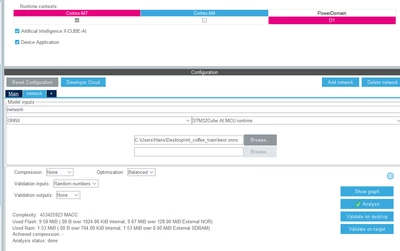
dogg_0-1730708586256.png

When I compile the code in the STM-IDE I get the following error a bunch of times:

undefined reference to `forward_conv2d_if32of32wf32'

I also get this: 


STM32H747I_DISCO_PersonDetect_Google_CM7.elf section `.bss' will not fit in region `DTCMRAM'
STM32H747I_DISCO_PersonDetect_Google_CM7.elf section `.axiram_section' will not fit in region `AXIRAM'
STM32H747I_DISCO_PersonDetect_Google_CM7.elf section `.sram_section' will not fit in region `SRAM123'
section .axiram_section VMA [24000000,241ad7ff] overlaps section .bss VMA [20017a40,2c6301a7]


even though CUBE-MX said that the used memory is within the flash and ram available (as shown in the image included).


The declaration is in layers_conv2d.h but I can't find the definition anywhere.

I have done the Updating to a newer version of X-CUBE-AI part in the tutorial successfully.

Any ideas?

thanks


Best answer by Julian E.

Hello @dogg ,

I don't know about a lower limit concerning data, I will ask the dev team.


Concerning the quantization, if everything went correctly, you should have a .tflite model in /experiment_output/<date of experiment>/quantized_model.


You can try to use only the quantization operation mode: 

  •  Add a quantization path in the dataset part of the yaml, it is advised to put the training data.
  • You may need to use the model_path in the general part and comment everything from training/model:
general:
 project_name: COCO_2017_person_Demo
 model_type: st_ssd_mobilenet_v1
 model_path: <PATH TO YOUR TRAINED MODEL>
 logs_dir: logs
 saved_models_dir: saved_models
 gpu_memory_limit: 12
 global_seed: 127

operation_mode: quantization

training:
 # model:
 # type: st_ssd_mobilenet_v1
 # alpha: 0.25
 # input_shape: (256, 256, 3)
 # weights: None
 # pretrained_weights: imagenet
...

 Leave everything else the same.


If it doesn't work, you can also try to use the ST Edge AI Dev cloud to do the quantization instead of the local installation of ST Edge AI. Just change on_cloud to True. (you need a st accound and you will be ask to log after running the python script)

tools:
 stedgeai:
 version: 9.1.0
 optimization: balanced
 on_cloud: True
 path_to_stedgeai: C:/Users/haris/STM32Cube/Repository/Packs/STMicroelectronics/X-CUBE-AI/9.1.0/Utilities/windows/stedgeai.exe
 path_to_cubeIDE: C:/ST/STM32CubeIDE_1.16.1/STM32CubeIDE/stm32cubeide.exe


Finally, if it does not work, you can also quantize it manually on the ST Edge AI Dev Cloud

Documentation: https://wiki.st.com/stm32mcu/wiki/AI:Getting_started_with_STM32Cube.AI_Developer_Cloud 


Let me know if it helps. 


Julian

6 replies

Julian E.
Technical Moderator
November 5, 2024

Hello @dogg ,

We are working on this tutorial to replace it with model zoo.


I don't know if you are familiar with model zoo but to replicate the tutorial you are following, in your place I would:


You can have a look on a similar thread where I describe how to replicate the object detection function pack:

Solved: stm32ai-modelzoo flash pre-trained model example. - STMicroelectronics Community

  • Here I explain how to install "st edge ai" for local quantization
  • Explain how to get a pretrained model from model zoo
  • deploy it 

It is quite similar to your issue I believe.


Have a good day, 

Julian


​In order to give better visibility on the answered topics, please click on 'Accept as Solution' on the reply which solved your issue or answered your question.
ST Employee
November 5, 2024

Hello dogg,


The situation triggers me an idea.

Between the versions of X-CUBE-AI, the implementation of the AI kernels is continuously improving.

Your problem sounds like a misalignment between C, H, and lib files of X-CUBE-AI versions that you have inside your project. May be you have, during your exploration, ended to a situation where one file is from a different version.

I would erase all the X-CUBE-AI files from your project and redo the integration.

I hope it will help


With Kind Regards,


Nicolas_V

doggAuthor
Associate III
November 5, 2024

Hi, 

Thanks for the support, I have already deleted and recreated it a few times but will try a fresh try once more.

Are you saying that the same can be done with the model zoo? Transferring my own model to the development board?

I will investigate on that too and get back to you here.


thanks again

doggAuthor
Associate III
November 6, 2024

Hi again,

I have managed to make the deployment example work on my disco board and have also managed to train sd_ssd_mobilenet_v1 on the pascal dataset. The output is a .h5 file however and I haven't managed to get a .tflite version. Can that be done automatically? I am having trouble with a generic converter python script getting this error:


Exception encountered: Unrecognized keyword arguments passed to DepthwiseConv2D: {'groups': 1}


I also tried training that model on my own dataset with yolo annotations but I get this error:


FileNotFoundError: [Errno 2] Unable to synchronously open file (unable to open file: name = 'C:\Users\Haris\Desktop\stm32ai-modelzoo\object_detection\src\experiments_outputs\2024_11_06_16_14_16\saved_models\best_weights.h5', errno = 2, error message = 'No such file or directory', flags = 0, o_flags = 0)


this is my yaml file for training from scratch:

general:
 project_name: COCO_2017_person_Demo
 model_type: st_ssd_mobilenet_v1
# model_path: C:/Users/Haris/Desktop/stm32ai-modelzoo/object_detection/pretrained_models/st_ssd_mobilenet_v1/ST_pretrainedmodel_public_dataset/coco_2017_person/st_ssd_mobilenet_v1_025_256/st_ssd_mobilenet_v1_025_256.h5
 logs_dir: logs
 saved_models_dir: saved_models
 gpu_memory_limit: 12
 global_seed: 127

operation_mode: training
#choices=['training' , 'evaluation', 'deployment', 'quantization', 'benchmarking',
# 'chain_tqeb','chain_tqe','chain_eqe','chain_qb','chain_eqeb','chain_qd ']

# dataset:
# name: COCO_2017_person
# class_names: [ person ]
# training_path:
# validation_path:
# test_path:
# quantization_path:
# quantization_split: 0.3

dataset:
 name: bugs # Dataset name. Optional, defaults to "<unnamed>".
 class_names: [nc, mr, wf] #[ aeroplane,bicycle,bird,boat,bottle,bus,car,cat,chair,cow,diningtable,dog,horse,motorbike,person,pottedplant,sheep,sofa,train,tvmonitor ] # Names of the classes in the dataset.
 training_path: C:/Users/Haris/Desktop/stm32ai-modelzoo/object_detection/src/bugs/train
 validation_path: C:/Users/Haris/Desktop/stm32ai-modelzoo/object_detection/src/bugs/valid 
 validation_split: 0.2 # Training/validation sets split ratio.
 test_path:
 quantization_path:
 quantization_split: # Quantization split ratio.
 seed: 123 # Random generator seed used when splitting a dataset.

preprocessing:
 rescaling: { scale: 1/127.5, offset: -1 }
 resizing:
 aspect_ratio: fit
 interpolation: nearest
 color_mode: rgb

data_augmentation:
 rotation: 30
 shearing: 15
 translation: 0.1
 vertical_flip: 0.5
 horizontal_flip: 0.2
 gaussian_blur: 3.0
 linear_contrast: [ 0.75, 1.5 ]

training:
 model:
 type: st_ssd_mobilenet_v1
 alpha: 0.25
 input_shape: (256, 256, 3)
 weights: None
 # pretrained_weights: imagenet
 dropout:
 batch_size: 12
 epochs: 1
 optimizer:
 Adam:
 learning_rate: 0.001
 callbacks:
 ReduceLROnPlateau:
 monitor: val_loss
 patience: 20
 EarlyStopping:
 monitor: val_loss
 patience: 40

postprocessing:
 confidence_thresh: 0.6
 NMS_thresh: 0.5
 IoU_eval_thresh: 0.3
 plot_metrics: True # Plot precision versus recall curves. Default is False.
 max_detection_boxes: 10

quantization:
 quantizer: TFlite_converter
 quantization_type: PTQ
 quantization_input_type: uint8
 quantization_output_type: float
 granularity: per_channel #per_tensor
 optimize: False #can be True if per_tensor
 export_dir: quantized_models

benchmarking:
 board: STM32H747I-DISCO

tools:
 stedgeai:
 version: 9.1.0
 optimization: balanced
 on_cloud: False
 path_to_stedgeai: C:/Users/haris/STM32Cube/Repository/Packs/STMicroelectronics/X-CUBE-AI/9.1.0/Utilities/windows/stedgeai.exe
 path_to_cubeIDE: C:/ST/STM32CubeIDE_1.16.1/STM32CubeIDE/stm32cubeide.exe

deployment:
 c_project_path: ../../stm32ai_application_code/object_detection/
 IDE: GCC
 verbosity: 1
 hardware_setup:
 serie: STM32H7
 board: STM32H747I-DISCO

mlflow:
 uri: ./experiments_outputs/mlruns

hydra:
 run:
 dir: ./experiments_outputs/${now:%Y_%m_%d_%H_%M_%S}


thanks 

Julian E.
Technical Moderator
November 7, 2024

Hello @dogg ,

There are different operation mode, you used training that just retrain a model, here are all the operation modes:

JulianE_0-1730985545592.png

https://github.com/STMicroelectronics/stm32ai-modelzoo/tree/main/image_classification 


What I generally do is chain_tbqeb  to do everything in one go: to train, benchmark the memory, inference time etc, quantize, evaluate the performance and do a new benchmark to see the difference between the .h5 and the .tfile.


You can use the quantize in your case.


For your first error, I am not sure what caused this, I never used the scripts other than the stm32ai_main.py

For the second error, it seems that a path is wrong and the file cannot be found.


The deployment operation mode generate a binary file flashed directly. If you want to generate a cubeIDE project or cubeMX project, you can take a look at the ST Edge AI Dev Cloud

https://wiki.st.com/stm32mcu/wiki/AI:Getting_started_with_STM32Cube.AI_Developer_Cloud 


Have a good day,

Julian

​In order to give better visibility on the answered topics, please click on 'Accept as Solution' on the reply which solved your issue or answered your question.
doggAuthor
Associate III
November 7, 2024

Hello,


I've managed to train the sd_ssd_mobilenet_v1 model on my own dataset but only after adding more data to my original dataset. Is there a lower limit to that? When I don't add more photos and annotations to my original dataset I get this:

FileNotFoundError: [Errno 2] Unable to synchronously open file (unable to open file: name = 'C:\Users\Haris\Desktop\stm32ai-modelzoo\object_detection\src\experiments_outputs\2024_11_06_16_14_16\saved_models\best_weights.h5', errno = 2, error message = 'No such file or directory', flags = 0, o_flags = 0)


Using chain_tqeb doesn't create a .tflite file which I believe is what is needed to download to the board, correct?

Don't we need to convert the .h5 file to .tflite?

I would then add my newly trained model to general.model_path in the .yaml file.

Please let me know. Really appreciate the much needed help so we can quickly go to developing a product with this. 

thanks

Julian E.
Julian E.Best answer
Technical Moderator
November 7, 2024

Hello @dogg ,

I don't know about a lower limit concerning data, I will ask the dev team.


Concerning the quantization, if everything went correctly, you should have a .tflite model in /experiment_output/<date of experiment>/quantized_model.


You can try to use only the quantization operation mode: 

  •  Add a quantization path in the dataset part of the yaml, it is advised to put the training data.
  • You may need to use the model_path in the general part and comment everything from training/model:
general:
 project_name: COCO_2017_person_Demo
 model_type: st_ssd_mobilenet_v1
 model_path: <PATH TO YOUR TRAINED MODEL>
 logs_dir: logs
 saved_models_dir: saved_models
 gpu_memory_limit: 12
 global_seed: 127

operation_mode: quantization

training:
 # model:
 # type: st_ssd_mobilenet_v1
 # alpha: 0.25
 # input_shape: (256, 256, 3)
 # weights: None
 # pretrained_weights: imagenet
...

 Leave everything else the same.


If it doesn't work, you can also try to use the ST Edge AI Dev cloud to do the quantization instead of the local installation of ST Edge AI. Just change on_cloud to True. (you need a st accound and you will be ask to log after running the python script)

tools:
 stedgeai:
 version: 9.1.0
 optimization: balanced
 on_cloud: True
 path_to_stedgeai: C:/Users/haris/STM32Cube/Repository/Packs/STMicroelectronics/X-CUBE-AI/9.1.0/Utilities/windows/stedgeai.exe
 path_to_cubeIDE: C:/ST/STM32CubeIDE_1.16.1/STM32CubeIDE/stm32cubeide.exe


Finally, if it does not work, you can also quantize it manually on the ST Edge AI Dev Cloud

Documentation: https://wiki.st.com/stm32mcu/wiki/AI:Getting_started_with_STM32Cube.AI_Developer_Cloud 


Let me know if it helps. 


Julian

​In order to give better visibility on the answered topics, please click on 'Accept as Solution' on the reply which solved your issue or answered your question.
Visitor II
January 9, 2025

I am glad that I found the perfect solution for this problem which I have been searching for a long time. I experienced the same & found this thread really helpful.