
Solved
Unicleo can't connect to SensorTile.box (port not open)
Hello,
I am trying to explore the STWIN Starter Kit (SensorTile Wireless Industrial Mode) functionality. My OS is Windows 11. I plan to collect data and train models, so I am trying to use Unicleo GUI to define the sensors to be used, the full scale, the sampling frequency or ODR (Output Data Rate). However, Unicleo does not detect the board ("port not open").
What I have done so far :
- turned the board in DFU mode (by connecting the USB cable while keeping the USR button pressed)
- opened STM32CubeProgrammer
- in the Erasing & Programming tab, erased flash memory (erased all sectors)
- in the Erasing & Programming tab, flashed the binary "DataLogExtended.bin" from the FP-SNS-STBOX1 (folder STM32CubeFunctionPack_FP-SNS-STBOX1_V1.6.0\Projects\STM32L4R9ZI-SensorTile.box\Applications\DataLogExtended\Binary) into the board
- disconnected the board, unpluged and pluged the USB and long-pressed the RESET button
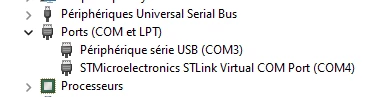
- at this step, I could see a new COM port (COM3) and a virtual COM port (COM4) devices appearing in the DeviceManager (see below)
- opened Unicleo GUI (version 1.25.1.11665), then I see the new COM port (COM3) in the Select Port dropdown.
- Click Connect, but the following error shows up in the "Info" tab :
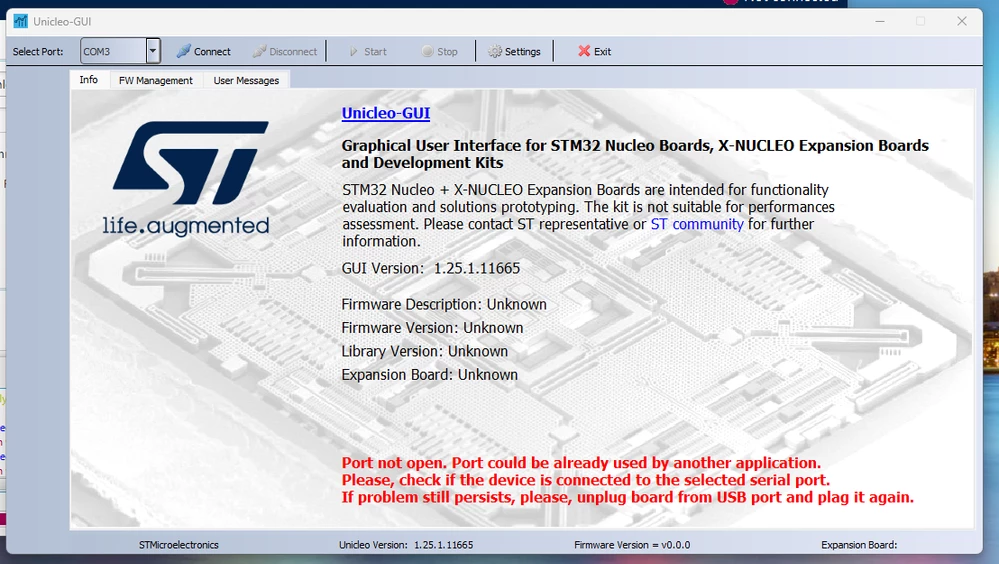
Also, I get the following error in "User messages tab" : "Port: COM3 Open Failed".
So, do I miss anything here?
Note: the same issue was posted by
Thank you,
Anthony