

TDK
Super User
January 29, 2024
Solved

Copy to Clipboard obscures code

  • January 29, 2024
  • 3 replies
  • 6253 views

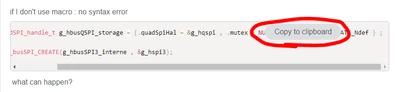
The "Copy to Clipboard" button is good to have, I guess, but in its current implementation you can't see what code is behind the button. Make it smaller, make it stay in the same position on a scroll, or something else so text can be seen.
TDK_0-1706498163358.png


In contrast, the View More button is a great addition. More good features like that please.

    Best answer by Laurids_PETERSEN

    Hi again,

    The clipboard button is now placed above the first line and has been replaced by an interactive logo. It's also no longer obstructing code in mobile view.

    For reference:

    /* Includes ------------------------------------------------------------------*/
    #include "main.h"
    #include "usbd_core.h"
    #include "usbd_cdc.h" /* Include class header file */

     
    Best regards, 
    Laurids

    3 replies

    TDK
    TDKAuthor
    Super User
    January 29, 2024

    More examples of copy to clipboard being a net-negative. Copy/paste worked before, button wasn't really necessary. Most people aren't copying/pasting the code.

    TDK_0-1706499383081.png


    "If you feel a post has answered your question, please click ""Accept as Solution""."
    Tesla DeLorean
    Guru
    January 29, 2024

    Completely gets in the way on the phone browser. Anyone test or review this change?

    If it needs the message / button, make it very small or as a mouse-over. It's completely obnoxious as currently implemented, needs a rethink.

    Tips, Buy me a coffee, or three.. PayPal VenmoUp vote any posts that you find helpful, it shows what's working..
    Laurids_PETERSEN
    Community Manager
    January 29, 2024

    Hi @TDK and @Tesla DeLorean,

    Thanks for providing your feedback on this component.
    Your points are clear and valid, and we agree that a change is required.

    I will reach out internally and find a solution that keeps the feature enabled, but makes it less intrusive to the actual code in the block. Your solution proposals are acknowledged in this context, thanks for providing those as well.

    Best regards,
    Laurids


    Laurids_PETERSEN
    Laurids_PETERSENBest answer
    Community Manager
    February 7, 2024

    Hi again,

    The clipboard button is now placed above the first line and has been replaced by an interactive logo. It's also no longer obstructing code in mobile view.

    For reference:

    /* Includes ------------------------------------------------------------------*/
    #include "main.h"
    #include "usbd_core.h"
    #include "usbd_cdc.h" /* Include class header file */

     
    Best regards, 
    Laurids