

Andrew Neil
Super User
September 23, 2024
Solved

"Invalid HTML" - but accepted in editor!

  • September 23, 2024
  • 2 replies
  • 3817 views

See: 

https://community.st.com/t5/other-hardware/equation-error-lmx35-lm135-lm235-lm335-temperature-sensor/m-p/722841/highlight/true#M28592

The post editor allows me to create multi-level subscripts, and it displays fine in the editor:

AndrewNeil_0-1727075702558.png

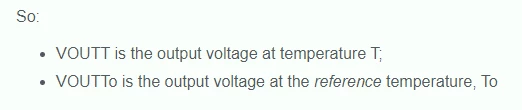
But, when I post, I get the "Invalid HTML" error, and the post loses all the subscripting:
AndrewNeil_1-1727075772617.png

Is this intended behaviour?

To be able to subscript would be useful.


PS:

So the HTML is not invalid; it may be unsupported - but it's not invalid.

Best answer by Andrew Neil

And again:

super normal sub

2 replies

Laurids_PETERSEN
Community Manager
September 23, 2024

Hi @Andrew Neil,

Thanks for your feedback.
At the moment the subscript <sub> and superscript <sup> tags are not enabled by default. It's not possible for us to add it manually, but I will reach out to our provider to understand if they can add them.

Best regards,
Laurids

Andrew Neil
Super User
September 23, 2024

Then the HTML editor really shouldn't let you insert them - should it?

There's also the long-standing issue that the messages says, "Correct the highlighted errors and try again" - but there is no highlighting, so we have no idea what to correct!


See: https://community.st.com/t5/feedback-forum/what-invalid-html/td-p/569839


A complex system that works is invariably found to have evolved from a simple system that worked.A complex system designed from scratch never works and cannot be patched up to make it work.
Laurids_PETERSEN
Community Manager
September 23, 2024

Hi @Andrew Neil,
I will ask about the scope of having a more "real-time" HTML editor. In the mean time, I suggest including the tags that are allowed on the community inside our guideline How to overcome HTML error when publishing pasted content into a post - let me know what you think.


Regarding the "Correct the highlighted errors and try again" message, I believe this is only applied when obligatory fields such as labels are not filled, and these are highlighted. HTML is edited automatically. Let me know if you have seen this elsewhere. 

Best regards,
Laurids


Andrew Neil
Super User
December 10, 2025

@Laurids_PETERSEN  I have un-marked the solution, because this has broken again!

super normal sub


That works in the editor, while composing the message:

AndrewNeil_0-1765358760616.png


But when I hit the button to post, it's again giving the "invalid HTML" - and removes the sub/superscript:

AndrewNeil_1-1765358841013.png


PS:

Maybe pure coincidence, but the  'Related Content' pointing to the *same* thread!  issue has also returned.

A complex system that works is invariably found to have evolved from a simple system that worked.A complex system designed from scratch never works and cannot be patched up to make it work.
Laurids_PETERSEN
Community Manager
December 10, 2025

Hi @Andrew Neil 

Thanks for letting me know. I'll investigate and ask for a fix asap.