Andrew Neil
Super User
April 13, 2026
Question

What's this new character-level 'code' format?

  • April 13, 2026
  • 2 replies
  • 86 views
I've seen it a couple of times - both from ST Employees, IIRC; eg,
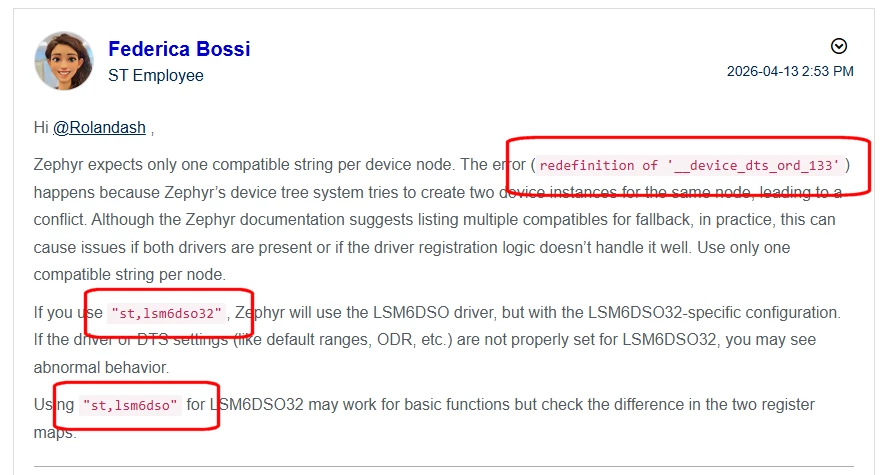
AndrewNeil_1-1776089549905.png

https://community.st.com/t5/mems-sensors/lsm6dso-and-lsm6dso32-compatible/m-p/891941/highlight/true#M27029


Neither the AndrewNeil_2-1776089605906.png button nor the AndrewNeil_3-1776089630142.pngoption allows just formatting a single word like that.


Looking at the HTML view of the above post, it's using the <code> tag - but I don't see any way to enter that via the Editor?

(I did that one via the HTML editor - but that's very klunky!)

2 replies

Andrew Neil
Super User
April 13, 2026

@Andrew Neil wrote:

ither the AndrewNeil_2-1776089605906.png button nor the AndrewNeil_3-1776089630142.pngoption allows just formatting a single word like that.


Looking at the HTML view of the above post, it's using the <code> tag - but I don't see any way to enter that via the Editor?


That appeared correctly in the editor, but broke on posting:

AndrewNeil_0-1776090237145.png


A complex system that works is invariably found to have evolved from a simple system that worked.A complex system designed from scratch never works and cannot be patched up to make it work.
Peter BENSCH
Technical Moderator
April 13, 2026

This type of formatting occurs when someone pastes pre-formatted text – for example, from ChatGPT – using a simple copy-and-paste, thereby copying its formatting. To prevent this, you can paste such text as plain ASCII text by using Ctrl+Shift+V instead of Ctrl+V.