

Andrew Neil
Super User
May 14, 2024
Solved

Why does the code block syntax highlighting not always work?

  • May 14, 2024
  • 4 replies
  • 4072 views

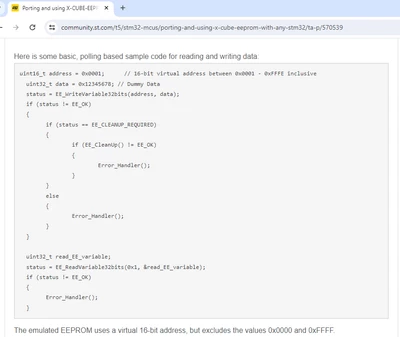
I've seen it in a few user posts, and now in this Knowledgebase article:

https://community.st.com/t5/stm32-mcus/porting-and-using-x-cube-eeprom-with-any-stm32/ta-p/570539
AndrewNeil_0-1715705410498.png


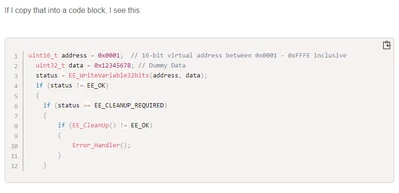
If I copy that into a code block, I see this:


uint16_t address = 0x0001;	// 16-bit virtual address between 0x0001 - 0xFFFE inclusive
 uint32_t data = 0x12345678; // Dummy Data
 status = EE_WriteVariable32bits(address, data);
 if (status != EE_OK)
 {
 	if (status == EE_CLEANUP_REQUIRED)
 	{
 		if (EE_CleanUp() != EE_OK)
 		{
 			Error_Handler();
 		}
 	}


EDIT:

After posting, that appears like this:
AndrewNeil_0-1715705616353.png

Which is as expected - with line numbers & syntax highlighting.

So what is that thing in the Knowledgebase article? It's also missing the 'copy to clipboard' button!

Best answer by Peter BENSCH

You mean he copied it from elsewhere, and the formatting we see in the forum was "inherited" from whatever that source was?

Yes.

Of course, you can achieve the same result by editing the HTML, but not everyone is an HTML professional.

When inserting via </>, you can select the format in the top left-hand corner. You can select HTML, Javascript, CSS, etc., whereby C is preset at the top left.

4 replies

Andrew Neil
Super User
May 14, 2024

@Andrew Neil wrote:

I've seen it in a few user posts, 


Here's an example:

AndrewNeil_0-1715705980593.png

https://community.st.com/t5/other-hardware/stm32h725-adc/m-p/673791/highlight/true#M27995


Again: no line numbers; no syntax highlighting; no 'copy to clipboard'

What's going on?

@hardrock  ?

A complex system that works is invariably found to have evolved from a simple system that worked.A complex system designed from scratch never works and cannot be patched up to make it work.
Laurids_PETERSEN
Community Manager
May 15, 2024

Hi @Andrew Neil,

Thanks for catching that on the article, I have fixed the issue and will be looking for other articles with the same issues to correct them.

Regarding the missing line numbering, view more, and copy function: These were added as a customization after we changed the community platform. Some code templates may not have changed retroactively, which is why you may see it in older posts (prior to about July-August 2023). 

With @hardrock's response it's caused by copy-pasting acceptable HTML from another site/editor and not using the standard code template in our text editor. 

Best regards,
Laurids


Peter BENSCH
Technical Moderator
May 15, 2024

I am quite sure and have also tested this in parallel that @hardrock, unlike you, did not copy the code block with </>, but simply copied it in directly. Unfortunately, the inserted block then also looks like a source code block. The community team needs to take a closer look at whether this can be made more distinguishable.

As has often been requested, it would also be better to place the </> button right at the beginning of the tool list anyway.

Regards
/Peter

@Lina_DABASINSKAITE 

Andrew Neil
Super User
May 15, 2024

@Peter BENSCH wrote:

I am quite sure and have also tested this in parallel that @hardrock, unlike you, did not copy the code block with </>, but simply copied it in directly.  


You mean he copied it from elsewhere, and the formatting we see in the forum was "inherited" from whatever that source was?

That figures.

I find I can also generate a similar-looking block by manually editing the HTML, and just putting in <pre> and </pre> tags; eg,

void SystemClock_Config(void)
{
 RCC_OscInitTypeDef RCC_OscInitStruct = {0};
 RCC_ClkInitTypeDef RCC_ClkInitStruct = {0};
 RCC_PeriphCLKInitTypeDef PeriphClkInit = {0};

 /** Initializes the RCC Oscillators according to the specified parameters
 * in the RCC_OscInitTypeDef structure.
 */
 RCC_OscInitStruct.OscillatorType = RCC_OSCILLATORTYPE_HSI|RCC_OSCILLATORTYPE_HSI14
 |RCC_OSCILLATORTYPE_LSI|RCC_OSCILLATORTYPE_HSE;
 RCC_OscInitStruct.HSEState = RCC_HSE_ON;


I'm really just curious about how this happens - not worried about it as a problem.


A complex system that works is invariably found to have evolved from a simple system that worked.A complex system designed from scratch never works and cannot be patched up to make it work.
Peter BENSCH
Peter BENSCHBest answer
Technical Moderator
May 15, 2024

You mean he copied it from elsewhere, and the formatting we see in the forum was "inherited" from whatever that source was?

Yes.

Of course, you can achieve the same result by editing the HTML, but not everyone is an HTML professional.

When inserting via </>, you can select the format in the top left-hand corner. You can select HTML, Javascript, CSS, etc., whereby C is preset at the top left.

hardrock
Associate II
May 16, 2024

Hi everybody,


Sorry my mistake.
I've misunderstood the format of the source insertion.


I've inserted source using by "Preformatted".
From now on, I'll insert source via "</>".


1. Use "Preformatted"

/**
* @brief The application entry point.
* @retval int
*/
int main(void)
{
/* USER CODE BEGIN 1 */

/* USER CODE END 1 */

/* MCU Configuration--------------------------------------------------------*/

/* Reset of all peripherals, Initializes the Flash interface and the Systick. */
HAL_Init();


2. Use "</>"

/**
 * @brief The application entry point.
 * @retval int
 */
int main(void)
{
 /* USER CODE BEGIN 1 */

 /* USER CODE END 1 */

 /* MCU Configuration--------------------------------------------------------*/

 /* Reset of all peripherals, Initializes the Flash interface and the Systick. */
 HAL_Init();


Andrew Neil
Super User
May 16, 2024

@hardrock wrote:

Sorry my mistake.
I've misunderstood the format of the source insertion.


No worries - I was really just curious as to what was going on. Thanks for the explanation.


@hardrock wrote:

I've inserted source using by "Preformatted".


What do you mean by that?

A complex system that works is invariably found to have evolved from a simple system that worked.A complex system designed from scratch never works and cannot be patched up to make it work.
Andrew Neil
Super User
September 17, 2024

@Andrew Neil wrote:

@hardrock wrote:

I've inserted source using by "Preformatted".


What do you mean by that?


Aha - I've just found it!

AndrewNeil_0-1726578432452.png

So we can do "preformatted" text without having to resort to the Source Code block:


ASCII-Art:

+-------------+
| |
------>+ +------>
inputs ------>+ process +------> outputs
------>+ +------>
| |
+-------------+


A complex system that works is invariably found to have evolved from a simple system that worked.A complex system designed from scratch never works and cannot be patched up to make it work.