

PTsen
Associate III
February 17, 2019
Solved

GNSS does not Fix @ 10 Hz

  • February 17, 2019
  • 2 replies
  • 2731 views

Hi, I can't get the correct fix rate for x-nucleo-gnss1a1

Using following command:

$PSTMSETPAR,1303,0.1,0

$PSTMSAVEPAR

$PSTMSRR

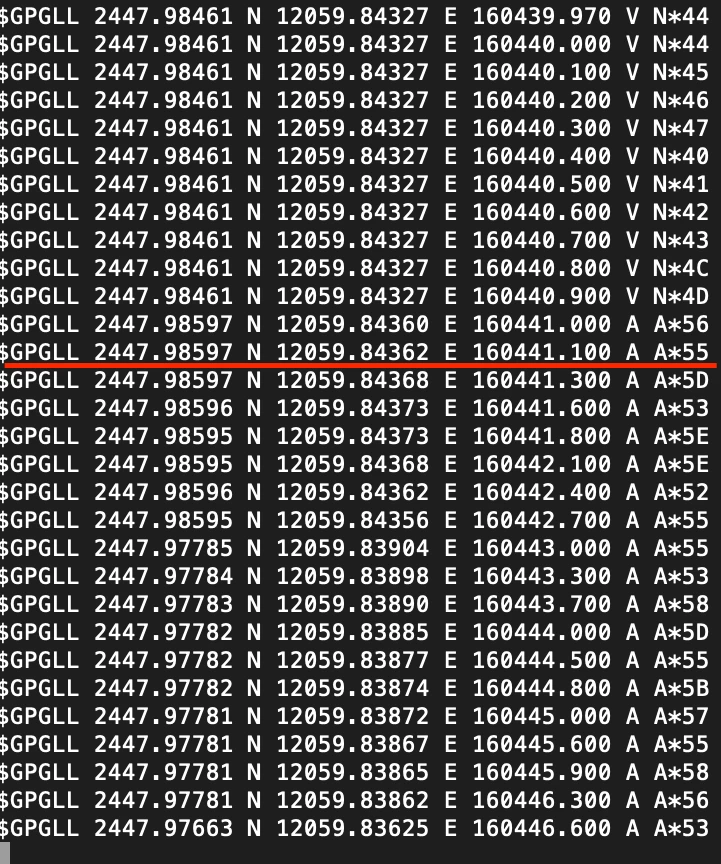
what I expected is update rate 10Hz, i.e., the timestamp is increasing 0.1 each time.

However, the result is
0690X000006Df9TQAS.png

above the red line, one can see that it is updating at the rate of 10Hz

below the red line, it is updating at the rate approximately 3Hz

If I reset the program, it will maintain 10Hz for about 1 sec, then back to 3Hz.

If I power off the stm32 and power on, it will maintain 10Hz for a while, then back to 3Hz.

Any idea or advice will be appreciated, thank you so much.

    This topic has been closed for replies.
    Best answer by Francesco Virlinzi

    Hi

    I'm sorry you are right.

    The system is "trying" to running @ 10 Hz but the cpu_clk is too low.

    The right scripts is:

    1. $PSTMSETPAR,1130,00,0 cpu_clk @ 192MHz
    2. $PSTMSETPAR,1303,RATE,0 rate is float (i.e: 0.1, 0.5, etc)
    3. $PSTMSAVEPAR
    4. $PSTMSRR

    The first setting increases the (internal) cpu_speed to guarantee the cpu can support 10Hz

    Moreover also a reduced message-list can help but the highest CPU_clk is mandatory

    Hope this helps.

    Regards

    Francesco

    2 replies

    Technical Moderator
    February 18, 2019

    Hi

    I'm sorry you are right.

    The system is "trying" to running @ 10 Hz but the cpu_clk is too low.

    The right scripts is:

    1. $PSTMSETPAR,1130,00,0 cpu_clk @ 192MHz
    2. $PSTMSETPAR,1303,RATE,0 rate is float (i.e: 0.1, 0.5, etc)
    3. $PSTMSAVEPAR
    4. $PSTMSRR

    The first setting increases the (internal) cpu_speed to guarantee the cpu can support 10Hz

    Moreover also a reduced message-list can help but the highest CPU_clk is mandatory

    Hope this helps.

    Regards

    Francesco

    PTsen
    PTsenAuthor
    Associate III
    February 18, 2019

    Hi, thanks for your response,

    from the software manual, I did not see the description for CBD 130, could you provide the syntax, I can't understand the "00" and "0" in this command "$PSTMSETPAR,1130,00,0" mean.

    Also, from the description in $PSTMCPU, it says that the possible CPU clock frequencies are 52, 104, 156, 208MHz. Does this mean that I can set CPU clock frequency higher than 192MHz? Btw, I didn't see 192MHz here, is this an error?

    thank you.

    Technical Moderator
    February 19, 2019

    Hi

    I'm working on a better software manual (which is still not completed) but you can have a look at the 'IC software manual' @ https://www.st.com/resource/en/user_manual/dm00495927.pdf

    Where you will find the correct CDB_ID-130 description.

    The highest CPU_clk depends on the TCXO (26Mhz in the LIV3) due to that the highest value is ~198Mhz.

    Regards

    Francesco

    PTsen
    PTsenAuthor
    Associate III
    March 2, 2019

    I decide to post it in the reply section since I am facing some problem related to fix rate when using TESEO, if it is better to post a new question, please tell me, thank you very much.

    I do success to make fix rate of TESEO run at 10Hz, however, I've immediately noticed that this fix rate is only guaranteed when the GNSS is not valid, i.e., the $GPGLL message informed invalid status ('V'). As long as the GPGLL message is valid ('A'), the fix rate dropped to 2 - 3 Hz.

    Despite the result looks totally reasonable to me, but I will still post it here, hoping that I am wrong and someone can tell me what should I do.

    Really appreciate for the help. Thank you.

    Technical Moderator
    March 4, 2019

    Hi

    10Hz has to be working with and without valid ('A') field.

    I have it working without problem as you can see in the image

    I used the scripts provided in the past I also increased the UART-baudrate (115200)

    No more than that. May be due to a baud rate too low the systems is skipping message

    Let me know

    Regards

    Francesco0690X000006E0SZQA0.png