
Associate
November 17, 2024
Solved

Gesture Kit ULD

  • November 17, 2024
  • 2 replies
  • 925 views

Hi,

Is there anyway I can add more dynamic gesture to Gesture Kit ULD?

Currently What I see is that it supports up to UP, DOWN, LEFT, RIGHT, TAP, and Double TAP.

If there is a way, could you share what is the process of it?

Thank you.
 

Best answer by labussiy

Hi,


You're right, our library is supporting all these 6 motion gestures.

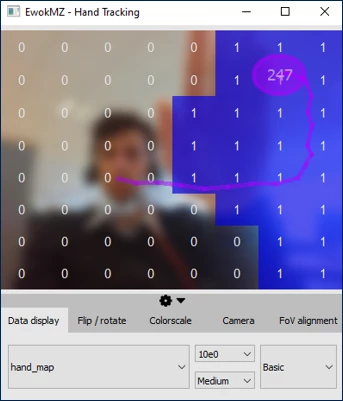
Inside this library, there is another advanced feature: Hand Tracking. You can evaluate how accurate and powerful is this feature with our GUI and the handtracking widget. We are more accurate than 8x8 resolution thanks to the algorithm used.

handtracking.png

This algorithm will return the hand position and the hand speed, it's very useful to develop new dynamic gestures.


Regards,

Yann

2 replies

labussiyBest answer
Technical Moderator
November 18, 2024

Hi,


You're right, our library is supporting all these 6 motion gestures.

Inside this library, there is another advanced feature: Hand Tracking. You can evaluate how accurate and powerful is this feature with our GUI and the handtracking widget. We are more accurate than 8x8 resolution thanks to the algorithm used.

handtracking.png

This algorithm will return the hand position and the hand speed, it's very useful to develop new dynamic gestures.


Regards,

Yann

ganboledeAuthor
Associate
November 18, 2024

Hi,

Is there a way to add a dynamic gesture like away from the sensor, something like opposite of tap?

If I can, is there any documentation that I can take a look?


Best,

Ganbolede

John E KVAM
ST Employee
November 18, 2024

The gesture kit - referred to by Yann is a function you call after each range. In order to detect the swipe, it needs to know the hand position - and tracks it. 

STSW-IMG035 - Turnkey gesture recognition solution based on VL53L5CX, VL53L7CX and VL53L8CX multizone Time-of-Flight ranging sensors - STMicroelectronics

It returns the location of the hand. It's simple enough to use this information to look for an increasing z distance. 

But let us suppose that you are NOT looking for a hand. 

You can find the zone with the shortest distance in each range. You can monitor it to see if it increases. If it does, something is moving away from your sensor. 

There is even a motion detect feature you can set to only interrupt you if there is motion. You can use that to save a lot of compute power when nothing of interest is moving in the field of view. 

- john