Associate III
October 23, 2025
Solved

vl53l0x in continue and Time mode

  • October 23, 2025
  • 2 replies
  • 380 views

Hi,

       vl53l0x in continue mode ,how to read data_status and in time mode how to set time and read data and data_status?

              thanks

Best answer by Zhiyuan.Han

Hi 

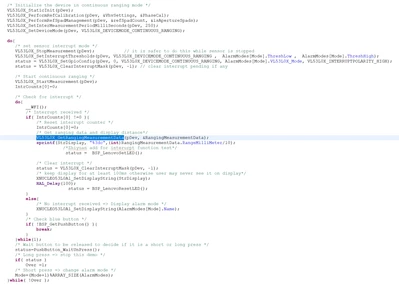
About continuous mode, it is same as single short, it needs to use   VL53L0X_GetRangingMeasurementData(pDev, &RangingMeasurementData) to read out all the data. 
ZhiyuanHan_0-1761272573061.png

About overall ranging flow, please refer page 12 of the SW UM VL53L0X API User_Manual.fm


Br

Zhiyuan.Han

2 replies

zhyAuthor
Associate III
October 23, 2025

Which function and where to call it, or do you need to check the data correctness for both patterns?

Zhiyuan.Han
Technical Moderator
October 23, 2025

Hi 

For 53L0X, it can either works in continuous mode or Continuous Timed Ranging mode, you can set the ranging mode by VL53L0X_SetDeviceMode()

and bout timing seting,

  • timing budget, you can set by VL53L0X_SetMeasurementTimingBudgetMicroSeconds()
  • if your prefer timed mode, you also need to set inter measurement time by VL53L0X_SetInterMeasurementPeriodMilliSeconds()

once measuring is done and data is ready, you can read out the data by VL53L0X_GetRangingMeasurementData().  

for more detail, please visit below two link in www.st.com for more information.

VL53L0X API User_Manual.fm

STSW-IMG005 | Product - STMicroelectronics


Br

Zhiyuan.Han

In order to give better visibility on the answered topics, please click on 'Accept as Solution' on the reply which solved your issue or answered your question.
zhyAuthor
Associate III
October 23, 2025

Hi,

  I only see a single measurement with VL53L0X_GetRangingMeasurementData(),and continue mode not find 

zhy_0-1761210020227.png


Zhiyuan.Han
Zhiyuan.HanBest answer
Technical Moderator
October 24, 2025

Hi 

About continuous mode, it is same as single short, it needs to use   VL53L0X_GetRangingMeasurementData(pDev, &RangingMeasurementData) to read out all the data. 

ZhiyuanHan_0-1761272573061.png

About overall ranging flow, please refer page 12 of the SW UM VL53L0X API User_Manual.fm


Br

Zhiyuan.Han

In order to give better visibility on the answered topics, please click on 'Accept as Solution' on the reply which solved your issue or answered your question.