

FPayn.1
Associate III
May 19, 2020
Question

VL53L0X inaccurate off-perpendicular?

  • May 19, 2020
  • 4 replies
  • 1925 views

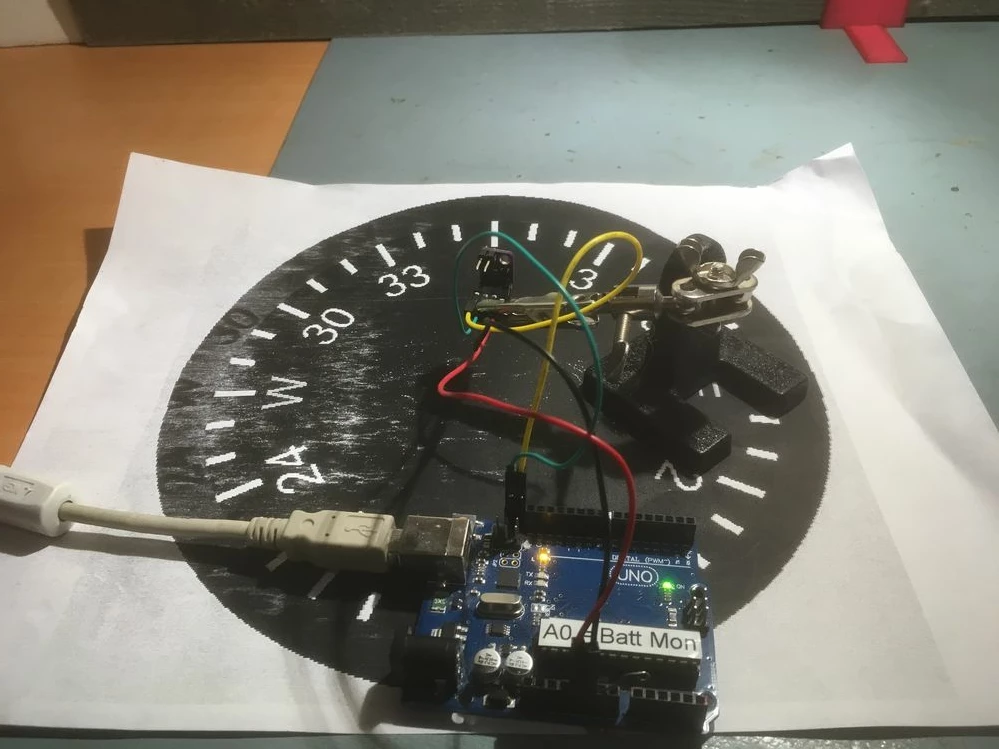
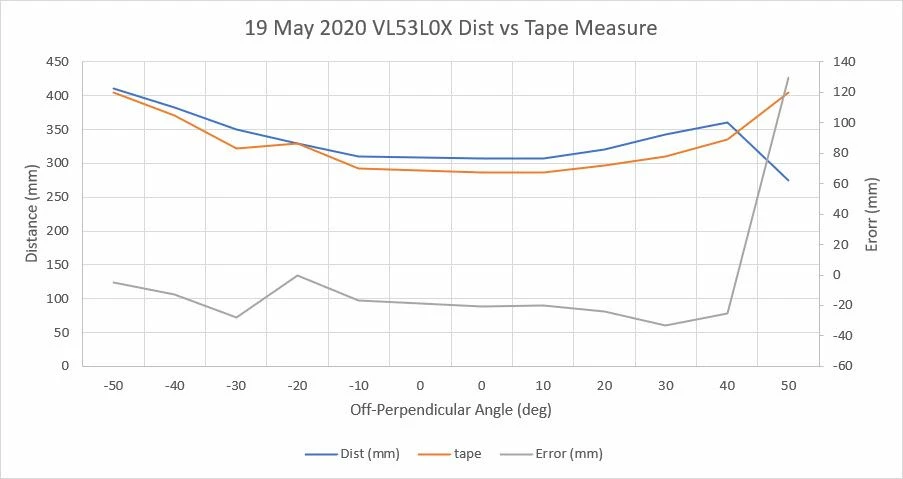
I'm using the VL35L0X.ino demo code on an Arduino UNO and a clone VL53L0X sensor. I very carefully measured the off-perpendicular distance measurements obtained from the VL53L0X and compared them to actual tape measure measurements. On average there was about 20mm difference between the two.

Also, the VL53L0X gets a little flaky more than 20-30 deg off perpendicular, reporting a '20' about every 3-4 measurement, making it a bit dubious for real-time measurements unless a 5-10 pt average is taken. Granted, the measurements were being done at 1 measurment per second so I would have plenty of time to average, but...
0693W000001cY9MQAU.jpg

0693W000001cY9RQAU.jpg

Anyone else care to weigh in on this issue?

TIA,

Frank

This topic has been closed for replies.

4 replies

John E KVAM
ST Employee
May 20, 2020

Frank -

The light goes out as a cone of 27 degrees. So the diameter of the cone at the target is equal to 0.44 times the distance to the target. So call it half.

the sensor 'averages' all the photons it gets back. So one might assume that as the target rotates from perpendicular the average will remain the same.

But it doesn't always work like that. If your target is at all 'mirror-like' (Specular) the photons will bounce away and never return. So one has to keep that in mind.

Can you also examine the signal rate. As the photons bounce away the signal rate goes down and if low enough creates error.

I also notice that at 0 degrees your error is 1cm. Can you look into doing an offset calibration before starting the experiment. I think that will solve that issue at least.

I really cannot tell from your picture, but at 40 degrees (where your error goes crazy) is the cone of illumination still fully on your target?

Increasing the timing budget (amount of time for each measurement) should help. 4x the time = 2x the accuracy.

It will at least reduce the jitter.

Great experiment.

  • john

FPayn.1
FPayn.1Author
Associate III
May 20, 2020

John,

Thanks for the prompt and informative reply. I'm just getting started with the VL53L0X, so I'm sure I'm doing lots wrong ;-). To address your questions:

The backdrop for the experiment was a textured wood plank, so not very specular. Earlier I had tried a piece of foam-core with a shiny white finish, and that didn't work as well - I suspect the 'lost photon' phenomenon was the culprit there.

No, I'm not sure the 27 degree beam was fully on the backdrop at the far edge of the experiment, so I suspect that was the problem there.

I'm sure an offset calibration would remove the constant offset, but I didn't see anything in my brief perusal of the datasheet and available code about doing such a calibration. I would assume I would just have to set the sensor up at a known offset, read the value, and then do a manual correction in my code. Is there a better way to do it? Unfortunately, in my intended application, manual offset correction will not be possible as I won't have a known starting offset condition.

In this initial experiment, I just used all default settings, just to see if I could get it to work. I haven't played with extending the timing budget, but that's next on my (ever-growing) list of things to do ;-).

Anything else you can contribute would be much appreciated.

TIA,

Frank

FPayn.1
FPayn.1Author
Associate III
May 23, 2020

John,

I have switched over to using the Adafruit VL53L0X library, and have created an Arduino (actually Teensy) program to acquire distances measurements from an array of three VL53L0X sensors. For each sensor, the measurement is obtained using cold like this:

 lidar_RR.rangingTest(&measure, false); // pass in 'true' to get debug data printout!
 if (measure.RangeStatus != 4) // phase failures have incorrect data
 {
 RR_Dist_mm = measure.RangeMilliMeter;
 if (RR_Dist_mm > MAX_LIDAR_RANGE_MM) RR_Dist_mm = MAX_LIDAR_RANGE_MM;
 }
 else RR_Dist_mm = 0;

In the above code, MAX_LIDAR_RANGE_MM = 1000

In my initial experiments, I have noticed there are quite a number of '0's showing up, indicating that the 'measure.RangeStatus' value is equal to 4, which apparently means some sort of 'phase failure'. Any clue what this might be, and whether or not I have to worry about this in a practical application?

TIA,

Frank

John E KVAM
ST Employee
May 26, 2020

An error 4 - phase error is trying to detect something called "radar aliasing". Google it. It's kind of interesting. Basically the light from flash N comes back after flash N+1, and an object at a far distance, looks near. To combat this we use two mini-ranges within each range. Call them A and B. They have different pulse repetition rates. So if aliasing happens, we can detect it and tell you about it.

So if range A does not e, we know you have aliasing and we warn you.

John E KVAM
ST Employee
May 26, 2020

If range A does not equal range B we return an warning 4.

But take the case of fast motion. Range A will probably not equal range B.

So if you know there is fast motion, you may accept the value as valid. At least it was valid at the time it was taken.

  • john
  •