

VL53L4CD using characterization GUI Tool
Hi,
I purchased the P-NULCEO-53L4A1 package and am testing it to use Liquid Level Monitoring.
I have downloaded STSW-IMG039 and am referencing AN5851 and STSW-IMG039-L4CD.pdf.
I used the provided GUI Tool (GUILiquidLevel.exe) for Nonliearity correction.
The test container and environment are shown below. (I placed a black object on the bottom of the container to lower the floor reflectivity)
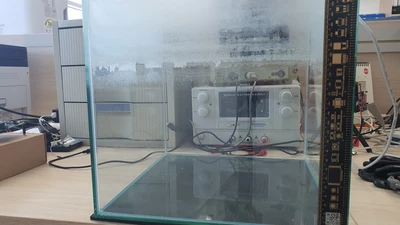
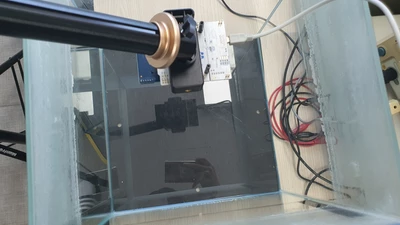
config.txt is shown below.
--------------------------
firmware=VL53L4CD
OCalgorithm=0
totalheight=200
offsetcalibration=100
indicators=10
characterization=2
turbu_det_std=20
--------------------------
Referring to page 3 of STSW-IMG039-L4CD.pdf, when the indicators was set to 5, 4 measurement levels (10, 20, 30, 40%) were created, but the distance values of the characterization plot did not match. Therefore, the indicator of config.txt was set to 10 and proceeded. (ex, if the total height is 200, the distance of 10% should be 180)
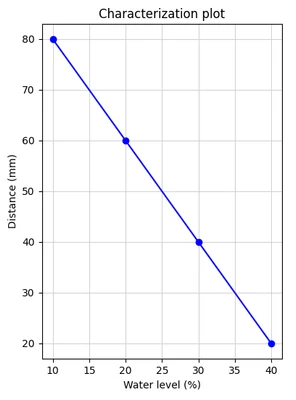
During non-linear correction, the Characterzation button changed from Level 1 to Level 10. Sometimes the button did not change to the next level even though the level button was pressed. In that case, the level was measured by pressing the Level button again at the same liquid level.
The measured characterzation is shown below.
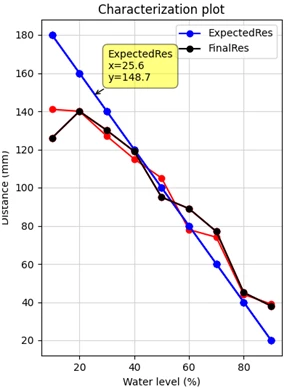
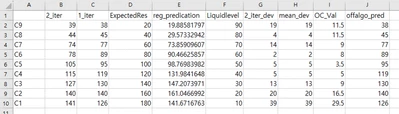
I think it's clearly mis-measured.
The question is below.
Q1. When setting the indicators in config.txt to a value less than 10, the distance value generated by the GUI and the water level % do not match. Are my calculations wrong?
Q2. When changing to LevelX by pressing the Characterzation button, there was a case where the button did not change to the next level even if the evel button was pressed. In that case, is it correct to measure the level by pressing the Level button again at the same liquid level?
Q3. Is there something wrong with my procedure or testing environment?
Thanks.