
Associate
March 31, 2025
Solved

Wiring a VL53L1X Breakout board, the datasheet (attached) confuses me

  • March 31, 2025
  • 3 replies
  • 1156 views

Hi,
I bought a VL53L1X Breakout board ToF sensor that I want to connect to a Raspberry Pi 3.
I need to connect the VIN, GND, SDA and SCL.
The documentation shows which pins are what, but it confuses me, as the layout in the documentation seems to be different than the boards itself.

Of the 10 pin holes on the board, one hole has a square around it, indiciating that would be pin 1. Across would be pin 2, and then on to the next row for the rest.
The square is on the outside column of the board.
However in the documentation pin 1 is on the inside column of the board.

What is the correct way to connect this?
VIN isn't specified on the board, does it have adifferent name?

I'm new to all of this, so I'm sorry if I ask the obvious.
Any help much appreciated.

Best answer by John E KVAM

In Andrew Neil's reply remove the question marks. He's exactly right. 

There is a user manual:

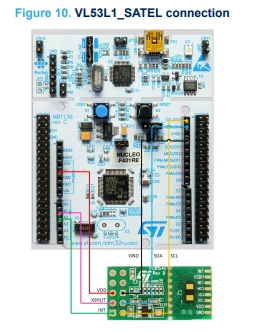
How to use the VL53L1 with STMicroelectronics' X-CUBE-TOF1 Time-of-Flight sensor software packages for STM32CubeMX - User manual

that shows:


We built those satellite boards to fit directly onto the X-Nucleo boards.

the datasheet of the X-Nucleo board shows:

JohnEKVAM_0-1743433766434.png

And that should make it clearer. 

- john

3 replies

Andrew Neil
Super User
March 31, 2025

You mean this: https://www.st.com/en/evaluation-tools/vl53l1x-satel.html ?


@JamesTheEighth wrote:

Of the 10 pin holes on the board, one hole has a square around it, indiciating that would be pin 1. Across would be pin 2, and then on to the next row for the rest.

Indeed.

Also, looking at the board & carrying on with that counting would say that pin 6 must be ground:

AndrewNeil_3-1743429332837.png

Which corresponds to the Data Brief:

AndrewNeil_4-1743429422203.png


@JamesTheEighth wrote:

However in the documentation pin 1 is on the inside column of the board.


Which document are you referring to?

I only see that DB3555 Data Brief, and the only board layout in that is the photo:

AndrewNeil_1-1743429102611.png


A complex system that works is invariably found to have evolved from a simple system that worked.A complex system designed from scratch never works and cannot be patched up to make it work.
Associate
March 31, 2025

Thank you for responding so swiftly.
I am indeed referencing the DB 3555 Rev2 manual, it has the diagram on page 3.

I read about the pin order and the little square on Chatgpt, so I want to double check:
Is the square indeed  on all PCB's always number 1, and is number two always next to it?

You said you could tell 6 is the ground by looking at the board. Is that because of the four tiny dots around it?

Thanks!


Andrew Neil
Super User
March 31, 2025

@JamesTheEighth wrote:

I am indeed referencing the DB 3555 Rev2 manual, it has the diagram on page 3.


you mean this:

AndrewNeil_0-1743435584467.png

That's a schematic - there's nothing on that which specifies physical positioning.

Schematics are about connections - not physical layout.

They are topological - not topographical.


@JamesTheEighth wrote:

Is the square indeed  on all PCB's always number 1


It is a common practice.

A complex system that works is invariably found to have evolved from a simple system that worked.A complex system designed from scratch never works and cannot be patched up to make it work.
John E KVAM
John E KVAMBest answer
ST Employee
March 31, 2025

In Andrew Neil's reply remove the question marks. He's exactly right. 

There is a user manual:

How to use the VL53L1 with STMicroelectronics' X-CUBE-TOF1 Time-of-Flight sensor software packages for STM32CubeMX - User manual

that shows:


We built those satellite boards to fit directly onto the X-Nucleo boards.

the datasheet of the X-Nucleo board shows:

JohnEKVAM_0-1743433766434.png

And that should make it clearer. 

- john

Andrew Neil
Super User
March 31, 2025

@John E KVAM wrote:

He's exactly right. 


Thanks!

ST are by no means the only ones guilty of this - this is an all too common documentation fail.

Pin numbering needs to be explicitly and clearly defined:

  • Where is pin one?
  • How does the numbering go from there?


A complex system that works is invariably found to have evolved from a simple system that worked.A complex system designed from scratch never works and cannot be patched up to make it work.
Associate
March 31, 2025

I forgot to confirm, it's indeed about the part that you linked at the beginning of your message.