

EYang
Visitor II
January 17, 2020
Question

BlueNRG-2 VTimer wake-up the system every 15 sec

  • January 17, 2020
  • 5 replies
  • 6233 views

Hello

We're using BlueNRG-2 VTimer to be RTC for wake-up the system when it's in sleeping mode.

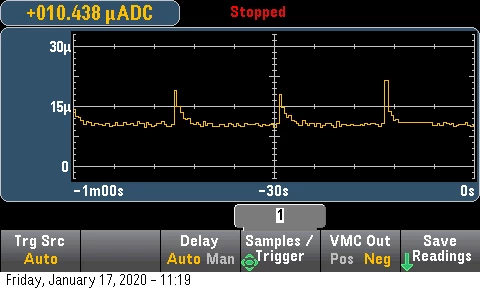
when we set the timer 10mins, it still wake-up the the system every 15 sec.

HAL_VTimerStart_ms(0, 600000);

But I don't turn on the other timer such as 1 or 2 or 3

HAL_VTimer_Stop(1);

HAL_VTimer_Stop(2);

HAL_VTimer_Stop(3);

the callback function still return the interrupt source is from timer 2.

HAL_VTimerTimeoutCallback();

is it possible? how do I solve this issue?

it increases whole the power consumption for nothing..
0690X00000Bw7NWQAZ.png

Elliott

    This topic has been closed for replies.

    5 replies

    ANath.1
    Associate II
    May 5, 2021

    Hi,

    did you find a solution for this? I am facing the same issue

    Winfred LU
    ST Employee
    May 10, 2021

    This is expected. It is how the system was implemented.

    The system needs to wake-up periodically about every 15 seconds due to some internal mechanisms.

    However, the related user callback will trigger only when the timeout that you specified expires.

    The application can still leverage the callbacks to have large timeouts.

    ANath.1
    Associate II
    May 10, 2021

    @Winfred LU​ 

    The callbacks are triggered according to the large timeouts, however, the MCU wakes from sleep in 15s and increases the power consumption of the system. I have a system where the sleep time is configured for 15 mins but the system returns from SLEEPMODE_WAKETIMER in 15s and does not go into sleep again which means we have 14 mins 45 s of CPU running which consumes ~2mA, reducing the battery life to just 3-4 days. Also, there is no mention of this behaviour in the datasheets(At least I couldn't find some). How can we implement a solution in which the system sleeps for a longer time? In leveraging the large callbacks, we lose on battery life

    Winfred LU
    ST Employee
    May 11, 2021

    >but the system returns from SLEEPMODE_WAKETIMER in 15s and does not go into sleep again

    Correction needed here. The system needs to wake up at the first 15 second, quickly do some HW chores, go to sleep again, then wait for the next 15 seconds.

    The overall power consumption will remain very low, since the the amount of time for these awaking periods compared to sleeping periods is very small (less than 1%, i don't have precise number currently).

    >there is no mention of this behaviour in the datasheets(At least I couldn't find some)

    Consider it as some hardware limitation. I guess that the Cortex M0 core was originally designed specific to the BLE application only, so this feature was just good enough. In BLE application, the timer to wake up the system does not need to be more than 10.x seconds. With the HW design of this chips, i am not aware of a workaround to get rid of these 15s waking-ups.

    ANath.1
    Associate II
    May 11, 2021

    @Winfred LU​ 

    >The system needs to wake up at the first 15 seconds, quickly do some HW chores, go to sleep again, then wait for the next 15 seconds.

    This isn't the behavior observed. The system keeps running after waking up from 15s sleep. I can confirm this by running the beacon for 15 mins interval on the battery and observing is its discharge. The battery calculator here supports this observation. I am able to achieve only ~4 days of battery. The current while sleeping for 15 mins should ~1uA, but is only for 15s and the rest 14 m 45 s (885 secs) is around 2mA.

    Are there any functions/APIs to confirm that the MCU is going back to sleep after 15s ?

    Winfred LU
    ST Employee
    May 11, 2021

    In the case of beaconing, the wake up interval depends on the advertising interval you configured. (The wake up period depends on the content that is about to be advertised.) The maximum possible advertising interval would be 10.24 seconds. The 15 second limitation will not be seen. (So i said it is good enough for BLE applications)

    The problem is that it shall enter low power mode after the advertisement is done. My guess would be something wrong with the application code.

    Winfred LU
    ST Employee
    May 17, 2021

    Yes, it is required to call BlueNRG_Sleep() to enter sleep after waken up.

    ANath.1
    Associate II
    May 17, 2021

    Alright. That seems to be the issue then. Can I suggest adding this in the documentation somewhere? None of the documents have this point that we need to call sleep() multiple times if sleep time > 15s.

    Winfred LU
    ST Employee
    May 17, 2021

    The modification will be addressed in the next SDK.