
Associate III
August 29, 2024
Solved

How to select I2C on STEVAL-MKI109V

  • August 29, 2024
  • 2 replies
  • 1133 views

Hi All 

I am running Unicon GUI on Windows 10 and using it to communicate with STHS34PF80 sensor plugged onto STEVAL-MKI109V dev board.

I can fully interact with the senor via the GUI app. Meaning reading and writing all registers of interest.

I however want see what registers are being written and read by the GUI so I attached my logic analyzer to the I2C pins but unable to read any sensible data. So I am assuming that the motherboard is communicating over SPI. 

I want to be able to sniff the interaction between the GUI app and the  senor over I2C.

So what do I have to do to make the GUI change communication protocol.

Ola
Best answer by Federica Bossi

Hi @ola ,


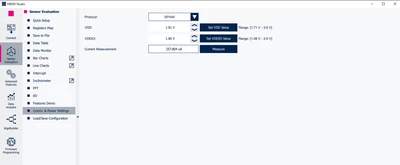
You can change the communication protocol in the Comm. & Power Settings tool window:

FedericaBossi_0-1725010354514.png


2 replies

Federica Bossi
Federica BossiBest answer
Technical Moderator
August 30, 2024

Hi @ola ,


You can change the communication protocol in the Comm. & Power Settings tool window:

FedericaBossi_0-1725010354514.png


In order to give better visibility on the answered topics, please click on 'Accept as Solution' on the reply which solved your issue or answered your question.
olaAuthor
Associate III
September 4, 2024

Hi Federica,

Thank you for your reply. Unfortunately I can see the page that you are showing on my version see below.

ola_0-1725468764173.png

Regards

Ola

olaAuthor
Associate III
September 4, 2024

Correction:

Unfortunately I can not see the page that you are showing on my version of Unico-GUI.

Regards

Ola

olaAuthor
Associate III
September 4, 2024

Hi Federica,

Looking at your image again. I noticed that you were using MEMS-Studio which is meant to have replaced the old Unico-GUI application that I was using. 

I have downloaded the MEMS-Studio and I can now read the I2C bus correctly. Thank you.
Regards

Ola