Associate II
August 12, 2024
Solved

LSM6DSO Pedometer

  • August 12, 2024
  • 2 replies
  • 1146 views

Hi BenG142, I'm trying to develop a pedometer application using the LSM6DSOX sensor, but I haven't been successful. Could you share your project files with me? I'd like to know which registers you used.

 

Best answer by BenG142

Hi @MasCreyt21 ,

Without more information on where you've been unsuccessful, I will try to explain all steps.

So, assuming you've had positive communications with the IC (read/write registers, etc):


1. Start by setting up the Performance/ Power Mode you want:

 case XL_Power_Mode_ODR::Mode_High_Performance_6_66_kHz:
 WriteRegisterBitRange(LSM6DSOX_CTRL1_XL, 7, 4, 0b1010 );
 WriteRegisterBit ( LSM6DSOX_CTRL5_C, 7, false ); //XL_ULP_Enable
 WriteRegisterBit ( LSM6DSOX_CTRL6_C, 4, false ); //XL_HM_Mode
 break;


2. Set up FIFO:

void LSM6DSOX_::setFifo_Steps(){

 WriteRegister ( LSM6DSOX_FUNC_CFG_ACCESS, 0x80 ); //Open Embedded Functions
 WriteRegisterBit( LSM6DSOX_EMB_FUNC_EN_A, 3, true ); //Enable Pedometer sensor in Adv Func
 WriteRegister ( LSM6DSOX_EMB_FUNC_EN_B, 0x10); //Enable false positive rejection
 WriteRegisterBit( LSM6DSOX_EMB_FUNC_FIFO_CFG, 6, true ); //Enable Step Counter Batching
 WriteRegister ( LSM6DSOX_FUNC_CFG_ACCESS, 0x00); //Close Embedded Functions

 WriteRegisterBitRange( LSM6DSOX_FIFO_CTRL4, 2, 0, 0b001 ); //set FIFO Mode


}


3. Read FIFO Registers:

 uint8_t reg1 = LSM6DSOX.ReadRegister(LSM6DSOX_FIFO_STATUS1);
 Serial.print("FIFO Status 1: ");
 Serial.println( reg1 );

 uint8_t reg2 = LSM6DSOX.ReadRegister(LSM6DSOX_FIFO_STATUS2);
 Serial.print("FIFO Status 2: ");
 Serial.println( reg2 );


4.  Clear FIFO at the end:

void LSM6DSOX_::setFifo_Clear(){
 WriteRegisterBitRange( LSM6DSOX_FIFO_CTRL4, 2, 0, 0b000);
}


Sadly not able to share the project, but hopefully this helps.

Cheers,

Ben


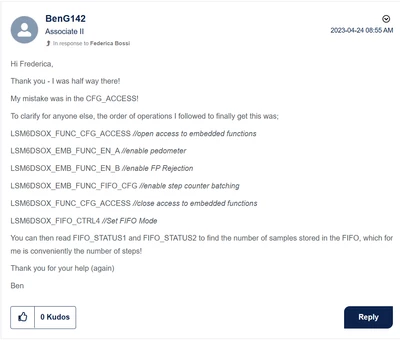
Screenshot from the closed thread mentioned by @Andrew Neil (Credit to @Federica Bossi) :
BenG142_0-1723479963735.png


2 replies

Andrew Neil
Super User
August 12, 2024

@MasCreyt21 wrote:

Hi BenG142


@BenG142 's thread was closed over a year ago:

https://community.st.com/t5/mems-sensors/lsm6dso-fifo-pedometer/td-p/61470


@MasCreyt21 wrote:

 I'm trying to develop a pedometer application using the LSM6DSOX sensor, but I haven't been successful.


So tell us what you did, and why you consider that "unsuccessful"

Did you follow the steps give by Ben and @Federica Bossi in the previous thread?

Please see the Posting Tips:

https://community.st.com/t5/community-guidelines/how-to-write-your-question-to-maximize-your-chances-to-find-a/ta-p/575228


A complex system that works is invariably found to have evolved from a simple system that worked.A complex system designed from scratch never works and cannot be patched up to make it work.
BenG142
BenG142Best answer
Associate II
August 12, 2024

Hi @MasCreyt21 ,

Without more information on where you've been unsuccessful, I will try to explain all steps.

So, assuming you've had positive communications with the IC (read/write registers, etc):


1. Start by setting up the Performance/ Power Mode you want:

 case XL_Power_Mode_ODR::Mode_High_Performance_6_66_kHz:
 WriteRegisterBitRange(LSM6DSOX_CTRL1_XL, 7, 4, 0b1010 );
 WriteRegisterBit ( LSM6DSOX_CTRL5_C, 7, false ); //XL_ULP_Enable
 WriteRegisterBit ( LSM6DSOX_CTRL6_C, 4, false ); //XL_HM_Mode
 break;


2. Set up FIFO:

void LSM6DSOX_::setFifo_Steps(){

 WriteRegister ( LSM6DSOX_FUNC_CFG_ACCESS, 0x80 ); //Open Embedded Functions
 WriteRegisterBit( LSM6DSOX_EMB_FUNC_EN_A, 3, true ); //Enable Pedometer sensor in Adv Func
 WriteRegister ( LSM6DSOX_EMB_FUNC_EN_B, 0x10); //Enable false positive rejection
 WriteRegisterBit( LSM6DSOX_EMB_FUNC_FIFO_CFG, 6, true ); //Enable Step Counter Batching
 WriteRegister ( LSM6DSOX_FUNC_CFG_ACCESS, 0x00); //Close Embedded Functions

 WriteRegisterBitRange( LSM6DSOX_FIFO_CTRL4, 2, 0, 0b001 ); //set FIFO Mode


}


3. Read FIFO Registers:

 uint8_t reg1 = LSM6DSOX.ReadRegister(LSM6DSOX_FIFO_STATUS1);
 Serial.print("FIFO Status 1: ");
 Serial.println( reg1 );

 uint8_t reg2 = LSM6DSOX.ReadRegister(LSM6DSOX_FIFO_STATUS2);
 Serial.print("FIFO Status 2: ");
 Serial.println( reg2 );


4.  Clear FIFO at the end:

void LSM6DSOX_::setFifo_Clear(){
 WriteRegisterBitRange( LSM6DSOX_FIFO_CTRL4, 2, 0, 0b000);
}


Sadly not able to share the project, but hopefully this helps.

Cheers,

Ben


Screenshot from the closed thread mentioned by @Andrew Neil (Credit to @Federica Bossi) :

BenG142_0-1723479963735.png


Associate II
August 19, 2024

@BenG142 
Thank you for your help, BenG142. Thanks to you, I solved my problem, and the LSM6DSOX is working as I wanted.