Associate
September 5, 2025
Solved

BluePill: Program is uploaded but MCU doesn't run correctly

  • September 5, 2025
  • 6 replies
  • 1525 views

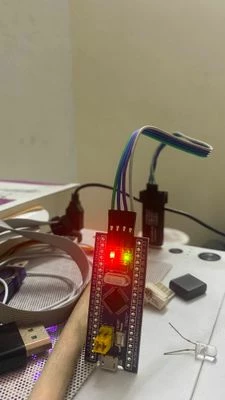
Hi, I'm getting started at embedded programming, I've got this blue pill board having the STM32F103C6 MCU and ST-LINK v2 programmer.

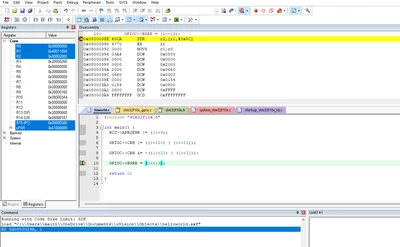
Here's my code, just to light up the LED on port C 13:

#include "stm32f10x.h"
 
int main() {
RCC->APB2ENR |= (1<<4);
 
GPIOC->CRH |= ((1<<20) | (1<<21));
 
GPIOC->CRH &= ~((1<<22) | (1<<21));
 
GPIOC->BSRR = (1<<13);
 
return 0;
}


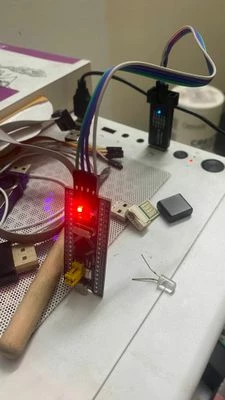
Despite the IDE flashes successfully the LED doesn't light up as I wanted, It will only lights up if I add a break point on debugging mode on Keil uVision
trung1_0-1757031227071.pngtrung1_4-1757031406660.jpegtrung1_5-1757031413287.jpeg

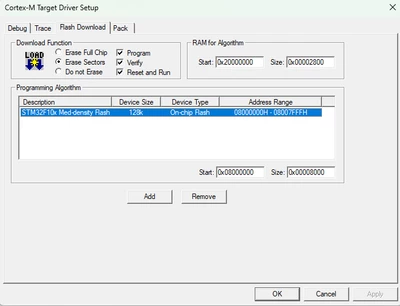
And here are my flash configurations:
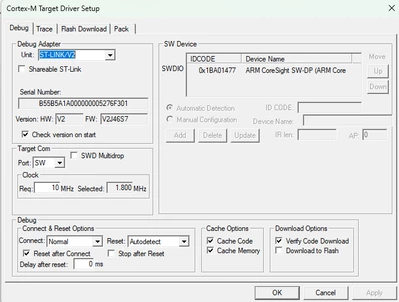
trung1_6-1757031487180.pngtrung1_7-1757031507356.png

Any help is appreciated.

Best answer by Pavel A.

which is weird because it turns on while setting the register and turns off when setting the set-bit = 1.

What I expected. Some LEDs are "active low". TL;DR this is not unusual, just depends on how the LED is connected.


6 replies

Pavel A.
Super User
September 5, 2025

Replace return 0; with while(1){}


trung1Author
Associate
September 5, 2025

It didn't work

Pavel A.
Super User
September 5, 2025

Try to comment out GPIOC->BSRR = (1<<13);


Rodo
Senior
September 5, 2025

It looks like your coding in assembly language? You don't have any comments on the lines of code for what they each do. But if the LED works in step mode in debugging then your program is probably ok but when you run it it runs too fast for human eyes to see it. It only blinks once and then your program ends. If you want to see a constant blinking you need to slow down the blinking like: LED on, delay, LED off.  Also, put the code in a forever loop if you want it to blink ... forever instead of just once.

trung1Author
Associate
September 5, 2025

Sorry for the late reply. I just started on the STM32 so I merely understand


RCC->APB2ENR |= (1<<4);
 
GPIOC->CRH |= ((1<<20) | (1<<21)); //Assigning output mode, max speed 50 MHz by writing 1 1 to the 21st 22nd bit of the register
 
GPIOC->CRH &= ~((1<<22) | (1<<21)); //Assigning general purpose output push-pull by writing 0 0 to the 23rd 24th bit of the register
 
as assigning pin function.
 
GPIOC->BSRR = (1<<13); //This line is the one that set the port C13 high
 
I tried wrapping this line inside a while loop or a for loop delay after the line, but neither of them works.
I just want to light up the LED.
Peter BENSCH
Technical Moderator
September 5, 2025

@trung1 

The ST-LINK/V2 you use is a clone of a genuine ST product and the support from ST experts is very limited. To get the support you need, please contact the third party you purchased this product from.

The same applies to your board called Blue Pill, because for years now, it has not been equipped with original STM32F103, but only with clones which are not supported by STMicroelectronics.

For assurance of using authentic ST products, we recommend purchasing exclusively through our official distributors, which you can find listed here: ST Official Distributors.

Regards
/Peter

Tesla DeLorean
Guru
September 5, 2025

PC13 needs to be LOW to illuminate the LED

...
 GPIOC->BSRR = (1<<(13+16)); // RESET PC13, as LED ON with LOW state
 while(1) {} // Infinite loop, so as not to exit 
 return 0;
}
Tips, Buy me a coffee, or three.. PayPal VenmoUp vote any posts that you find helpful, it shows what's working..
trung1Author
Associate
September 5, 2025

But I was trying to turn it on, it doesn't light up if I was not in Keil debugger mode and having the command paused at 

GPIOC->BSRR = (1<<13);

Tesla DeLorean
Guru
September 5, 2025

Try using HAL code, check the HW works with that. I don't have a strong desire to validate others bare-metal coding.

Watch also for the clock hazard related to enabling the GPIO's APB clock and then immediately writing it's registers.

In Keil you should be able to do a Peripheral View of the GPIOC bank, and manually modify the registers, and toggle the PC13 pin.

Check the schematic, the other end of the LED connects to VCC, you need to ground the pin via OD or PP mode operation to provide a current path to light then LED.

PC13 HIGH will not illuminate the LED. And also has low current sourcing ability in any case.

Tips, Buy me a coffee, or three.. PayPal VenmoUp vote any posts that you find helpful, it shows what's working..
Shirley.Ye
ST Employee
September 7, 2025

what is the CRH register? seems not consistent with the Reference manual.


and are you sure you are setting the GPIO output mode?


and also need to replace the return 0 with while(1).

Shirley.Ye
ST Employee
September 8, 2025

seems the GPIOC->CRH &= ~((1<<22) | (1<<21)); should be

GPIOC->CRH &= ~((1<<22) | (1<<23));


ShirleyYe_0-1757293042872.png


trung1Author
Associate
September 11, 2025

I did make such a mistake. After fixing bit register 21 -> 23, the LED turns on at 

GPIOC->CRH &= ~((1<<22) | (1<<23));

and turns off at

GPIOC->BSRR = (1<<13);

which is weird because it turns on while setting the register and turns off when setting the set-bit = 1.

Pavel A.
Pavel A.Best answer
Super User
September 11, 2025

which is weird because it turns on while setting the register and turns off when setting the set-bit = 1.

What I expected. Some LEDs are "active low". TL;DR this is not unusual, just depends on how the LED is connected.