
Associate II
April 30, 2025
Solved

"NO DEVICE FOUND ON TARGET"

  • April 30, 2025
  • 4 replies
  • 789 views

and in the FAIL.txt "The interface firmware FAILED to reset/halt the target MCU"


When I connected my F4 Discovery card to my computer, the card's folder opened in front of me and in it, apart from the usual files, another file called FAIL.txt, which I saw for the first time. Inside the file, the error “The interface firmware FAILED to reset/halt the target MCU” was written.

I tried to enter debug mode and this time I got the error “Failed to execute MI command”. When I searched this situation in this community, none of the solutions worked for me. I did St-link firmware update via CubeIDE, CubeProgrammer and ST-link utility. Although I did update via ST-link utility and cube programmer, it does not allow me to enter the contents to do a full-chip erase. When I asked Chat-Gpt, he scared me by saying that my card might be burned. But I did not do anything to burn the board.

I connected the PA0, PA1, PB2 and PB10 pins on the board to the channels of the logic analyzer and connected the GND line of the logic analyzer to the GND line of the board and then the things I described above happened. The screenshot of the error message is as follows. There is no heating on the board, I measure 2.96V from the 3V pin, 4.78V from the 5V pin, 0.11V from the VDD pin. Could my board be burnt? :(
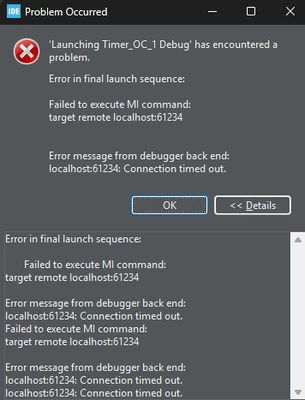
 

Morpheuss01_0-1746033644852.png


Best answer by Morpheuss01

Now I unplugged the JP1 jumber and plugged it back in and this time cubeIDE went into dubeg mode. I think there was a small loss of contact. Thanks for trying to help anyway :)

4 replies

Peter BENSCH
Technical Moderator
April 30, 2025

Welcome @Morpheuss01, to the community!

Unfortunately, you have only described a symptom without giving any details about the board. Have you taken a look at the schematics and considered what could be the cause? If no or only a very low voltage can be measured at VDD, you may have inadvertently removed the IDD jumper JP1 (between connector row P1 and the STM32F407).

Regards
/Peter

Associate II
April 30, 2025

Jumper is plugged in as usual

AScha.3
Super User
April 30, 2025

0.11V from the VDD pin  = no power at cpu.

Is jumper 1 set ?

AScha3_0-1746035675505.png

- if not = what you see.

"If you feel a post has answered your question, please click ""Accept as Solution""."
Associate II
April 30, 2025

Jumper is plugged in as usual

Explorer
April 30, 2025

1)Check if the boot0 jumper is on 0

2)Do this on the debbuger configuration : ST LINK GBD server

3)If the probleme consist try to use the stm software : stm32  ST LINK utility --> the do the full ship erase 

4)!!!!! always check if the jumper boot0 is at the 0 position 

Morpheuss01AuthorBest answer
Associate II
April 30, 2025

Now I unplugged the JP1 jumber and plugged it back in and this time cubeIDE went into dubeg mode. I think there was a small loss of contact. Thanks for trying to help anyway :)