
Associate
January 5, 2026
Solved

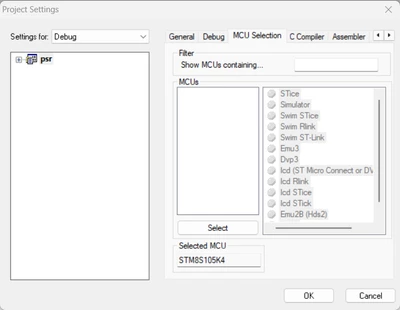
STVD MCU Selection List Empty dao360 re-register not work anymore

  • January 5, 2026
  • 5 replies
  • 736 views

Hi ST support team,

     I'm using STVD version 4.3.12,  no matter create an empty project or open the existing project. 

 The MCU selection in Project Setting always empty.  But the same STVD installation package works in some other computers.

     My computer is 64-bit x64-based processor, running Windows 11 Enterprise Version 24H2.

     I tried re-register dao360.dll in administrator CMD, there was a period when it could be resolved, but I'm not sure if it was due to Windows updates or some other reason. Now it's not working anymore.

 CMD command:

Regsvr32 /u "C:\Program Files (x86)\Common Files\Microsoft Shared\DAO\DAO360.DLL"

Regsvr32 "C:\Program Files (x86)\Common Files\Microsoft Shared\DAO\DAO360.DLL"
 

Allen_Huang_1-1767594485057.png

    Best answer by Peter BENSCH

    Welcome @Allen_Huang, to the community!

    Unfortunately, the software is no longer being developed because all resources are focused on the more modern  32-bit architecture STM32.

    As you can see in the release note RN0013, section 1, STVD requires administrator rights to start. Problems may also occur in Windows 10 and Windows 11 if the path to the installation directory is too long and/or contains non-ASCII characters or spaces, so you should try installing to a short path such as C:\ST\STVD, for example.

    Hope that helps?

    Regards
    /Peter

    5 replies

    Peter BENSCH
    Peter BENSCHBest answer
    Technical Moderator
    January 5, 2026

    Welcome @Allen_Huang, to the community!

    Unfortunately, the software is no longer being developed because all resources are focused on the more modern  32-bit architecture STM32.

    As you can see in the release note RN0013, section 1, STVD requires administrator rights to start. Problems may also occur in Windows 10 and Windows 11 if the path to the installation directory is too long and/or contains non-ASCII characters or spaces, so you should try installing to a short path such as C:\ST\STVD, for example.

    Hope that helps?

    Regards
    /Peter

    Associate
    January 6, 2026

            I installed sttoolset_pack42.exe in administrator mode to in path C:\ST\STVD,  also run STVD in administrator, still the same. I also tried run STVD in compatibility mode of win7,win8 also failed.

            Is there any other way?

    I also tried copy other computer's file DAO350.DLL, dao360.dll, DAO2535.TLB, and that computer can select MCU correctly. But still failed with my computer.

    Andrew Neil
    Super User
    January 6, 2026

    Another thread about problems with STVD on more recent Windows versions here.

    A complex system that works is invariably found to have evolved from a simple system that worked.A complex system designed from scratch never works and cannot be patched up to make it work.
    Associate
    January 6, 2026
    Are there any other methods besides using a virtual machine?
     
    Graduate
    January 7, 2026
    Hi. I tried to install STVD with:
    https://www.st.com/en/development-tools/stvp-stm8.html
    On windows-10 64-bit. So quickly, I just checked if I could choose a microcontroller for a new project. And it's OK. Screenshot:
    STVD-1.PNG

    STVD-2.PNG

     
    On virtualbox on linux (W7-32bit) I have this:
    STVD-virtualbox.png

    Maybe uninstall everything and install from that location?
    Andrew Neil
    Super User
    January 6, 2026

    I have no idea - just sharing for info.

    Perhaps @RobK1 @DarekR or @Rombersoft could help?

    A complex system that works is invariably found to have evolved from a simple system that worked.A complex system designed from scratch never works and cannot be patched up to make it work.
    Associate
    January 8, 2026

    It's weird, sometimes even doing nothing my Win11 64-bit system can select MCU normally, but after restart computer back to empty issue. Since VirtualBox come with a cost, I'll skip that. I'm dropping STVD and moving to VS Code with the STM8 Debugger extension for debugging.  Even it's not stable but at least a workaround way.

    Allen_Huang_1-1767859876259.png

    Andrew Neil
    Super User
    January 8, 2026

    If you consider that resolves the issue, please mark the solution.


    Or, @Rombersoft suggests a way to use the Arduino IDE here.

    A complex system that works is invariably found to have evolved from a simple system that worked.A complex system designed from scratch never works and cannot be patched up to make it work.
    Visitor II
    March 6, 2026

    Run with Win-11

    Screenshot 2026-03-06 160148.jpg

    Run with Win-7

    5698aba9-3b8e-4c46-a6de-dc9fd71d02b1.jpg

    I have the same problem with Windows 11 (64-bit). I use ”Oracle VM VirtualBox“ with Windows 7 32-bit to solve this problem, running well now.