A BUG about using STM32-MAT to automatically generate code
Some times when we follow the usual process to build a SIMULINK model of STM32 MCU, hoping to use the STM32-MAT tool chain to automatically generate code that STM32 MCU can run. The HEX or BIN file obtained as a result is downloaded to the MCU, but the MCU does not operate in accordance with the desired action.
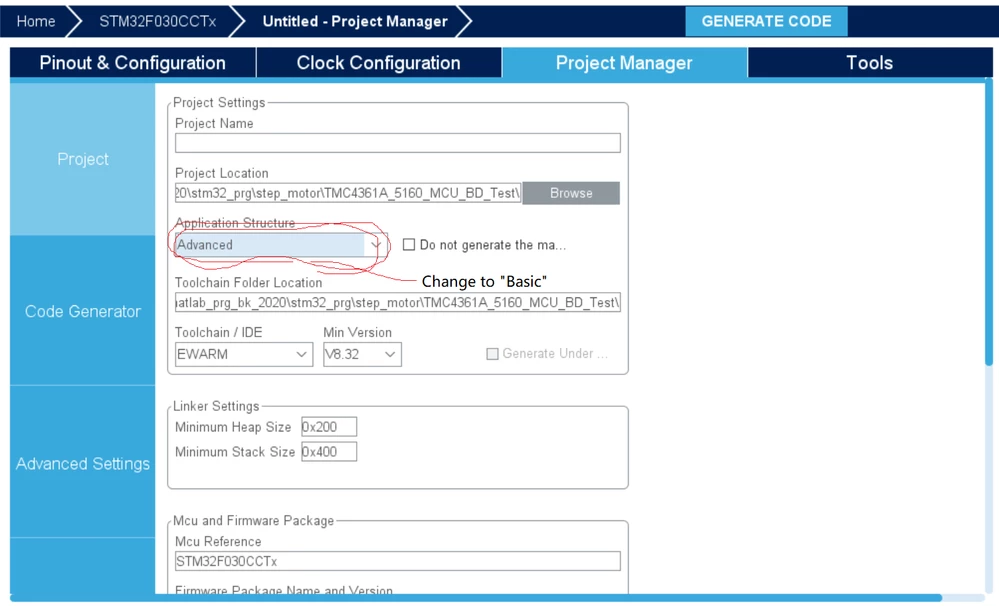
After many experiments, it is found that when creating a CubeMX project, select "Advanced" in the "Application Structure" option of the Project Manager window (the default option when creating a new project), then the BIN (HEX) file we finally get is invalid , And during the creation process, the software did not prompt that an error occurred.
When "Basic" is selected in the "Application Structure" option of the Project Manager window, the final BIN (HEX) file we get is valid, and it runs normally in the MCU. I don't know if this is STM32-MAT or an error generated by CubeMX, I hope it can be corrected.
There is also a small problem. After the Simulink correctly generates the project and imports it into the compilation tool, if the generated EWARM project is compiled without problems after importing, and the TrueSTUDIO or STM32Cube project is generated, it will prompt that some source files cannot be found during compilation. Then, you need to manually add the source file path generated by Simulink, TrueSTUDIO or STM32Cube can compile correctly.