Anjie Wang
Associate
August 1, 2019
Solved

CAN communication demo running error (CAN_IT Module) of STM32-MAT/TARGET

  • August 1, 2019
  • 1 reply
  • 993 views

Hello!

I have installed the ​STM32-MAT/TARGET toolbox.My operating environment:

matlab 2018b

STM32CubeMX 5.1.0

STM32-MAT/TARGET 5.1.0

There are two question about CAN communication example!

  • Question 1:

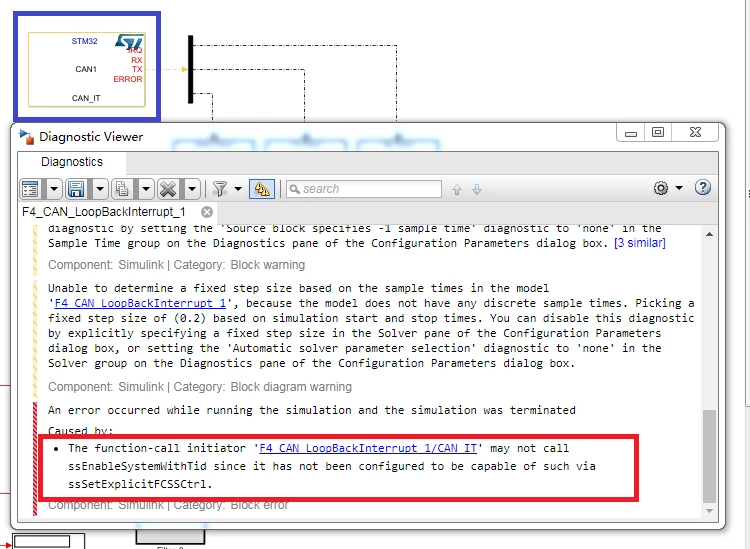
There is a error about CAN_IT module as follows when I simulate the CAN communication example in STM32demos.​

0690X000009Z6mwQAC.pngI have tryed to solve this error.However,It seems that we need to modify S-function.But the S-function is saved as .p file,we can't view and modify.

  • Question 2:

I want to delete CAN_IT module and simulate in polling mode.However,it still can't send or recieve CAN messege.The CAN state which gets from CAN_Get_State module is always “reset�?.

The attached are the Simulink model and the .ioc configuration file for STM32CubeMX of question 1 and question 2.

Please any help! Thank you!

This topic has been closed for replies.
Best answer by Nickname12840_O

Hi Anjie ****,

sorry for the late answer.

STM32-MAT/TRAGET does not support simulation but code generation only for STM32 devices.

So, CAN blocks drivers can't be used for Simulation but for code generation only.

We reproduce the issue when we press Run button on the Simulink toolbar instead of the Build Model button.

Using the Build button, Build process completed successfully

And can be compiled with IDE.

Then, only execution on the target failed due TX FIFO full (due to changes in the RX filter in your application).

Hopping it clarifies the situation you met.

Regards.

Pascal & Cyril

1 reply

Nickname12840_O
Nickname12840_OBest answer
Associate
August 19, 2019

Hi Anjie ****,

sorry for the late answer.

STM32-MAT/TRAGET does not support simulation but code generation only for STM32 devices.

So, CAN blocks drivers can't be used for Simulation but for code generation only.

We reproduce the issue when we press Run button on the Simulink toolbar instead of the Build Model button.

Using the Build button, Build process completed successfully

And can be compiled with IDE.

Then, only execution on the target failed due TX FIFO full (due to changes in the RX filter in your application).

Hopping it clarifies the situation you met.

Regards.

Pascal & Cyril