
Clock issues in STM32H753ZI100_24 - SystemClock_Config() hangs
I have been using the STM32H753ZI100_24 for getting pressure data from the MS5611-01BA03 mems sensor. The debugger stops at SystemClock_Config() function in the code of reading prom registers from the MS5611-01BA03 sensor as per the datasheet Barometre datasheet
int main(void)
{

 /* USER CODE BEGIN 1 */

 /* USER CODE END 1 */

 /* MPU Configuration--------------------------------------------------------*/
 MPU_Config();

 /* MCU Configuration--------------------------------------------------------*/

 /* Reset of all peripherals, Initializes the Flash interface and the Systick. */
 HAL_Init();

 /* USER CODE BEGIN Init */

 /* USER CODE END Init */

 /* Configure the system clock */
 SystemClock_Config();

 /* USER CODE BEGIN SysInit */

 /* USER CODE END SysInit */

 /* Initialize all configured peripherals */
 MX_GPIO_Init();
 MX_SPI1_Init();
 /* USER CODE BEGIN 2 */
 uint16_t prom[8] = {0};

 uint8_t rst_cmd = 0x1E; // Reset command
 HAL_GPIO_WritePin(GPIOD, GPIO_PIN_13, GPIO_PIN_RESET);
 HAL_SPI_Transmit(&hspi1, &rst_cmd, 1, HAL_MAX_DELAY);
 HAL_GPIO_WritePin(GPIOD, GPIO_PIN_13, GPIO_PIN_SET);
 HAL_Delay(3);


// if (MS5611_ReadPROM(prom) == HAL_OK) {
// // Now prom[] contains all PROM coefficients including factory data and CRC
// for (int i = 0; i < 8; i++) {
//	 printf("PROM[%d] = %u\n", i, prom[i]);
// }
// } else {
// printf("Error reading PROM!\n");
// }

 /* USER CODE END 2 */

 /* Infinite loop */
 /* USER CODE BEGIN WHILE */
 while (1)
 {
 /* USER CODE END WHILE */

 /* USER CODE BEGIN 3 */
	 MS5611_ReadPROM(prom);
	 HAL_Delay(1000);
 }
 /* USER CODE END 3 */
}
I will also attach the SystemClock_Config function.
void SystemClock_Config(void)

{

RCC_OscInitTypeDef RCC_OscInitStruct = {0};

RCC_ClkInitTypeDef RCC_ClkInitStruct = {0};


/** Supply configuration update enable

 */

 HAL_PWREx_ConfigSupply(PWR_LDO_SUPPLY);


/** Configure the main internal regulator output voltage

 */

 __HAL_PWR_VOLTAGESCALING_CONFIG(PWR_REGULATOR_VOLTAGE_SCALE3);


while(!__HAL_PWR_GET_FLAG(PWR_FLAG_VOSRDY)) {}


/** Initializes the RCC Oscillators according to the specified parameters

 * in the RCC_OscInitTypeDef structure.

 */

 RCC_OscInitStruct.OscillatorType = RCC_OSCILLATORTYPE_HSE;

 RCC_OscInitStruct.HSEState = RCC_HSE_ON;

 RCC_OscInitStruct.PLL.PLLState = RCC_PLL_ON;

 RCC_OscInitStruct.PLL.PLLSource = RCC_PLLSOURCE_HSE;

 RCC_OscInitStruct.PLL.PLLM = 25;

 RCC_OscInitStruct.PLL.PLLN = 200;

 RCC_OscInitStruct.PLL.PLLP = 20;

 RCC_OscInitStruct.PLL.PLLQ = 20;

 RCC_OscInitStruct.PLL.PLLR = 2;

 RCC_OscInitStruct.PLL.PLLRGE = RCC_PLL1VCIRANGE_0;

 RCC_OscInitStruct.PLL.PLLVCOSEL = RCC_PLL1VCOWIDE;

 RCC_OscInitStruct.PLL.PLLFRACN = 0;

if (HAL_RCC_OscConfig(&RCC_OscInitStruct) != HAL_OK)

 {

 Error_Handler();

 }


/** Initializes the CPU, AHB and APB buses clocks

 */

 RCC_ClkInitStruct.ClockType = RCC_CLOCKTYPE_HCLK|RCC_CLOCKTYPE_SYSCLK

 |RCC_CLOCKTYPE_PCLK1|RCC_CLOCKTYPE_PCLK2

 |RCC_CLOCKTYPE_D3PCLK1|RCC_CLOCKTYPE_D1PCLK1;

 RCC_ClkInitStruct.SYSCLKSource = RCC_SYSCLKSOURCE_PLLCLK;

 RCC_ClkInitStruct.SYSCLKDivider = RCC_SYSCLK_DIV1;

 RCC_ClkInitStruct.AHBCLKDivider = RCC_HCLK_DIV1;

 RCC_ClkInitStruct.APB3CLKDivider = RCC_APB3_DIV1;

 RCC_ClkInitStruct.APB1CLKDivider = RCC_APB1_DIV1;

 RCC_ClkInitStruct.APB2CLKDivider = RCC_APB2_DIV1;

 RCC_ClkInitStruct.APB4CLKDivider = RCC_APB4_DIV1;


if (HAL_RCC_ClockConfig(&RCC_ClkInitStruct, FLASH_LATENCY_0) != HAL_OK)

 {

 Error_Handler();

 }

}
Here the debugger stops at the Error_Handler() function of the statement
if (HAL_RCC_OscConfig(&RCC_OscInitStruct) != HAL_OK)

 {

 Error_Handler();

 }
So I step into HAL_RCC_OscConfig() function where it shows
_weak HAL_StatusTypeDef HAL_RCC_OscConfig(RCC_OscInitTypeDef *RCC_OscInitStruct)
{
 uint32_t tickstart;
 uint32_t temp1_pllckcfg, temp2_pllckcfg;

 /* Check Null pointer */
 if (RCC_OscInitStruct == NULL)
 {
 return HAL_ERROR;
 }

 /* Check the parameters */
 assert_param(IS_RCC_OSCILLATORTYPE(RCC_OscInitStruct->OscillatorType));
 /*------------------------------- HSE Configuration ------------------------*/
 if (((RCC_OscInitStruct->OscillatorType) & RCC_OSCILLATORTYPE_HSE) == RCC_OSCILLATORTYPE_HSE)
 {
 /* Check the parameters */
 assert_param(IS_RCC_HSE(RCC_OscInitStruct->HSEState));

 const uint32_t temp_sysclksrc=__HAL_RCC_GET_SYSCLK_SOURCE();
 const uint32_t temp_pllckselr = RCC->PLLCKSELR;
 /* When the HSE is used as system clock or clock source for PLL in these cases HSE will not disabled */
 if ((temp_sysclksrc== RCC_CFGR_SWS_HSE) || ((temp_sysclksrc== RCC_CFGR_SWS_PLL1) && ((temp_pllckselr & RCC_PLLCKSELR_PLLSRC) == RCC_PLLCKSELR_PLLSRC_HSE)))
 {
 if ((__HAL_RCC_GET_FLAG(RCC_FLAG_HSERDY) != 0U) && (RCC_OscInitStruct->HSEState == RCC_HSE_OFF))
 {
 return HAL_ERROR;
 }
 }
 else
 {
 /* Set the new HSE configuration ---------------------------------------*/
 __HAL_RCC_HSE_CONFIG(RCC_OscInitStruct->HSEState);

 /* Check the HSE State */
 if (RCC_OscInitStruct->HSEState != RCC_HSE_OFF)
 {
 /* Get Start Tick*/
 tickstart = HAL_GetTick();

 /* Wait till HSE is ready */
 while (__HAL_RCC_GET_FLAG(RCC_FLAG_HSERDY) == 0U)
 {
 if ((uint32_t)(HAL_GetTick() - tickstart) > HSE_TIMEOUT_VALUE)
 {
 return HAL_TIMEOUT;
 }
 }
 }
 else
 {
 /* Get Start Tick*/
 tickstart = HAL_GetTick();

 /* Wait till HSE is disabled */
 while (__HAL_RCC_GET_FLAG(RCC_FLAG_HSERDY) != 0U)
 {
 if ((uint32_t)(HAL_GetTick() - tickstart) > HSE_TIMEOUT_VALUE)
 {
 return HAL_TIMEOUT;
 }
 }
 }
 }
 }
In this function since i have only enable HSE clock but our custom board have both HSE and LSE in it.
Coming back to code in this HAL_RCC_OscConfig() function the debugger stops at the below while loop
while (__HAL_RCC_GET_FLAG(RCC_FLAG_HSERDY) == 0U)
 {
 if ((uint32_t)(HAL_GetTick() - tickstart) > HSE_TIMEOUT_VALUE)
 {
 return HAL_TIMEOUT;
 }
 }
it toggles between while() statement and if() statement. is it normal for the oscillator to start after toggling it so many times or is the there any problem in enabling clock from my side
the clock for spi is connected to APB2 which is 25 MHz. I have attach the photo of the clock configuration of the above project.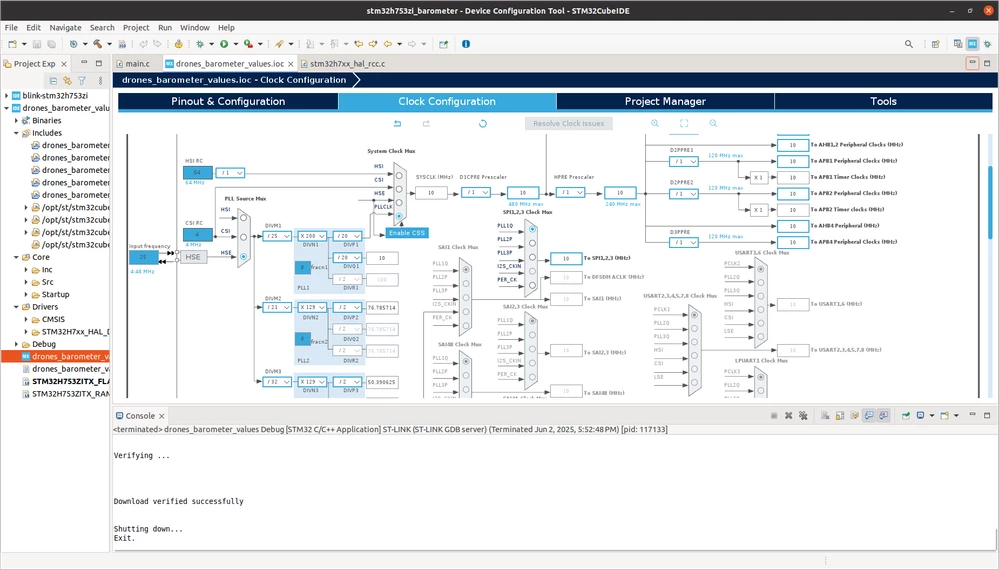
and the stm32 datasheet stm32 datasheet which we are using.