MIPI DSI Display Stays Black on STM32H757 using LVGL UI framework
Hi,
I am working with a custom board using the STM32H757BIT and a Riverdi RVT70HSMNWC00 connected through MIPI DSI.
I followed the “lv_port_riverdi_70-stm32h7” example for the CubeMX setup and for the DSI display initialization.
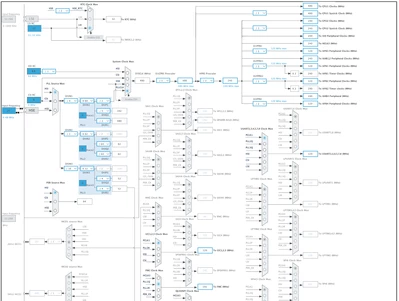
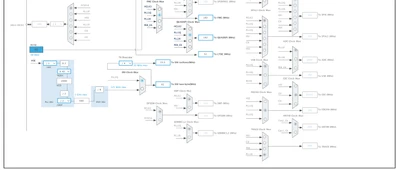
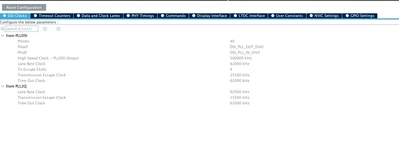
The system runs from a 25 MHz external HSE, and I have tested the DSI clock using both the HSE and PLL2Q.
HAL version: V1.12.1.
The UI framework is LVGL.
My issue is that the display stays completely black. When LVGL triggers the flush callback, nothing appears on the screen.
The screen content I want to show is extremely simple, just for testing:
 /*Change the active screen's background color*/
 lv_obj_set_style_bg_color(lv_screen_active(), lv_color_hex(0x003a57), LV_PART_MAIN);

 /*Create a white label, set its text and align it to the center*/
 lv_obj_t * label = lv_label_create(lv_screen_active());
 lv_label_set_text(label, "Hello world");
 lv_obj_set_style_text_color(lv_screen_active(), lv_color_hex(0xffffff), LV_PART_MAIN);
 lv_obj_align(label, LV_ALIGN_CENTER, 0, 0);
I have the system configured with double buffering using external RAM, with the LVGL buffer in Direct mode.
The flush function is called only once. I have verified that the buffer currently used is the correct one, and debugging shows that the external RAM buffer is filled correctly with the expected image.
Flush CB
if (lv_display_flush_is_last(disp)) {
		SCB_CleanInvalidateDCache();
		// wait for VSYNC to avoid tearing
		while (!(LTDC->CDSR & LTDC_CDSR_VSYNCS));
		// swap framebuffers (NOTE: LVGL will swap the buffers in the background, so here we can set the LCD framebuffer to the current LVGL buffer, which has been just completed)
		HAL_StatusTypeDef ret = HAL_LTDC_SetAddress(&hltdc, (uint32_t)(lv_display_get_buf_active(disp)->data), 0);
 SEGGER_RTT_printf(0, "HAL_LTDC_SetAddress returned %d\n", ret);
	}
	lv_display_flush_ready(disp);
Display Initialization Sequence
I am initializing the DSI display using the following commands:
 ret = HAL_DSI_Start(&hdsi);

 ret = HAL_DSI_ShortWrite(&hdsi, 0, DSI_DCS_SHORT_PKT_WRITE_P0, DSI_SOFT_RESET, 0x0);
 HAL_Delay(120);

 ret = HAL_DSI_ShortWrite(&hdsi, 0, DSI_GEN_SHORT_PKT_WRITE_P2, 0x87, 0x5A);

 ret = HAL_DSI_ShortWrite(&hdsi, 0, DSI_GEN_SHORT_PKT_WRITE_P2, 0xB0, 0x80);

 ret = HAL_DSI_ShortWrite(&hdsi, 0, DSI_GEN_SHORT_PKT_WRITE_P2, 0xB2, 0x50);

 ret = HAL_DSI_ShortWrite(&hdsi, 0, DSI_GEN_SHORT_PKT_WRITE_P2, 0x80, 0x4B);

 ret = HAL_DSI_ShortWrite(&hdsi, 0, DSI_GEN_SHORT_PKT_WRITE_P2, 0x81, 0xFF);

 ret = HAL_DSI_ShortWrite(&hdsi, 0, DSI_GEN_SHORT_PKT_WRITE_P2, 0x82, 0x1A);

 ret = HAL_DSI_ShortWrite(&hdsi, 0, DSI_GEN_SHORT_PKT_WRITE_P2, 0x83, 0x88);

 ret = HAL_DSI_ShortWrite(&hdsi, 0, DSI_GEN_SHORT_PKT_WRITE_P2, 0x84, 0x8F);

 ret = HAL_DSI_ShortWrite(&hdsi, 0, DSI_GEN_SHORT_PKT_WRITE_P2, 0x85, 0x35);

 ret = HAL_DSI_ShortWrite(&hdsi, 0, DSI_GEN_SHORT_PKT_WRITE_P2, 0x86, 0xB0);
 HAL_Delay(50);

 ret = HAL_DSI_ShortWrite(&hdsi, 0, DSI_DCS_SHORT_PKT_WRITE_P0, DSI_EXIT_SLEEP_MODE, 0x0);
 HAL_Delay(120);

 ret = HAL_DSI_ShortWrite(&hdsi, 0, DSI_DCS_SHORT_PKT_WRITE_P0, DSI_SET_DISPLAY_ON, 0x0);
 HAL_Delay(120);
Everything seems to execute without errors, but the display remains black.
Frequency
DSI: 62 MHz
DSI txclkesc 15.5 MHz
LTDC: 52 MHz
CubeMX setup
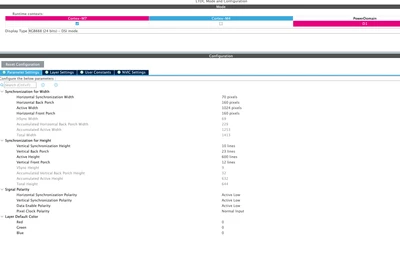
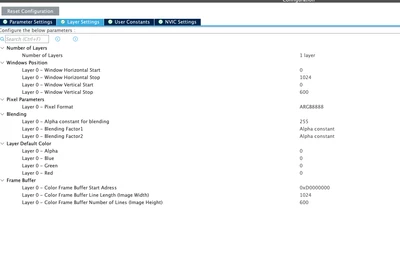
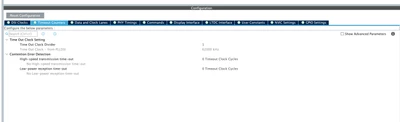
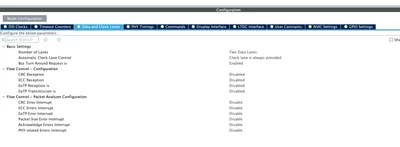
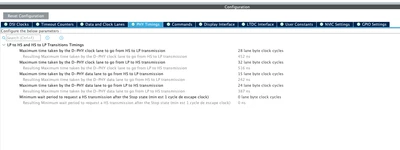
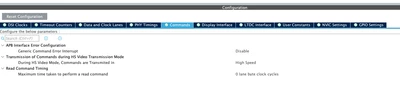
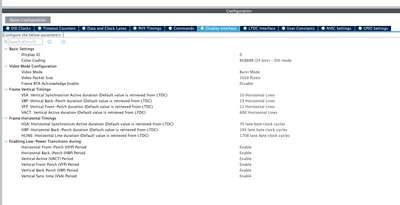
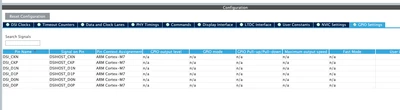
I am attaching images of my CubeMX configuration for:
- System Clock
- DSI

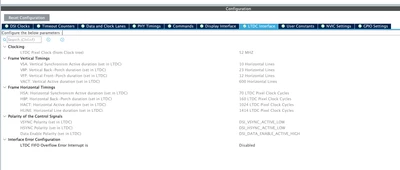
LTDC: