

WBerr.2
Associate
July 23, 2020
Solved

Problem with step one opening example file?

  • July 23, 2020
  • 2 replies
  • 1483 views

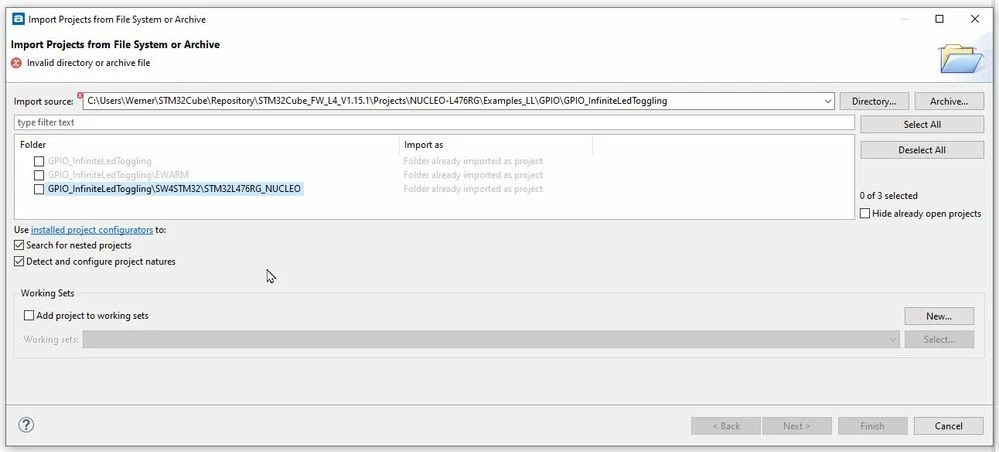
Carefully following the instructions I got with my STM32 Nucleo board I am trying to opent the:

C:\Users\myname\STM32Cube\Repository\STM32Cube _FW_L4_V1.11.0\Projects\NUCLEOL476RG\Examples_LL\ GPIO\GPIO_InfiniteLedToggling

Then project:

GPIO_InfiniteLedToggling\SW4STM32 \STM32L476RG_NUCLEO

I am getting the error: Invalid directory or archive file? And am not able to click checkbox.

Thanks for the help!

Werner0693W000001tTMAQA2.jpg
This topic has been closed for replies.
Best answer by Pavel A.

It says "the folder is already imported". Looks like the Eclipse workspace is garbaged.

Create a new empty workspace folder and import this into it.

-- pa

2 replies

Pavel A.
Pavel A.Best answer
Super User
July 23, 2020

It says "the folder is already imported". Looks like the Eclipse workspace is garbaged.

Create a new empty workspace folder and import this into it.

-- pa

WBerr.2
WBerr.2Author
Associate
July 24, 2020

Hi Pavel,

Thanks so much for the help! I did as you said and did get things working. After spending the day with TrueStudio I am afraid it is just way to complicated of a program for me. Too much time involved just to get the simplest things to work.

Stay safe my friend,

Werner

Pavel A.
Super User
July 24, 2020

You too, Werner. Thanks for the update.

-- pa