SBas3
Associate
September 22, 2022
Question

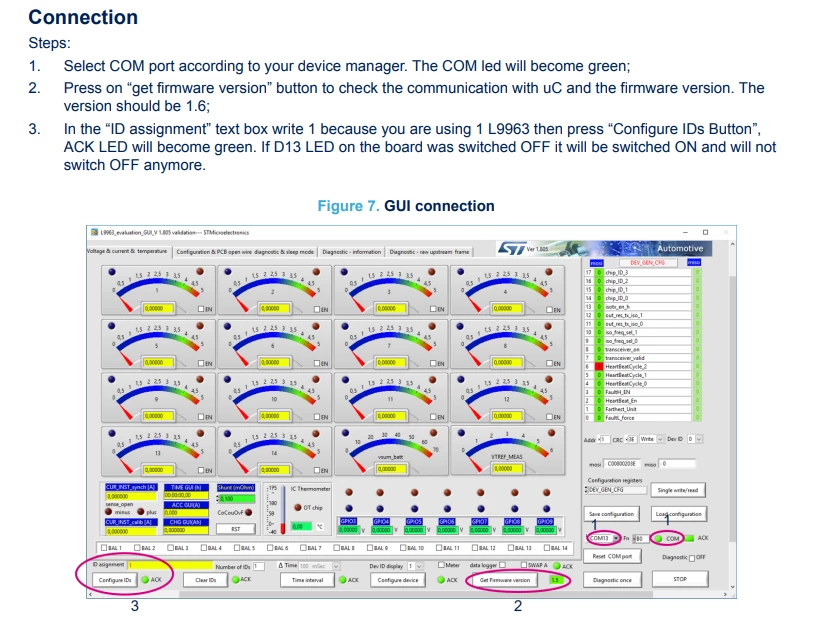
Hi, i have purchased an EVAL-L9963E-MCU and i am trying to test it with the STSW-L9963E GUI. I'am following the application note AN5696 but i am stucked at the third point of the connection section (see sreen).

  • September 22, 2022
  • 4 replies
  • 3698 views

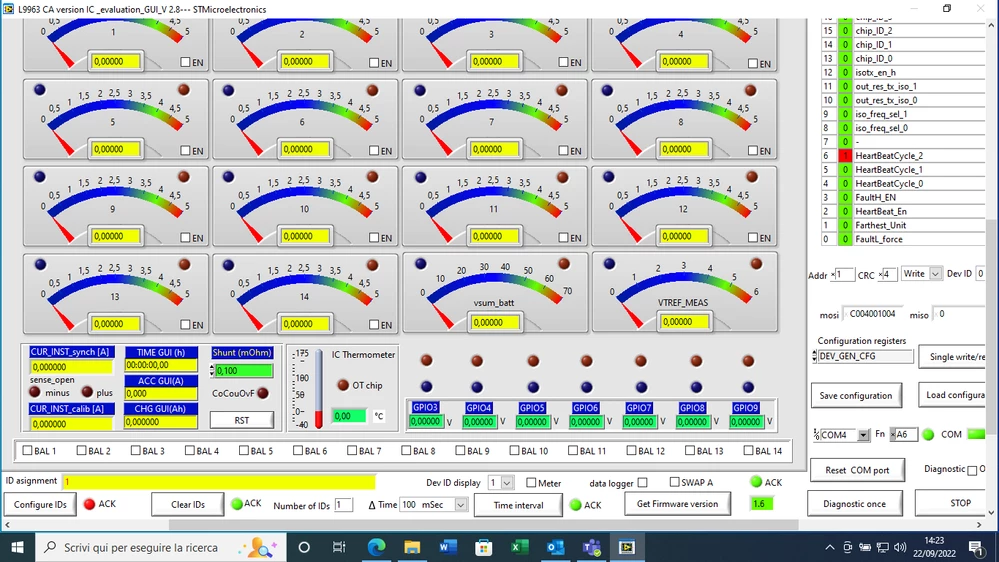
The main issue is that when i enter 1 in the ID assignment, as i'm using the L9963, the ACK LED wont turn green but red instead. The D13 LED on the board behaves consistently with what is written in the application note i.e. is tuned on when the Configure IDs Button is pressed. Do you know how to solve this in order to test the L9963 functionality? Thanks in advance.0693W00000Sw0G2QAJ.png0693W00000Sw0FdQAJ.png 
    This topic has been closed for replies.

    4 replies

    Jonas.1
    Visitor II
    November 28, 2022

    I have the same problem. Did you find a solution?

    SBas3
    SBas3Author
    Associate
    November 28, 2022

    Still waiting an ST reply

    KTANG.9
    ST Employee
    December 7, 2022

    There is an issue when using only 5V USB to power the board apparently.

    Use 12V PSU to power the board.

    Jumper settings for 12V PSU

    0693W00000WKPkMQAX.png

    SBas3
    SBas3Author
    Associate
    December 12, 2022

    Thanks for the reply. That was the problem, now it is working.

    Jonas.1
    Visitor II
    December 21, 2022

    I have the same problem. Did someone solve it already? How did you do it?

    KTANG.9
    ST Employee
    December 22, 2022

    Hi,

    You need to power the board with a 12V power brick . It is not designed to run off the 5V USB power.

    Its written in the application note .

    0693W00000WLaFgQAL.png 

    Jonas.1
    Visitor II
    January 10, 2023

    I'm powering the board with 12V and have the jumper settings like you told us but it’s still not working. 0693W00000Y7qANQAZ.jpg

    KTANG.9
    ST Employee
    January 10, 2023

    Hi,

    the 12V brick powers the MCU , but the L9963E is separately powered via the P2 multi pin connector. Please refer to attached application note.

    0693W00000Y7qZmQAJ.png 

    If you don't have battery , minimum connection is 12V power supply to VBAT_CELL pin and GND_B.

    Procedure -

    1. Supply power to L9963E via P2. LED D13 will be switched on.
    2. If the addressing procedure from the MCU is not executed within 30 s, L9963E will go in standby mode - LED D13 will be switched off, and you will need to restart from 1.
    3. Supply 12V power to Eval board MCU via X1.
    4. Connect USB cable to P1.
    5. Open the GUI. Follow below steps - make sure "Configure ID " is pressed only once !

    0693W00000Y7qjrQAB.png 

    Jonas.1
    Visitor II
    January 13, 2023

    Hallo,

    now it´s working. Thank you very much for your help.