
Associate II
April 23, 2024
Solved

How to configure the STEVAL-WLC38RX board to receive 5W power

  • April 23, 2024
  • 1 reply
  • 1693 views

Hello everyone!

I would like to ask you for some advice on how to configure the STEVAL-WLC38RX board in the WPSTUDIO GUI so that it receives 5W power.
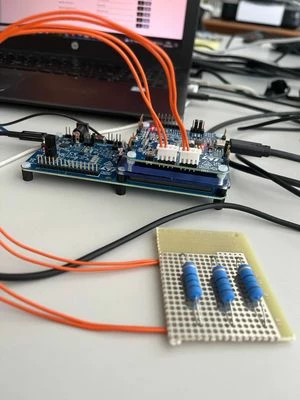
The STEVAL-WLC38RX board is placed on the STEVAL-WBC86TX at the distance shown in the photo. I would like to obtain 5W power to simulate wireless charging of a smartphone for example.
DZaot1_0-1713881293174.jpeg

I am supplying the board with 8V (WBC86TX) and I have connected a 5 ohm resistor between VOUT and GND of WLC38RX.


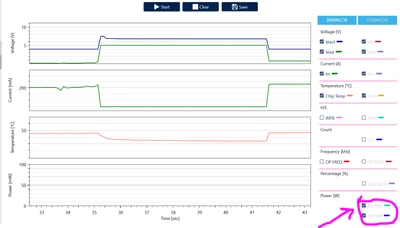
In addition, I wanted to know if it is possible to display the power received by STEVAL-WLC38RX via the CHARTS of WPSTUDIO, as on the receive side there is nothing unlike on the transmit side.
DZaot1_1-1713881505052.png

Via the GUI I can only graph the trends of RX PWR and TX PWR on the transmission side. Is this normal?


Thanks for your help


This topic has been closed for replies.
Best answer by willzhou

Hi 

1.To simulate wireless charging of a smartphone, you need to use an e-loader and add loader step by step, But when you use resistor when rx vout reaches to 5V, it will draw 1A immediately. Wireless charging system can not draw high current immediately, based on qi spec, it needs control-error packet to communicate TX and RX to reach power. So I suggest you to follow the application notes.

2.GUI have limited show data, you can click "save " button it will have all the data inside the log.

1 reply

willzhouBest answer
Technical Moderator
April 23, 2024

Hi 

1.To simulate wireless charging of a smartphone, you need to use an e-loader and add loader step by step, But when you use resistor when rx vout reaches to 5V, it will draw 1A immediately. Wireless charging system can not draw high current immediately, based on qi spec, it needs control-error packet to communicate TX and RX to reach power. So I suggest you to follow the application notes.

2.GUI have limited show data, you can click "save " button it will have all the data inside the log.

In order to give better visibility on the answered topics, please click on Accept as Solution on the reply which solved your issue or answered your question.
DZaot1Author
Associate II
April 23, 2024

Thank you, Will Zhou. Can you tell me which application note you are referring to?

Technical Moderator
April 23, 2024
In order to give better visibility on the answered topics, please click on Accept as Solution on the reply which solved your issue or answered your question.