

Central SUPPORT
Senior
June 27, 2019
Solved

How to evaluate LED7708 with more than 16 channels

  • June 27, 2019
  • 2 replies
  • 1876 views

I am running a STEVAL-ILL035V1 board using software downloaded from your site.

Downloaded software is LED_DRIVER_GUI7708_1.0.1_130722.exe.

Then I connected an additional board STEVAL-ILL035V2 and changed SW7 on ...V1.

But now I am not able to control the outputs. Tested with one channel active on each board. Which board output that answered to brightness command could swap when exercising the channel active box. Still only 16 channels presented on the GUI.

1.    So, can mentioned software handle dual boards? If so, is there available, any instruction/description of how to control this board combination? If not, is there any other software and description I can get to enable control of 32 channels simultaneously?

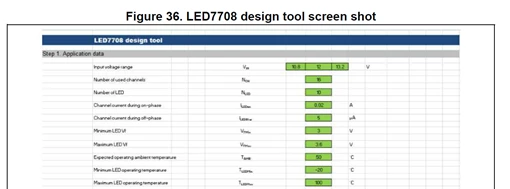
2.    Additionally I would like to have the spreadsheet for “LED7708 design tool�? that is referenced and described in your application note AN4578 in paragraph 4 “Step by step design�? on page 32:
0690X000009XfVgQAK.png

NOTE: This question and answer originated from a customer support case which was handled by us. We regularly review support cases and add any helpful ones here for all to benefit from.

This topic has been closed for replies.
Best answer by Central SUPPORT

1)    Yes, our software covers three different aspects of our LED7708 evaluation tool: 

  • Graphical User Interface (GUI) running on a Windows PC;
  • µC (STM32F103C6T6A) placed on the eval board and communicating with PC via USB;
  • LED7708 controlled by µC via SPI on the board

The GUI has been designed to allow the configuration of the following device registers:

DEVCFG0
DEVCFG1

Attached ZIP file contains a document describing how to connect both boards and control them in a master-slave configuration.

2)    Mentioned LED7708_design_tool.xlsx is also included in attached ZIP file. 

2 replies

Central SUPPORT
Central SUPPORTAuthorBest answer
Senior
June 27, 2019

1)    Yes, our software covers three different aspects of our LED7708 evaluation tool: 

  • Graphical User Interface (GUI) running on a Windows PC;
  • µC (STM32F103C6T6A) placed on the eval board and communicating with PC via USB;
  • LED7708 controlled by µC via SPI on the board

The GUI has been designed to allow the configuration of the following device registers:

DEVCFG0
DEVCFG1

Attached ZIP file contains a document describing how to connect both boards and control them in a master-slave configuration.

2)    Mentioned LED7708_design_tool.xlsx is also included in attached ZIP file. 

Visitor II
August 23, 2023

Hello,

I'm sorry for re-opening the post, but I recently acquired a STEVAL-ILL035V1 and have no idea how to get it to work.
More so, I can't find and download the Graphical User Interface (GUI) tool. Only the example code that I also don't know how to use and compile (using STM32Cube?).

Any help in getting started would be appreciated.

Thanks,

Ziv

Visitor II
March 11, 2024

Hi bro,
Have you found the GUI?
I facing the same issue- no GUI at the ST page, but it is clearly described in the application note.
Already open ticket at the support, waiting for the response.

Visitor II
March 12, 2024

Hi, no I haven't.

It seems that ST has abandoned this product or the support for it unless you're a car or headlight company (I assume). 

Visitor II
March 14, 2024

Thanks for the answer.
I have opened ticket at the ST helpdesk, let's see.