
L9963 Evaluation Board GUI Error: Configure ID button does not work
I downloaded the NI Labview-runtime 2014, NI VISA-RUNTIME and FTDI driver.
I connected the EVM to the PC via USB and connected VBAT_CELL pin to power supply with 20V and GND_B to GND of power supply (see below picture). As can be seen from the picture all the LEDs are switched ON which means that the power supply to the module is properly done.
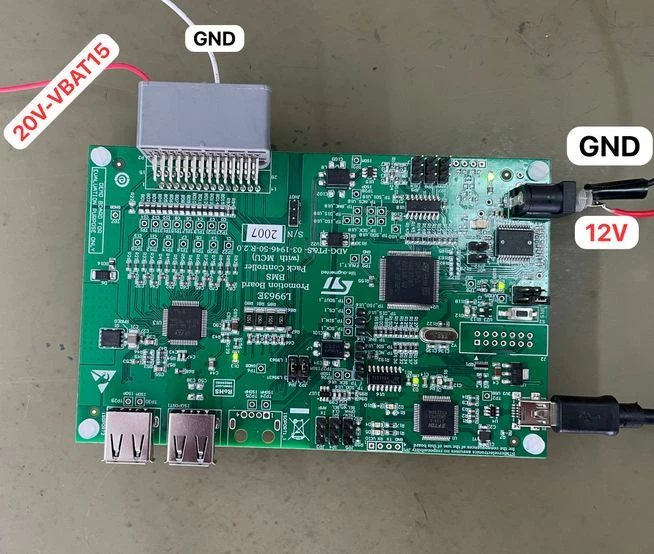
Then, on GUI, I did the first 2 steps according to user guide. I saw the firmware version by pressing the 'get firmware version' button as mentioned in the datasheet. After that, we tried to activate Configure IDs button by writing 1 to ID asignment textbox. But the ACK light does not turn to green. Steps are explained below (see below picture).
Step 1: Click "Reset COM port" - DONE (Fn is set to B0 and both COM and ACK signs became green)
Step 2: Click "Get Firmware version" - DONE (version is 1.6)
Step 3: On "Id Assignment" write 1 and click "Configure IDs" - CAN NOT DONE (After clicking, ACK led became red)
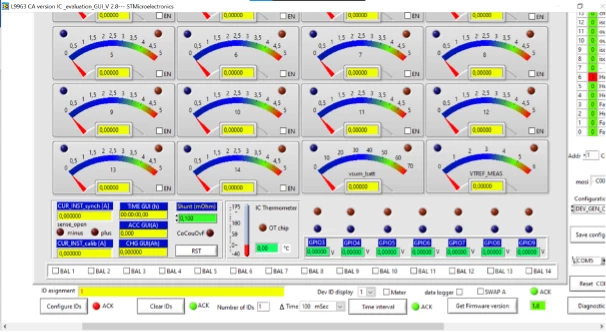
What could be the problem? Can anyone help me about this?
Thanks.