
Associate
January 13, 2026
Solved

STEVAL-ISC004V1 PDO Configuration Not Working

  • January 13, 2026
  • 1 reply
  • 157 views

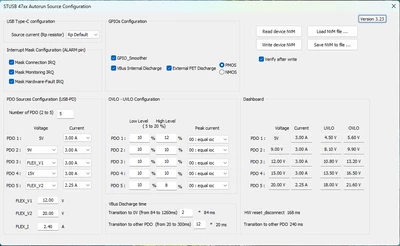
Using the NVM configuration utility for the STEVAL-ISC004V1 seems to program fine
jadczak_slr_0-1768319667125.png

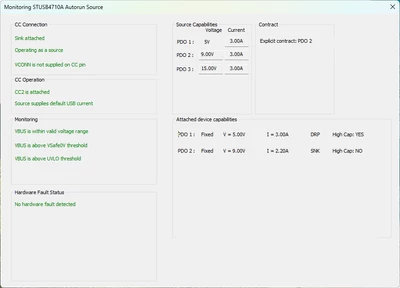
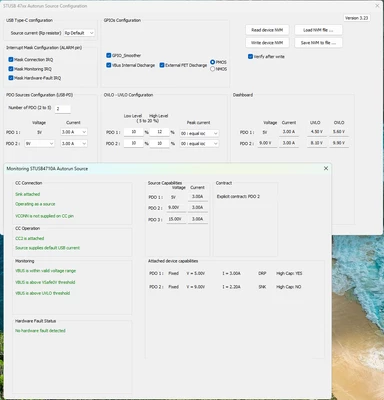
However regardless of what I am writing the to the NVM, the source capabilities on the device dashboard never change and always show 3 PDOs for 5, 9, and 15 volts.
jadczak_slr_1-1768319760713.png

jadczak_slr_2-1768319847931.png


Best answer by Didier HERROUIN

Dear jadczak_slr,

After programming the new PDOs using the GUI, you must :

- Press "Write device NVM" to write the new parameters inside the STUSB4710 Flash memory

- Reset the STSUB4710 by removing the power supply from the STEVAL-ISC004V1 so that the new parameters are taken into account at next negotiation with the SINK.

After the reset and before connecting a SINK, you can also Read the Device NVM to check that the new parameters have been correctly written.

Best regards,

Didier

1 reply

Didier HERROUIN
Didier HERROUINBest answer
Technical Moderator
January 22, 2026

Dear jadczak_slr,

After programming the new PDOs using the GUI, you must :

- Press "Write device NVM" to write the new parameters inside the STUSB4710 Flash memory

- Reset the STSUB4710 by removing the power supply from the STEVAL-ISC004V1 so that the new parameters are taken into account at next negotiation with the SINK.

After the reset and before connecting a SINK, you can also Read the Device NVM to check that the new parameters have been correctly written.

Best regards,

Didier

In order to give better visibility on the answered topics, please click on 'Accept as Solution' on the reply which solved your issue or answered your question.