
Associate III
November 10, 2023
Solved

STEVAL-WBC86TX -> Bricked accidentally, any chance of recovery?

  • November 10, 2023
  • 13 replies
  • 4996 views

Hello,

So I recently received the dev board STEVAL-WBC86TX and was quite impressed with the features. Accidentally the wrong config ID was written to the board. Now I cannot connect to it again using the Windows utility.

The USB to I2C appears to be working normally, but there is an error in the log and the device never connects successfully in the GUI, thus, I cannot flash the original config and nvm patch files from the website, provided as STSW-WBC86FWBPP.

[TX]WBC86 connection ex: Wrong config id 0xDA06 and patch id 0x0000 for TX"

I thought I could edit WBC86.json.enc, which probably contains which ID and such... I'm guessing this is encrypted json.

Is there a way to hard reset this chip to restore connectivity to the dev board?
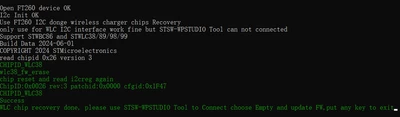
 

Best answer by willzhou

@AnkhInnovationsLLC 

please use this link tool

Wireless Charging solution Wiki - STMicroelectronics Community


willzhou_0-1718525293795.png


13 replies

Associate III
November 10, 2023

Managed to get it working again by glitching the i2c pin as the program tries to read the config id / patch id over the bus. Flashed the stock firmware for both patch and config after that.

Associate III
June 10, 2024

We accidentally flashed (Few Times Programmable) an STWLC38 with the nvpatch of an SWBC86. The chip is now non-functional, but still appears at 0x61 on the i2c bus. The WPC Studio won't connect to it as Empty or RX.

Anyone have any ideas how flash it again?

A similar thread doesn't have any technical details: https://community.st.com/t5/power-management/stwbc86-ftp/td-p/58861


Technical Moderator
June 10, 2024

please use command line for wlc38


@Echo off
REM use tool and command line to down fw to chip
set memh_patch="STSW-WLC38FWEPP\STEVAL-WLC38RX_nvmpatch_1437.memh"
set memh_cfg="STSW-WLC38FWEPP\STEVAL-WLC38RX_config_1F46_EPP.memh"
"STSW-WPSTUDIO V2.2.5.exe" fw -d WLC38 -p %memh_patch% -c %memh_cfg%
pause


In order to give better visibility on the answered topics, please click on Accept as Solution on the reply which solved your issue or answered your question.
Technical Moderator
June 10, 2024

Hi
Please include "Wireless charging" tag so i can get notices.

Please use bash command line, like this

@Echo off
REM use tool and command line to down fw to chip
set memh_patch="STSW-WBC86FWBPP\STEVAL-WBC86TX_nvmpatch_1242.memh"
set memh_cfg="STSW-WBC86FWBPP\STEVAL-WBC86TX_config_120D_BPP.memh"
"STSW-WPSTUDIO V2.2.5.exe" fw -d WBC86 -p %memh_patch% -c %memh_cfg%
pause

also i have attach the file

In order to give better visibility on the answered topics, please click on Accept as Solution on the reply which solved your issue or answered your question.
Associate III
June 10, 2024

Thanks for the prompt reply... Usually these forums are so slow until you got here :)

The command didn't work... I get a non-descriptive error message:


Tried like this:

C:\STSW-WPSTUDIO V2.0>"STSW-WPSTUDIO V2.2.5.exe" fw -d WLC38 -p "STSW-WLC38FWEPP\STEVAL-WLC38RX_nvmpatch_1437.memh" -c "STSW-WLC38FWEPP\STEVAL-WLC38RX_config_1F46_EPP.memh" -o "log.txt"

Results:

STSW-WPSTUDIO command line V1.1.0
ERR: Object reference not set to an instance of an object.


Or like this:

@Echo off
C:\STSW-WPSTUDIO V2.0>REM use tool and command line to down fw to chip
C:\STSW-WPSTUDIO V2.0>set memh_patch="STSW-WLC38FWEPP\STEVAL-WLC38RX_nvmpatch_1437.memh"
C:\STSW-WPSTUDIO V2.0>set memh_cfg="STSW-WLC38FWEPP\STEVAL-WLC38RX_config_1F46_EPP.memh"
C:\STSW-WPSTUDIO V2.0>"STSW-WPSTUDIO V2.2.5.exe" fw -d WLC38 -p %memh_patch% -c %memh_cfg%

Results:

STSW-WPSTUDIO command line V1.1.0
ERR: Object reference not set to an instance of an object.


Lastly, tried as the .bat files attached above... it does not work

C:\Windows\System32>cd "C:\STSW-WPSTUDIO V2.0"

C:\STSW-WPSTUDIO V2.0>dir
Volume in drive C has no label.
Volume Serial Number is 2E66-181D

Directory of C:\STSW-WPSTUDIO V2.0

06/10/2024 10:27 AM <DIR> .
05/07/2024 07:34 AM 272 a1_wlc38_downfw.bat
05/07/2024 07:34 AM 272 a2_wbc86_downfw.bat
06/10/2024 10:19 AM 1,005 DataFile.bin
06/10/2024 10:23 AM 1,984 log.txt
06/10/2024 10:14 AM <DIR> Project
06/10/2024 10:14 AM <DIR> STSC-STWLC98-STEVAL-WLC98RX
06/10/2024 10:14 AM <DIR> STSC-STWLC99-STEVAL-WLC99RX
06/10/2024 10:14 AM <DIR> STSW-WBC86FWBPP
06/10/2024 10:14 AM <DIR> STSW-WLC38FWEPP
03/12/2024 04:42 PM 6,152,856 STSW-WPSTUDIO V2.2.5.exe
5 File(s) 6,156,389 bytes
6 Dir(s) 208,621,858,816 bytes free

C:\STSW-WPSTUDIO V2.0>a1_wlc38_downfw.bat
STSW-WPSTUDIO command line V1.1.0
ERR: Object reference not set to an instance of an object.

Usage:
STSW-WPSTUDIO.exe fw -d {DeviceType} -p {PatchFile} -c {ConfigFile} -o {LogFile}
-d DeviceType : target device type
-p PatchFile : path to patch file
-c ConfigFile : path to config file
-o LogFile : path to log file (optional)

Press any key to continue . . .

Associate III
June 10, 2024

It did not work on my soft bricked STWLC38.

The tool did work to flash an STWBC86 that already has a correct nvmpatch + config. This rules out any driver issues.

The device still shows up on i2c bus as 0x61 and thus is still communicating... But is in a state that the tool doesn't want to flash it. 

My guess is it tries to read some chip ID or other values over I2C, then doesn't create the necessary device object, which is null and error's out.

Technical Moderator
June 11, 2024

HI

Sorry i am not very clear, please check this attach file.


In order to give better visibility on the answered topics, please click on Accept as Solution on the reply which solved your issue or answered your question.
Associate III
June 11, 2024

Hi @willzhou ,


Yes, it's clear but it does not solve the problem.


C:\Windows\System32>cd C:\Tool

C:\Tool>dir
Volume in drive C has no label.
Volume Serial Number is 2E66-181D

Directory of C:\Tool

06/11/2024 04:20 PM <DIR> .
05/07/2024 07:34 AM 272 a1_wlc38_downfw.bat
05/07/2024 07:34 AM 272 a2_wbc86_downfw.bat
06/11/2024 04:20 PM <DIR> STSW-WBC86FWBPP
06/11/2024 04:20 PM <DIR> STSW-WLC38FWEPP
03/12/2024 03:42 AM 6,152,856 STSW-WPSTUDIO V2.2.5.exe
3 File(s) 6,153,400 bytes
3 Dir(s) 211,396,284,416 bytes free

C:\Tool>a1_wlc38_downfw.bat
STSW-WPSTUDIO command line V1.1.0
ERR: Object reference not set to an instance of an object.

Usage:
STSW-WPSTUDIO.exe fw -d {DeviceType} -p {PatchFile} -c {ConfigFile} -o {LogFile}
-d DeviceType : target device type
-p PatchFile : path to patch file
-c ConfigFile : path to config file
-o LogFile : path to log file (optional)

Press any key to continue . . .

Technical Moderator
June 12, 2024

Hi

How about you add -o testlog.txt to export some logs

In order to give better visibility on the answered topics, please click on Accept as Solution on the reply which solved your issue or answered your question.
Associate III
June 12, 2024

2024-06-12 10:29:17.416 AM [Info] 1 - ConnectionType: ADDRESS_SIZE_2_BYTES bytes
2024-06-12 10:29:17.416 AM [Info] 1 - ReadChunk: 50 bytes
2024-06-12 10:29:17.416 AM [Info] 1 - WriteChunk: 50 bytes
2024-06-12 10:29:17.496 AM [Info] 1 - FT260 Dongle[0] id: \\?\hid#vid_0403&pid_6030&mi_00#8&3ea09e0&0&0000#{4d1e55b2-f16f-11cf-88cb-001111000030}
2024-06-12 10:29:17.512 AM [Info] 1 - FT260 Dongle[1] id: \\?\hid#vid_0403&pid_6030&mi_01#8&1bad9625&0&0000#{4d1e55b2-f16f-11cf-88cb-001111000030}
2024-06-12 10:29:17.622 AM [Info] 1 - ConnectionType: ADDRESS_SIZE_2_BYTES bytes
2024-06-12 10:29:17.622 AM [Info] 1 - ReadChunk: 50 bytes
2024-06-12 10:29:17.622 AM [Info] 1 - WriteChunk: 50 bytes
2024-06-12 10:29:17.734 AM [Info] 1 - FT260DongleConfig: FW Version: 0x1010500
2024-06-12 10:29:17.734 AM [Info] 1 - FT260DongleConfig: Chip ID: 0x2600200
2024-06-12 10:29:17.734 AM [Info] 1 - FT260DongleConfig: SAD: 0x61
2024-06-12 10:29:17.734 AM [Info] 1 - FT260DongleConfig: ClockRate changed to Standard
2024-06-12 10:29:17.751 AM [Debug] 1 - W[2]: 00 00 , R[2]: FF FF
2024-06-12 10:29:17.783 AM [Info] 1 - ConnectionType: ADDRESS_SIZE_2_BYTES bytes
2024-06-12 10:29:17.783 AM [Info] 1 - ReadChunk: 50 bytes
2024-06-12 10:29:17.783 AM [Info] 1 - WriteChunk: 50 bytes
2024-06-12 10:29:17.783 AM [Error] 1 - FT260Dongle: I2c master Init/slave Adress
2024-06-12 10:29:17.828 AM [Info] 1 - FT260DongleConfig: FW Version: 0x1010500
2024-06-12 10:29:17.828 AM [Info] 1 - FT260DongleConfig: Chip ID: 0x2600200
2024-06-12 10:29:17.828 AM [Info] 1 - FT260DongleConfig: SAD: 0x61
2024-06-12 10:29:17.828 AM [Info] 1 - FT260DongleConfig: ClockRate changed to Standard
2024-06-12 10:29:17.828 AM [Error] 1 - FT260Dongle: rawWriteRead Failed
2024-06-12 10:29:17.828 AM [Warning] 1 - W[2] ex: FT260Dongle [rawWriteRead] : Failed

Technical Moderator
June 13, 2024

It read 0xFF 0XFF from i2c reg address 0x0000, and it can not detect chip id anymore.

Let me ask internally to solved this issues.

In order to give better visibility on the answered topics, please click on Accept as Solution on the reply which solved your issue or answered your question.
Associate III
June 13, 2024

Okay thanks let me know

willzhouBest answer
Technical Moderator
June 16, 2024

@AnkhInnovationsLLC 

please use this link tool

Wireless Charging solution Wiki - STMicroelectronics Community


willzhou_0-1718525293795.png


In order to give better visibility on the answered topics, please click on Accept as Solution on the reply which solved your issue or answered your question.
Associate
January 16, 2025

Hi will,

I have the same issue but I don't understand the steps to recovery the EVB STEVAL-SWBC86TXA.
Best Regards
Alessandro