Senior
December 22, 2023
Solved

STSW-GMBL02V1 cannot connect

  • December 22, 2023
  • 1 reply
  • 2234 views

Hi Team.

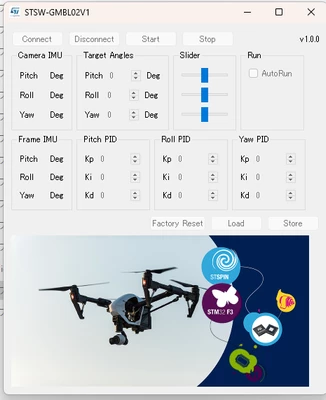
I'm trying to connect STEVAL-GMBL02V1 board with STSW-GMBL02V1 control application.
The cursor icon becomes a standby animation, but I cannot connect.

I connected using the following steps:

  1. supply 8V of power to the STEVAL-GMBL02V1 board.
  2. connect the USB.
  3. start up the STSW-GMBL02V1 application.

Condition:

  • Motor is not connected yet.

Kenji1_0-1703227174648.png

The thing to be concerned about is that when you connect USB, the current value decreases.
I am using a power supply that can only display up to two decimal places, but 40mA is displayed as 0A.


I would like to know if the board is defective or if there is a problem with the procedure.
Has anyone experienced a similar problem?


This topic has been closed for replies.
Best answer by RLW

Hi Kenji and ST Team,

We also have the same problem we also cannot connect to the provided GUI. 
Did you find a solution to this?


We followed the instructions:
- Flashed the Board with the provided executable from the website download and when we power the board by USB we get the flashing LED

- Installed the STM32 virtual COM Port Driver (our OS is Windows 11)

The device enumerates in device manager but we cannot connect to the APP GUI.


Best Regards,


Ross

1 reply

RLWBest answer
Visitor II
February 12, 2024

Hi Kenji and ST Team,

We also have the same problem we also cannot connect to the provided GUI. 
Did you find a solution to this?


We followed the instructions:
- Flashed the Board with the provided executable from the website download and when we power the board by USB we get the flashing LED

- Installed the STM32 virtual COM Port Driver (our OS is Windows 11)

The device enumerates in device manager but we cannot connect to the APP GUI.


Best Regards,


Ross

Visitor II
February 12, 2024

Hi all,


For reference this is now working and was solved by installing Windows 10 on a virtual machine and following the instructions again. Seems that there is some issue with Windows 11 and perhaps the Virtual COM Port driver.


Best Regards,


Ross