JCard.3
Associate II
February 3, 2025
Solved

Building NFC Tap for iOS

  • February 3, 2025
  • 6 replies
  • 1113 views

Hi,


I'm trying to compile NFC Tap for iOS but no luck so far.  I've resolved the following issues, by following the advice of other posts on this forum:

  • Add st25sdk header search path
  • Remove ST25NFCAppClip from build
  • Fix signing and j2objc path
  • Add st25sdk framework from en.stsw-st25ios005.zip
  • Change bundle identifier

After these fixes, the project still fails to compile due to the errors shown below.  I'm suspecting  an issue with the j2objc version.  I'm using the latest from their repo.  Is there any recommended version that I should use?

Xcode Version: 16.1

STSW-ST25IOS002 version: 7.6.0

STSW-ST25IOS005 version: 1.0.0

Thanks!
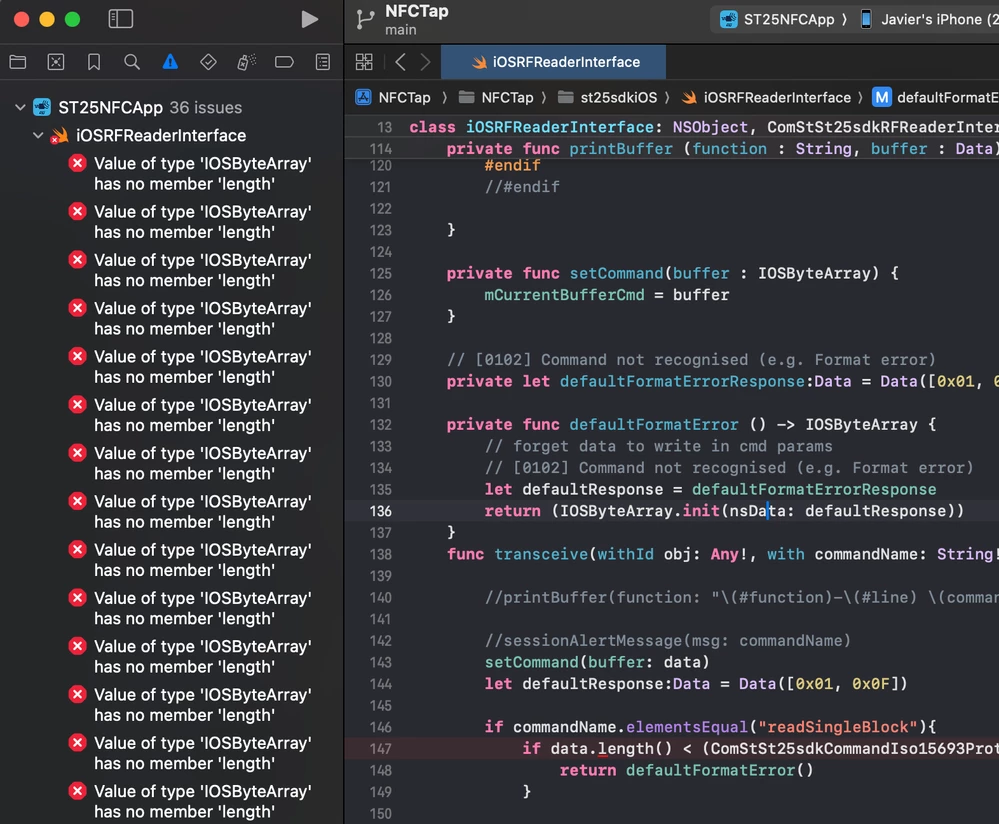
 

errors.png

This topic has been closed for replies.
Best answer by JCard.3

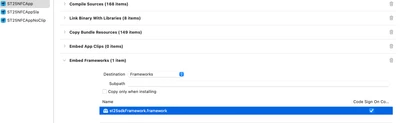
Yay!  Finally got it to run.  I had to add an extra build step to embed st25sdkFramework into the final bundle.  (Project -> Build Phases -> + -> New Copy Files phase -> Rename to "Embed Frameworks" -> Destination "Frameworks" -> st25sdkFramework.framework


JCard3_1-1738680746618.png


So, for my future self, and for others trying to do this, here is the summary of the steps I followed to compile and run NFC Tap:

  • Extract en.stsw-st25ios002.zip
  • Change bundle identifier
  • Extract en.stsw-st25ios005.zip into an external directory
  • Add st25sdk framework from en.stsw-st25ios005.zip under Frameworks
  • Add st25sdk header search path
  • Remove ST25NFCAppClip from build
  • Verify j2objc search paths are non-recursive
  • Set J2OBJC_HOME to `$(PROJECT_DIR)/Frameworks/st25sdkFramework.framework`
  • Remove build flag -ljre_lib
  • Add a build phase to copy st25sdkFramework onto the bundle

Relevant configuration variables are:

HEADER_SEARCH_PATHS = ... 
$(PROJECT_DIR)/Users/javier/dev/nfc-tap/NFCTap/st25sdklib/include/** 
$(PROJECT_DIR)/Users/javier/dev/nfc-tap/NFCTap/st25sdklib/com/st/st25pc/model 
$(PROJECT_DIR)/Users/javier/dev/nfc-tap/NFCTap/openssl/** 
$(PROJECT_DIR)/Users/javier/dev/nfc-tap/Frameworks/st25sdkFramework.framework/Headers 
$(PROJECT_DIR)/Users/javier/dev/nfc-tap/Frameworks/st25sdkFramework.framework/Headers/Jre 

Thanks for the help.

Best,

6 replies

victor laraison
ST Employee
February 4, 2025

Hi Jcard,

Thx for your interest.

We never tried with latest version of j2objC tool. We recommend you use the version 2.4 : it was the version used for our software.

Otherwise, if you use the st25sdkframework provided in "en.stsw-st25ios005.zip", you shouldn't need to install J2OBJC, as framework is self-sufficient and contains all binaries + header needed for building iOS NFC Tap. 

hope it helps and clarifies more.

Keep me informed of your changes.

Br,


JCard.3
JCard.3Author
Associate II
February 4, 2025

Thanks for the quick reply, @victor laraison 

I went ahead with your second suggestion, that is, to use st25sdkframework.

These are my build settings now:


HEADER_SEARCH_PATHS = 
 /Users/javier/dev/nfc-tap/NFCTap/st25sdklib/include/com/st/st25sdk/** 
 /Users/javier/dev/nfc-tap/NFCTap/st25sdklib/com/st/st25pc/model 
 /Users/javier/dev/nfc-tap/NFCTap/openssl/** 
 /Users/javier/dev/nfc-tap/st25sdkFramework.framework/Headers/**

J2OBJC_HOME = /Users/javier/dev/nfc-tap/st25sdkFramework.framework/

FRAMEWORKS_FOLDER_PATH = NFC Tap.app/Frameworks

FRAMEWORK_SEARCH_PATHS = 
 /Users/javier/dev/nfc-tap/st25sdkFramework.framework/frameworks 
 /Users/javier/dev/nfc-tap


With these I got past the errors from my original post.  Now I'm struggling with this:

JCard3_1-1738670545533.png

I'm tweaking the search paths of the include files, but so far no luck.  Any suggestions?

Thanks!

Javier

EDIT:  Additional detail on the specific include files below:

JCard3_2-1738670778730.png


JCard.3
JCard.3Author
Associate II
February 4, 2025

Getting there inch by inch...


The cyclic dependency is fixed by making the j2objc search paths non-recursive.  That is:


- "$(SRCROOT)/st25sdkFramework.framework/Headers/**",
+ "$(SRCROOT)/st25sdkFramework.framework/Headers",
+ "$(SRCROOT)/st25sdkFramework.framework/Headers/Jre",


So compilation now completes successfully.  Now dealing with a linking error...

Library 'jre_emul' not found


You mentioned that:


the st25sdkframework provided in "en.stsw-st25ios005.zip" [...] is self-sufficient and contains all binaries + header needed for building iOS NFC Tap.

... but I cannot find `libjre_emul.a` there. Should it be?

JCard.3
JCard.3Author
Associate II
February 4, 2025

Oh, just removed -ljre_emul from the linker flags, and the app builds.  Great!

The app starts running on the phone, I see the splash screen... and the it crashes:


JCard3_0-1738676780068.png

So close...


JCard.3
JCard.3AuthorBest answer
Associate II
February 4, 2025

Yay!  Finally got it to run.  I had to add an extra build step to embed st25sdkFramework into the final bundle.  (Project -> Build Phases -> + -> New Copy Files phase -> Rename to "Embed Frameworks" -> Destination "Frameworks" -> st25sdkFramework.framework


JCard3_1-1738680746618.png


So, for my future self, and for others trying to do this, here is the summary of the steps I followed to compile and run NFC Tap:

  • Extract en.stsw-st25ios002.zip
  • Change bundle identifier
  • Extract en.stsw-st25ios005.zip into an external directory
  • Add st25sdk framework from en.stsw-st25ios005.zip under Frameworks
  • Add st25sdk header search path
  • Remove ST25NFCAppClip from build
  • Verify j2objc search paths are non-recursive
  • Set J2OBJC_HOME to `$(PROJECT_DIR)/Frameworks/st25sdkFramework.framework`
  • Remove build flag -ljre_lib
  • Add a build phase to copy st25sdkFramework onto the bundle

Relevant configuration variables are:

HEADER_SEARCH_PATHS = ... 
$(PROJECT_DIR)/Users/javier/dev/nfc-tap/NFCTap/st25sdklib/include/** 
$(PROJECT_DIR)/Users/javier/dev/nfc-tap/NFCTap/st25sdklib/com/st/st25pc/model 
$(PROJECT_DIR)/Users/javier/dev/nfc-tap/NFCTap/openssl/** 
$(PROJECT_DIR)/Users/javier/dev/nfc-tap/Frameworks/st25sdkFramework.framework/Headers 
$(PROJECT_DIR)/Users/javier/dev/nfc-tap/Frameworks/st25sdkFramework.framework/Headers/Jre 

Thanks for the help.

Best,

victor laraison
ST Employee
February 4, 2025

Thx so much Jcard3 for your investigations, feedback and solution at the end. 

I will update documentation accordingly. 

Just one minor comment : why do you need to define J2OBJC  to `$(PROJECT_DIR)/Frameworks/st25sdkFramework.framework` ? Normally, we shouldn't use anymore J2OBJC varaible with framework.

In addition, I guess you forgot to embed framework in your app at the beggining. This could explain why you must 

  • "Add a build phase to copy st25sdkFramework onto the bundle"

Br,


JCard.3
JCard.3Author
Associate II
February 4, 2025

Hi @victor laraison 

> why do you need to define J2OBJC to `$(PROJECT_DIR)/Frameworks/st25sdkFramework.framework` ? Normally, we shouldn't use anymore J2OBJC varaible with framework.

Yes, you are right, that is not strictly needed.  It is just that $(J2OBJC) was referenced in the search paths, so by setting the variable, the search paths were set correctly.  But the better fix is to remove that variable altogether.

> I guess you forgot to embed framework in your app at the beggining

Yes, I thought that by dragging a Framework into the project, Xcode would take care of that step for you.  I guess it does not.


Thanks for the help!