Associate
November 23, 2023
Solved

How to use NUCLEO-L4R5ZI with X-NUCLEO-NFC08A1?

  • November 23, 2023
  • 4 replies
  • 1635 views

Hi, i need help with the integration between NUCLEO-L4T5ZI and X-NUCLEO-NFC08A1 board.

What I tried is:

  1. Create a project using STM32CubeIDE. 
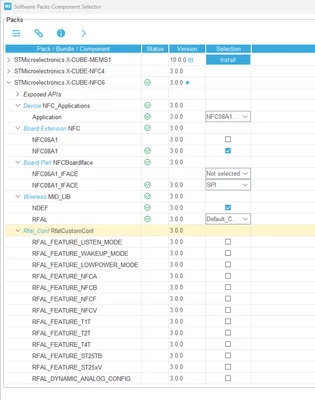
  2. Choose X-CUBE-NFC in the Middleware and Software Packs and update the configuration.
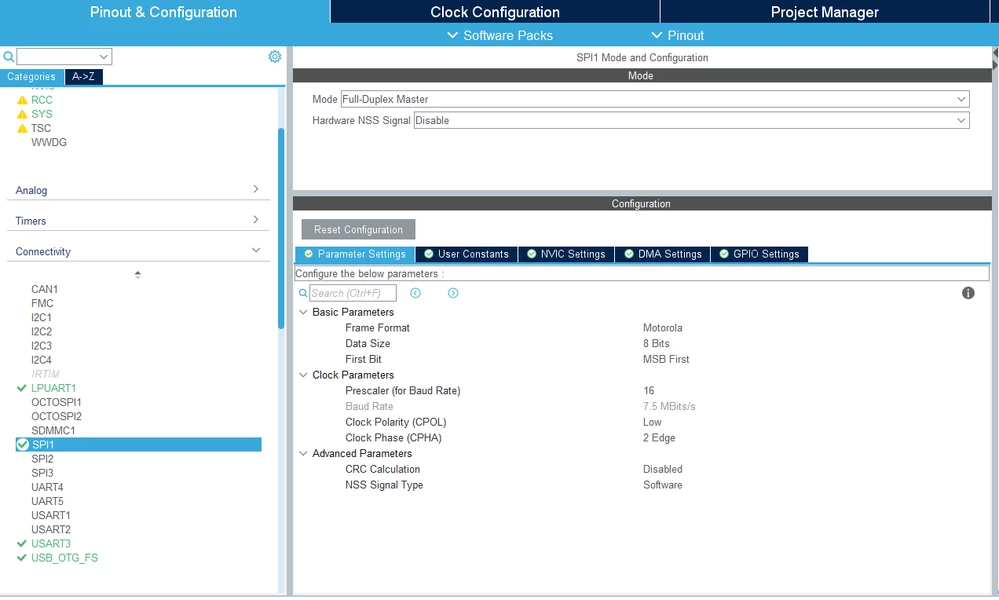
    1. Enabled SPI1 p2.png
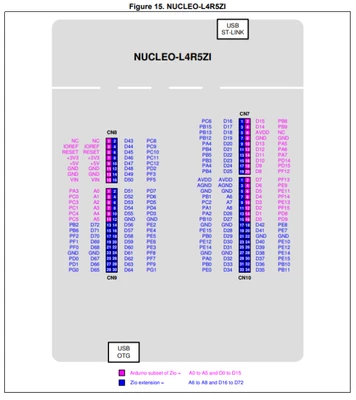
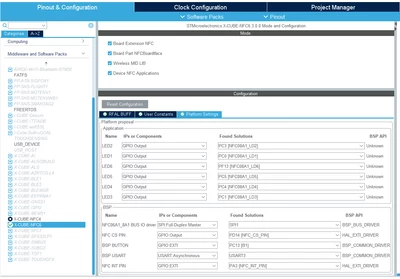
    2. Update the PIN assignment
      CheeSiong_1-1700700632037.png
      CheeSiong_0-1700698878358.pngCheeSiong_1-1700699017488.pngCheeSiong_2-1700699133855.png
    3.  Use the automatic code generation feature to generate the code
      1. the attachment is the .ioc file with the above settings Google Drive link 
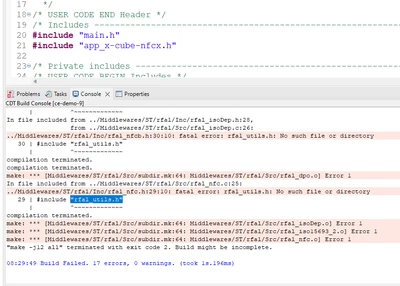
    4. I found that after the code generation didnt generate the "rfal_utils.h" file, the X-CUBE-NFC is version 3.0.0 downloaded in the STM32CubeIDE MCU Embedded Software Packages Manager. So I copy the "rfal_utils.h" file from the ST X-CUBE-NFC6 download linkCheeSiong_3-1700699734597.png


    5.  After copying the "rfal_utils.h" to the project, the project can be built successfully but the demo project not running successfully on the hardware.


    6. I probed the MISO/MOSI PIN with an oscilloscope and found no signal.
  3. This is my project file -> Google Drive link
    Can anyone guide me? I'm a STM32 Beginner and this is my first time using the STM32 dev environment.

This topic has been closed for replies.
Best answer by Brian TIDAL

Hi @CheeSiong 

the rfal_utils.h issue has been already identified internally. A fix will be available in the next release of the X-CUBE-NFC6 package (likely in few days).

I had a look to the project file. The EXTI Line 3 interrupt has not been enabled:

BrianTIDAL_0-1700748790031.png

This is the interrupt used by the ST25R3916B device to signal events. Make sure to enable this interrupt otherwise the system will stay stuck at initialization stage.

Also I would suggest to enable the ST25R_SELFTEST switch in your project to debug the initialization stage and to run the st25r3916Initialize step by step if you still have some issues. 

Rgds

BT

4 replies

Brian TIDAL
Brian TIDALBest answer
Technical Moderator
November 23, 2023

Hi @CheeSiong 

the rfal_utils.h issue has been already identified internally. A fix will be available in the next release of the X-CUBE-NFC6 package (likely in few days).

I had a look to the project file. The EXTI Line 3 interrupt has not been enabled:

BrianTIDAL_0-1700748790031.png

This is the interrupt used by the ST25R3916B device to signal events. Make sure to enable this interrupt otherwise the system will stay stuck at initialization stage.

Also I would suggest to enable the ST25R_SELFTEST switch in your project to debug the initialization stage and to run the st25r3916Initialize step by step if you still have some issues. 

Rgds

BT

In order to give better visibility on the answered topics, please click on Accept as Solution on the reply which solved your issue or answered your question.
CheeSiongAuthor
Associate
November 24, 2023

Thanks, @Brian TIDAL , it works now!
By the way, may I ask how to enable the ST25R_SELFTEST?

Brian TIDAL
Technical Moderator
November 24, 2023

Hi,

Well done!

Regarding your question "By the way, may I ask how to enable the ST25R_SELFTEST?": open the project properties:

BrianTIDAL_0-1700822828927.png

and add the ST25R_SELFTEST in the Define symbols.

Rgds

BT

In order to give better visibility on the answered topics, please click on Accept as Solution on the reply which solved your issue or answered your question.
CheeSiongAuthor
Associate
November 24, 2023

Thanks @Brian TIDAL !