Omar.ABDELMALEK
Associate
October 9, 2024
Solved

Raspberry Pi 3 to the STEVAL-25R3916B issue

  • October 9, 2024
  • 2 replies
  • 1273 views

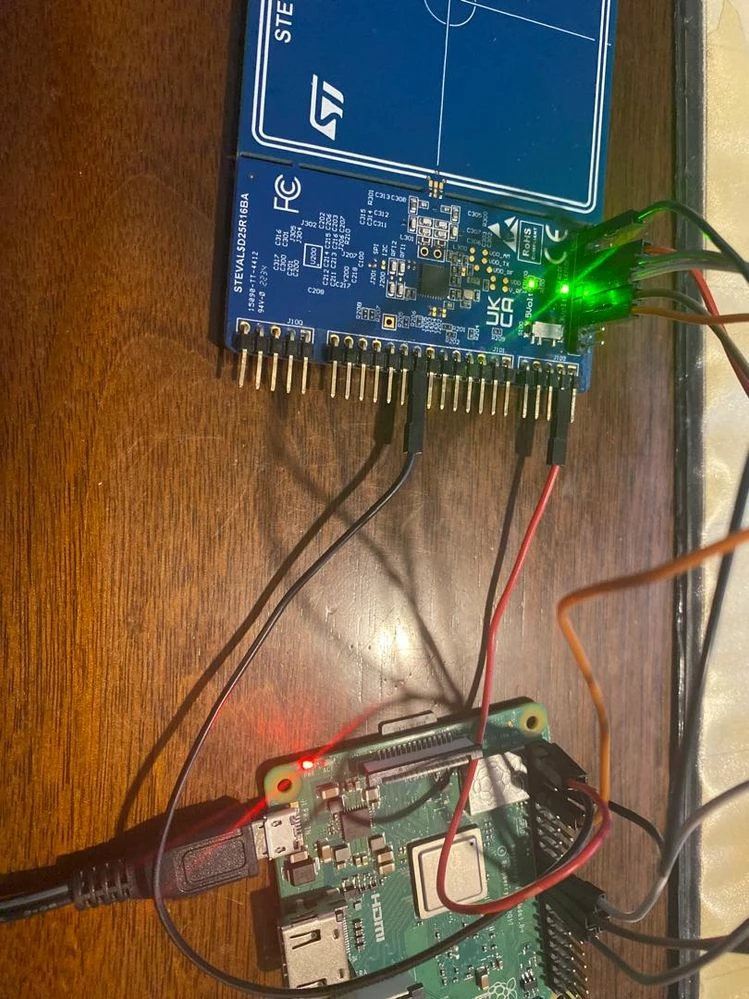
I connected a Raspberry Pi 3 to the ST25R3911B-DISCO and used the Linux driver suggested by ST.


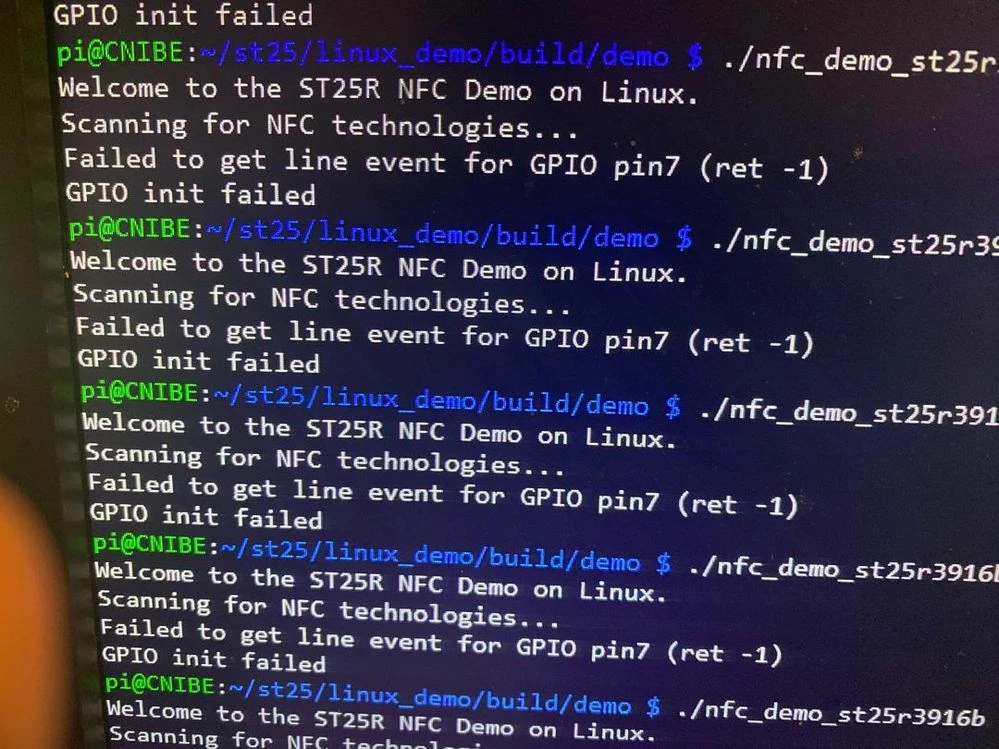
However, I haven't been able to successfully detect the IRQ despite following the setup.


1.jpg2.jpgAny suggestions on troubleshooting this issue?

This topic has been closed for replies.
Best answer by Jasper Preston

Hi,

I have already seen that. It happened with newer Linux kernel and SPI driver that controls by default GPIO8 for SPI0 CS0 and GPIO7 for SPI0 CS1 (e.g modinfo spidev: v5.5.61).
There is a conflict with the ST25R NFC demo that uses ST25R_INT_PIN on GPIO7 as interrupt line between the reader and the microcontroller.

To overcome this, configure the SPI driver to control a different GPIO than GPIO7 for the Chip Select signal.
This can be done with the dtoverlay command.

$ dtoverlay -a ; list all overlay available

$ dtoverlay -h spi0-1cs
Name: spi0-1cs

Info: Only use one CS pin for SPI0

Usage: dtoverlay=spi0-1cs,<param>=<val>

Params: cs0_pin GPIO pin for CS0 (default 8)
 no_miso Don't claim and use the MISO pin (9), freeing
 it for other uses.


Edit the boot configuration to use this overlay, add the following line:

$ sudo /boot/config.txt
dtoverlay=spi0-1cs
$ reboot


The parameter cs0_pin may be needed in case the driver assigns CE0 to another pin.
e.g. dtoverlay spi0-1cs,cs0_pin=6


Inspect the GPIO configuration

See http://wiringpi.com and use their convenient tool to inspect the GPIOs:

See http://wiringpi.com/ and use their convenient tool to inspect the GPIO:
$ gpio readall

 +-----+-----+---------+------+---+---Pi 4B--+---+------+---------+-----+-----+
 | BCM | wPi | Name | Mode | V | Physical | V | Mode | Name | wPi | BCM |
 +-----+-----+---------+------+---+----++----+---+------+---------+-----+-----+
 | | | 3.3v | | | 1 || 2 | | | 5v | | |
 | 2 | 8 | SDA.1 | IN | 1 | 3 || 4 | | | 5v | | |
 | 3 | 9 | SCL.1 | IN | 1 | 5 || 6 | | | 0v | | |
 | 4 | 7 | GPIO. 7 | IN | 1 | 7 || 8 | 1 | IN | TxD | 15 | 14 |
 | | | 0v | | | 9 || 10 | 1 | IN | RxD | 16 | 15 |
 | 17 | 0 | GPIO. 0 | IN | 0 | 11 || 12 | 0 | IN | GPIO. 1 | 1 | 18 |
 | 27 | 2 | GPIO. 2 | IN | 0 | 13 || 14 | | | 0v | | |
 | 22 | 3 | GPIO. 3 | IN | 0 | 15 || 16 | 0 | IN | GPIO. 4 | 4 | 23 |
 | | | 3.3v | | | 17 || 18 | 0 | IN | GPIO. 5 | 5 | 24 |
 | 10 | 12 | MOSI | ALT0 | 0 | 19 || 20 | | | 0v | | |
 | 9 | 13 | MISO | ALT0 | 0 | 21 || 22 | 0 | IN | GPIO. 6 | 6 | 25 |
 | 11 | 14 | SCLK | ALT0 | 0 | 23 || 24 | 1 | OUT | CE0 | 10 | 8 |
 | | | 0v | | | 25 || 26 | 0 | IN | CE1 | 11 | 7 | <= *: Check that 'CE1' GPIO pin 7 shows direction 'IN', to receive interrupt signal
 | 0 | 30 | SDA.0 | IN | 1 | 27 || 28 | 1 | IN | SCL.0 | 31 | 1 |
 | 5 | 21 | GPIO.21 | IN | 1 | 29 || 30 | | | 0v | | |
 | 6 | 22 | GPIO.22 | IN | 1 | 31 || 32 | 0 | IN | GPIO.26 | 26 | 12 |
 | 13 | 23 | GPIO.23 | IN | 0 | 33 || 34 | | | 0v | | |
 | 19 | 24 | GPIO.24 | IN | 0 | 35 || 36 | 0 | IN | GPIO.27 | 27 | 16 |
 | 26 | 25 | GPIO.25 | IN | 0 | 37 || 38 | 0 | IN | GPIO.28 | 28 | 20 |
 | | | 0v | | | 39 || 40 | 1 | IN | GPIO.29 | 29 | 21 |
 +-----+-----+---------+------+---+----++----+---+------+---------+-----+-----+
 | BCM | wPi | Name | Mode | V | Physical | V | Mode | Name | wPi | BCM |
 +-----+-----+---------+------+---+---Pi 4B--+---+------+---------+-----+-----+


*: Check that 'CE1' GPIO pin 7 shows direction 'IN', to receive interrupt signal


Hope this helps.

Br,

Jasper

2 replies

Ulysses HERNIOSUS
Technical Moderator
October 9, 2024

Hi,


well, you are not showing a ST25R3911B-DISCO but a STEVAL-2543916B board. 

The error message you are getting indicates that in your system somebody else uses the GPIO7. This should also happen without the 3916B board connected. I think you need to look on your Linux to see the usage of the different GPIOs.

BR, Ulysses

Omar.ABDELMALEK
Associate
October 9, 2024

i have install new image in my rasp without any other program 

Jasper Preston
Jasper PrestonBest answer
ST Employee
October 9, 2024

Hi,

I have already seen that. It happened with newer Linux kernel and SPI driver that controls by default GPIO8 for SPI0 CS0 and GPIO7 for SPI0 CS1 (e.g modinfo spidev: v5.5.61).
There is a conflict with the ST25R NFC demo that uses ST25R_INT_PIN on GPIO7 as interrupt line between the reader and the microcontroller.

To overcome this, configure the SPI driver to control a different GPIO than GPIO7 for the Chip Select signal.
This can be done with the dtoverlay command.

$ dtoverlay -a ; list all overlay available

$ dtoverlay -h spi0-1cs
Name: spi0-1cs

Info: Only use one CS pin for SPI0

Usage: dtoverlay=spi0-1cs,<param>=<val>

Params: cs0_pin GPIO pin for CS0 (default 8)
 no_miso Don't claim and use the MISO pin (9), freeing
 it for other uses.


Edit the boot configuration to use this overlay, add the following line:

$ sudo /boot/config.txt
dtoverlay=spi0-1cs
$ reboot


The parameter cs0_pin may be needed in case the driver assigns CE0 to another pin.
e.g. dtoverlay spi0-1cs,cs0_pin=6


Inspect the GPIO configuration

See http://wiringpi.com and use their convenient tool to inspect the GPIOs:

See http://wiringpi.com/ and use their convenient tool to inspect the GPIO:
$ gpio readall

 +-----+-----+---------+------+---+---Pi 4B--+---+------+---------+-----+-----+
 | BCM | wPi | Name | Mode | V | Physical | V | Mode | Name | wPi | BCM |
 +-----+-----+---------+------+---+----++----+---+------+---------+-----+-----+
 | | | 3.3v | | | 1 || 2 | | | 5v | | |
 | 2 | 8 | SDA.1 | IN | 1 | 3 || 4 | | | 5v | | |
 | 3 | 9 | SCL.1 | IN | 1 | 5 || 6 | | | 0v | | |
 | 4 | 7 | GPIO. 7 | IN | 1 | 7 || 8 | 1 | IN | TxD | 15 | 14 |
 | | | 0v | | | 9 || 10 | 1 | IN | RxD | 16 | 15 |
 | 17 | 0 | GPIO. 0 | IN | 0 | 11 || 12 | 0 | IN | GPIO. 1 | 1 | 18 |
 | 27 | 2 | GPIO. 2 | IN | 0 | 13 || 14 | | | 0v | | |
 | 22 | 3 | GPIO. 3 | IN | 0 | 15 || 16 | 0 | IN | GPIO. 4 | 4 | 23 |
 | | | 3.3v | | | 17 || 18 | 0 | IN | GPIO. 5 | 5 | 24 |
 | 10 | 12 | MOSI | ALT0 | 0 | 19 || 20 | | | 0v | | |
 | 9 | 13 | MISO | ALT0 | 0 | 21 || 22 | 0 | IN | GPIO. 6 | 6 | 25 |
 | 11 | 14 | SCLK | ALT0 | 0 | 23 || 24 | 1 | OUT | CE0 | 10 | 8 |
 | | | 0v | | | 25 || 26 | 0 | IN | CE1 | 11 | 7 | <= *: Check that 'CE1' GPIO pin 7 shows direction 'IN', to receive interrupt signal
 | 0 | 30 | SDA.0 | IN | 1 | 27 || 28 | 1 | IN | SCL.0 | 31 | 1 |
 | 5 | 21 | GPIO.21 | IN | 1 | 29 || 30 | | | 0v | | |
 | 6 | 22 | GPIO.22 | IN | 1 | 31 || 32 | 0 | IN | GPIO.26 | 26 | 12 |
 | 13 | 23 | GPIO.23 | IN | 0 | 33 || 34 | | | 0v | | |
 | 19 | 24 | GPIO.24 | IN | 0 | 35 || 36 | 0 | IN | GPIO.27 | 27 | 16 |
 | 26 | 25 | GPIO.25 | IN | 0 | 37 || 38 | 0 | IN | GPIO.28 | 28 | 20 |
 | | | 0v | | | 39 || 40 | 1 | IN | GPIO.29 | 29 | 21 |
 +-----+-----+---------+------+---+----++----+---+------+---------+-----+-----+
 | BCM | wPi | Name | Mode | V | Physical | V | Mode | Name | wPi | BCM |
 +-----+-----+---------+------+---+---Pi 4B--+---+------+---------+-----+-----+


*: Check that 'CE1' GPIO pin 7 shows direction 'IN', to receive interrupt signal


Hope this helps.

Br,

Jasper