
Schuyler
Associate III
March 17, 2023
Solved

unable to read NDEF information in STSW-ST25001 APP

  • March 17, 2023
  • 9 replies
  • 2959 views

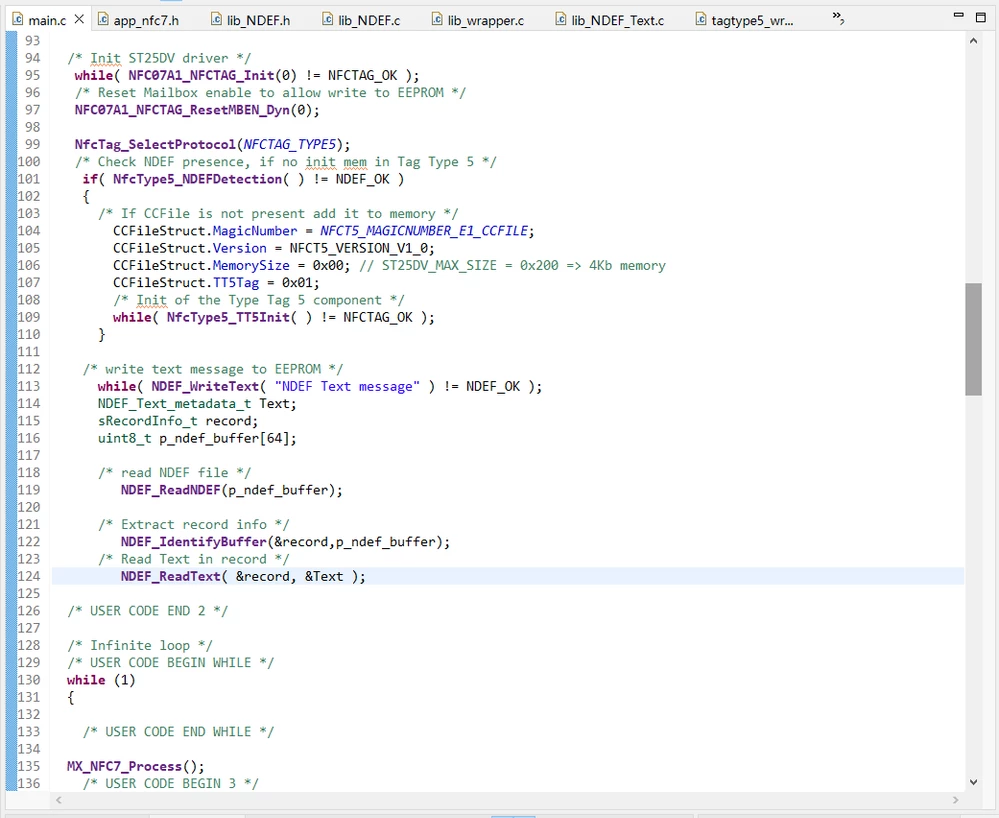
Why am I unable to read NDEF information in the STSW-ST25001 APP using the following code, with no messages being displayed?

0693W00000aJA08QAG.png

This topic has been closed for replies.
Best answer by Brian TIDAL

Hi,

see § 1.2 Board setup in the UM2960 (Getting started with the X-NUCLEO-NFC07A1 NFC/RFID tag IC expansion board based on ST25DV64KC for STM32 Nucleo). Make sure the ST1 connector is in place on the 3.3V position. If you do not have a jumper, just put a wire between the middle pin and the 3.3V pin of the ST1 connector.

Without this jumper, the ST25DV device is not powered and the I2C communication is impossible.

Feel free to click on select as best if this solves your issue.

Thanks

Rgds

BT

9 replies

Brian TIDAL
Technical Moderator
March 20, 2023

Hi,

what is the content of the tag memory? Would you please provide a dump of the tag memory?

Rgds

BT

In order to give better visibility on the answered topics, please click on Accept as Solution on the reply which solved your issue or answered your question.
Schuyler
SchuylerAuthor
Associate III
March 20, 2023

Hello,Mr.TIDAL

.I'm using NUCLEO-L476RG and X-NUCLEO-NFC07A1, Write text information into NDEF

Brian TIDAL
Technical Moderator
March 20, 2023

Hi,

would you please dump the content of the tag memory using the ST25 NFC tap app?

Rgs

BT

In order to give better visibility on the answered topics, please click on Accept as Solution on the reply which solved your issue or answered your question.
Schuyler
SchuylerAuthor
Associate III
March 20, 2023

yes, I used app named STSW-ST25001,Here are the links:STSW-ST25001 - Application executable of the "NFC Tap" Android app for ST25 product family - STMicroelectronics. But I did not implement the app to read NDEF messages with the above code, What should I do?

Brian TIDAL
Technical Moderator
March 21, 2023

Hi,

my previous message was just a suggestion to check that the tag memory contains the expected NDEF data and thus to dump the tag memory with the android app.

Rgds

BT

In order to give better visibility on the answered topics, please click on Accept as Solution on the reply which solved your issue or answered your question.
Schuyler
SchuylerAuthor
Associate III
March 22, 2023

HI,

As you can see, I need to write NDEF data to the STM32 CUBE IDE by NUCLEO-L476RG, Instead of writing through an application. I wrote the code above  in order to write the message, but  ST25 NFC tap app have not a single NDEF message, Please help me check whether the above code is correct and achieves the functions

Brian TIDAL
Technical Moderator
March 22, 2023

Hi,

a working example of NDEF writing is provided in X-CUBE-NFC7: NDEF_URI. I would suggest to first compile and run this example and then read the NDEF with the NFC tap app. Once this is working, just modify the MX_NFC7_NDEF_URI_Init function to write your own NDEF.

Rgds

BT

In order to give better visibility on the answered topics, please click on Accept as Solution on the reply which solved your issue or answered your question.
Schuyler
SchuylerAuthor
Associate III
March 29, 2023

Hi,

​I compile and run this example and then read the NDEF with the NFC tap app.But is not working, the tap does not have any information

Brian TIDAL
Brian TIDALBest answer
Technical Moderator
March 29, 2023

Hi,

see § 1.2 Board setup in the UM2960 (Getting started with the X-NUCLEO-NFC07A1 NFC/RFID tag IC expansion board based on ST25DV64KC for STM32 Nucleo). Make sure the ST1 connector is in place on the 3.3V position. If you do not have a jumper, just put a wire between the middle pin and the 3.3V pin of the ST1 connector.

Without this jumper, the ST25DV device is not powered and the I2C communication is impossible.

Feel free to click on select as best if this solves your issue.

Thanks

Rgds

BT

In order to give better visibility on the answered topics, please click on Accept as Solution on the reply which solved your issue or answered your question.