

B.Montanari
ST Employee
May 22, 2023

How to jump to system bootloader from application code on STM32 microcontrollers

  • May 22, 2023
  • 84 replies
  • 132226 views

Introduction

There are many possible ways to access the System Bootloader in STM32 devices and, in this tutorial, we will cover how to easily perform this jump directly from application code for all our families and product series, except for the STM32F0 and some STM32L0 that have an empty check mechanism in place.
To achieve this goal, we highly recommend following two main sources of documentation to ensure an easy and successful jump. Both the microcontroller’s Reference Manual and the Application Note AN2606 contain bootloader details, such as important addresses, supported peripherals and specific requirements to keep in mind when using the STM32 devices Custom or System Bootloader. In the app note it is possible to see the note explaining the effect of the empty check for the mentioned series:

496.png
This article will not cover the workaround of erasing the first page, but the code will have all STM32s addresses in it to facilitate the implementation, in case the reader wants to use it. We do suggest reading this article that explains how to execute code from SRAM.

I'd also like to appreciate the fantastic contribution from @Ahmet Yasin CİVAN in the post STM32H745XI: Software Jump to System Bootloader Without BOOT0/Option Bytes – Has Anyone Succeeded? , as this address a particular problem related to the STM32H745 series. 
Assuming you are using a series that allow you to make the jump from the application into system memory, we need to be aware of some important and necessary steps to be performed and some notes to keep in mind.

1. How to find System Memory / Bootloader Start Address value:

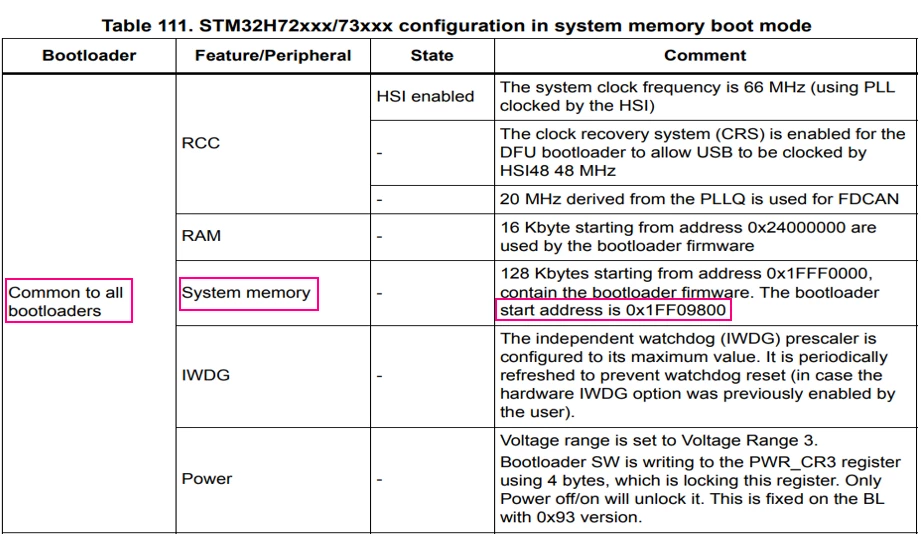
Refer to AN2606 “Configuration in System Memory Boot Mode” tables. Each device will have a specific System Memory/Bootloader address, and this value must be known to jump to bootloader correctly.
For example, for the STM32H723ZG microcontroller (a quick article showing the code for this series is available here), the Bootloader doesn’t start from the same address as the System Memory, but this is clearly defined in Table 111.
497.png

1.2. Disable, deinit and clear all peripherals your application has configured:

Including Clock Structure, Systick timer, ISR, Peripheral initializations and GPIO, every peripheral settings must be set to their default states to avoid interruptions when system is in boot mode. That’s why it is of the most importance to deinit all these functions and prevent an interruption to happen without a proper handler.

1.3. Re-enable Interrupts:

With the registers cleared, the interrupts can be re-enabled without compromising the application while in Bootloader.
 

1.4. Set the Bootloader Reset Handler address:

Bootloader Reset Handler address = Bootloader address + 4 bytes offset.

1.5. Set the Main Stack Pointer (MSP) to the values stored at the Bootloader stack.

1.6. Call a function pointing to the system bootloader to start execution.


Obs.: If your project uses watchdogs (IWDG and or WWDG), set the time base to the higher value possible to avoid a reset from it while in Boot Mode.

2. Development


Considering all the topics mentioned above, there is defined below a general code where you can simply set the MCU used in your application according to the list in the “enum” structure and the function is ready to be used in your project.
This code works by lighting one of the available User LEDs in the NUCLEO-H723ZG board, and then entering in system bootloader mode by calling the JumpToBootloader function.
Please be aware that all the different parts of code are specifically written between /*USER CODE BEGIN*/ regions so the code will not be erased when regenerating the project *.ioc file.
 

/* Private define ------------------------------------------------------------*/
/* USER CODE BEGIN PD */
/* Set the enumeration of the STM32 Microcontrollers Series*/
enum{C0, F030x8, F030xC, F03xx, F05, F07, F09, F10xx, F105, F107, F10XL, F2, F3, F4, F7, G0, G4, H503, H563, H573, H7x, H7A, H7B, L0, L1, L4, L5, WBA, WBX, WL, U5};

#define MCU			H7x		//Define here the MCU being used
/* USER CODE END PD */
/* USER CODE BEGIN PFP */
void JumpToBootloader(void);
/* USER CODE END PFP */
/* Infinite loop */
	/* USER CODE BEGIN WHILE */
	while (1)
	{
		HAL_GPIO_TogglePin(LED_GREEN_GPIO_Port, LED_GREEN_Pin);
		HAL_Delay(1000);

		JumpToBootloader();

		/* USER CODE END WHILE */
		/* USER CODE BEGIN 3 */
	}
	/* USER CODE END 3 */
/* USER CODE BEGIN 4 */

void JumpToBootloader (void)
{
uint32_t i=0;
void (*SysMemBootJump)(void);


/* Set a vector addressed with STM32 Microcontrollers names */
/* Each vector position contains an address to the boot loader entry point */

	volatile uint32_t BootAddr[33];

	BootAddr[C0] = 0x1FFF0000;
	BootAddr[F030x8] = 0x1FFFEC00;
	BootAddr[F030xC] = 0x1FFFD800;
	BootAddr[F03xx] = 0x1FFFEC00;
	BootAddr[F05] = 0x1FFFEC00;
	BootAddr[F07] = 0x1FFFC800;
	BootAddr[F09] = 0x1FFFD800;
	BootAddr[F10xx] = 0x1FFFF000;
	BootAddr[F105] = 0x1FFFB000;
	BootAddr[F107] = 0x1FFFB000;
	BootAddr[F10XL] = 0x1FFFE000;
	BootAddr[F2] = 0x1FFF0000;
	BootAddr[F3] = 0x1FFFD800;
	BootAddr[F4] = 0x1FFF0000;
	BootAddr[F7] = 0x1FF00000;
	BootAddr[G0] = 0x1FFF0000;
	BootAddr[G4] = 0x1FFF0000;
	BootAddr[H503] = 0x0BF87000;
	BootAddr[H563] = 0x0BF97000;
	BootAddr[H573] = 0x0BF97000;
	BootAddr[H7x] = 0x1FF09800;
	BootAddr[H7A] = 0x1FF0A800;
	BootAddr[H7B] = 0x1FF0A000;
	BootAddr[L0] = 0x1FF00000;
	BootAddr[L1] = 0x1FF00000;
	BootAddr[L4] = 0x1FFF0000;
	BootAddr[L5] = 0x0BF90000;
	BootAddr[WBA] = 0x0BF88000;
	BootAddr[WBX] = 0x1FFF0000;
	BootAddr[WL] = 0x1FFF0000;
	BootAddr[U5] = 0x0BF90000;

	/* Disable all interrupts */
	__disable_irq();

	/* Disable Systick timer */
	SysTick->CTRL = 0;

	/* Set the clock to the default state */
	HAL_RCC_DeInit();

	/* Clear Interrupt Enable Register & Interrupt Pending Register */
	for (i=0;i<5;i++)
	{
		NVIC->ICER[i]=0xFFFFFFFF;
		NVIC->ICPR[i]=0xFFFFFFFF;
	}

	/* Re-enable all interrupts */
	__enable_irq();

	/* Set up the jump to boot loader address + 4 */
	SysMemBootJump = (void (*)(void)) (*((uint32_t *) ((BootAddr[MCU] + 4))));

	/* Set the main stack pointer to the boot loader stack */
	__set_MSP(*(uint32_t *)BootAddr[MCU]);

	/* Call the function to jump to boot loader location */
	SysMemBootJump();

	/* Jump is done successfully */
	while (1)
	{
		/* Code should never reach this loop */
	}
}

/* USER CODE END 4 */


There are different useful ways to test if the code worked successfully, two of them are explained below.
 

2.1. STM32CubeIDE debugging tab.

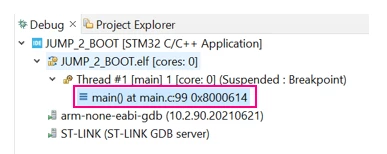
You can check whether the PC is set to the Flash or Boot address in the debug tab on the top left corner of the debug perspective. At first, the PC starts in Flash address: 0x08000614 (for this particular demo).
498.png
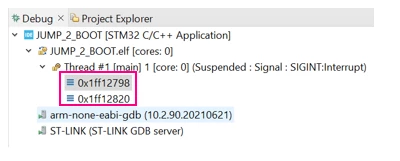
After entering the Bootloader, the PC is now set to an address inside the Boot region: 0x1FF127BC. You can see the tab below after hitting “pause” button.
499.png
 

2.2. STM32CubeProgrammer Tool


Once within the Bootloader region, we can use the STM32CubeProg to guarantee that the system is working in system boot mode.
For this tutorial, we will use the USB entry point to perform this, but other interfaces available for the given series could be used as well. Just keep in mind that the USB has higher priority than the others, so if the cable is connected it will be the one selected. The AN2606 covers all of this peripherals and needed settings for all series.
Obs.: Please pay attention to the pins specified in the AN2606, because even if the STM32CubeIDE allows the pin reallocation, to enter in bootloader the pins must be the same as in the Application Note.
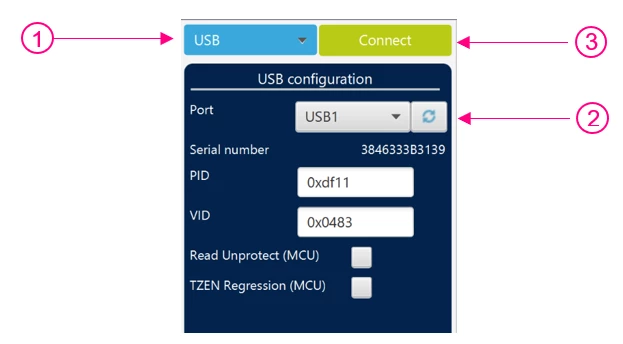
To execute this over USB, connect the USB cable on the User USB connector. After that:


- In the right corner, select USB instead of ST-LINK
- Refresh the Port to recognize the USB
- Hit “Connect”

501.png
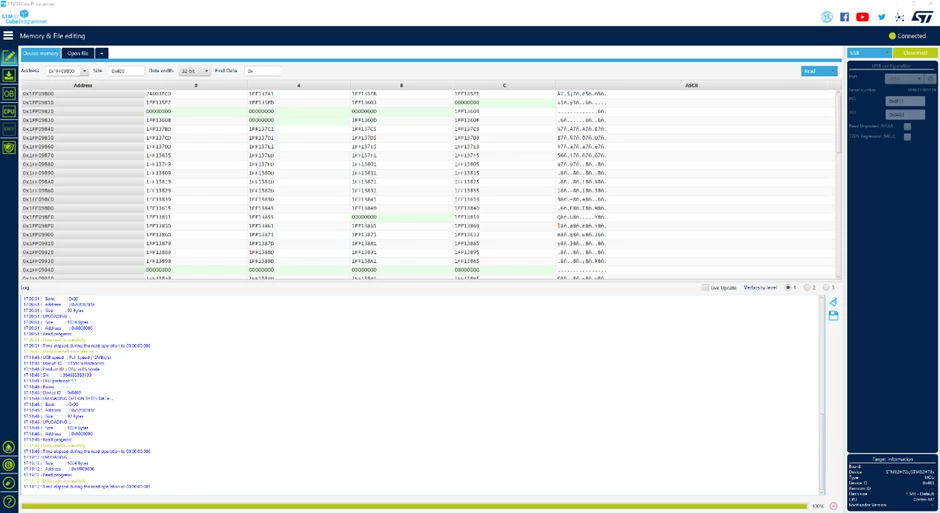
After connecting,  search for the Bootloader start address and you will see something similar to the following image.
505.png
You have now successfully jumped to bootloader from the application. Well done!
Hope this article was helpful.
 

84 replies

EThom.3
Senior II
January 3, 2025

@MM..1 

In my case, it doesn't seem to jump back from the bootloader.

But the functionality you describe sounds super sketchy! Erasing the first sector before actually beginning the download is not an option for me.

Explorer
January 21, 2025

Thanks so much for all this, but even though I went through all the comments, I still can't seem to get this to work on a STM32U575.  I do seem to jump in the bootloader (using bootloader address 0x0BF90000 as per the AN2606), but instead of staying in the bootloader and starting DFU, it just goes on to restart the application right away.

What am I missing?

#define BOOTLOADER_ADDRESS 0x0BF90000

void jump_to_bootloader(void) {
 uint32_t i = 0;
 void (*SysMemBootJump)(void);

 /* Disable all interrupts */
 __disable_irq();

 /* Disable Systick timer */
 SysTick->CTRL = 0;

 /* Set the clock to the default state */
 HAL_RCC_DeInit();

 /* Clear Interrupt Enable Register & Interrupt Pending Register */
 for (i = 0; i < 5; i++) {
 NVIC->ICER[i] = 0xFFFFFFFF;
 NVIC->ICPR[i] = 0xFFFFFFFF;
 }

 /* Re-enable all interrupts */
 __enable_irq();

 volatile uint32_t BootAddr = BOOTLOADER_ADDRESS;
 /* Set up the jump to boot loader address + 4 */
 SysMemBootJump = (void (*)(void))(*((uint32_t *)((BootAddr + 4))));

 /* Set the main stack pointer to the boot loader stack */
 __set_MSP(*(uint32_t *)BootAddr);

 /* Call the function to jump to boot loader location */
 SysMemBootJump();

 /* Jump is done successfully */
 while (1) {
 /* Code should never reach this loop */
 }
}


EThom.3
Senior II
January 26, 2025

@unknown 

The built-in bootloader is its own piece of firmware, not designed to depend on your application. For instance, if you use the BOOT hardware pin(s), the microcontroller will start the bootloader for you, no matter if there is a user application or not.

My guess is, that the built-in bootloader "assumes" that all necessary registers are in their reset states when it starts. When you initialize USB CDC before you invoke the bootloader, this is no longer the case. It may very well make something in the built-in bootloader fail.

In the STM32L433, I managed to get it working by resetting the USB port before starting the bootloader. If I didn't, the bootloader wouldn't work, as the USB port was running in CDC mode in my application.

In the STM32G473, I haven't succeeded getting the built-in bootloader to work yet, even when invoking it right after MCU reset. I've read a rumour, that if there seems to be an application at flash address 0x08000000, the bootloader immediately exits. However, I haven't been able to confirm this yet. Also, it seems like a really useless "feature".

Instead of relying on the built-in bootloader for the G473, I've written my own. I had to do this anyway, since, in my case, the STM32CubeProgrammer normally cannot communicate directly with the board. Writing my own bootloader turned out to be surprisingly non-difficult.

Gonza
Explorer II
February 6, 2025

Hello everyone here

Thanks @m4l490n for your suggestion. It works fine here, but I have exactly the same problem as @AWack . After entering the bootloader and flashing the new application, the bootloader CAN NOT jump again to the new application code. It kind of dies (no more response from the bootloader to ANY command). I think something is crashing after issuing the Go command (to application address 0x8000000).

Doing a power reset, the new application starts fine. But that is not possible for this project, the STM32 should start running again without a power reset.

Do you have any idea of why this could be happening? It seems that entering the bootloader right after the main() starts makes de Go Command fail. Like if the Go Command needed something configured before making the jump to the bootloader.


Gonza
Explorer II
February 12, 2025

Ok, I will leave this here in case someone needs it.

I didn't have problems entering the bootloader. The function is similar to what @gbm posted but with I additionally mapped the bootloader memory and set the CONTROL register to use the MSP. With those two changes, it worked fine.

The real problem was returning from the bootloader. When jumping to my application back (with the GO command addressed to 0x08000000) it always failed. It was like the bootloader was giving the application control in a weird state that ended up hanging everything.

To resolve this I created a second vector table located at 0x08000200. That second vector table only contains the stack pointer address and the reset handler. The stack pointer address is the same as the original vector table, but the reset handler just calls NVIC_SystemReset(). It doesn't do anything else. Just force a reboot. 

This way, when I want to return to my application, I just send a GO command to the bootloader with the address of the new vector table at 0x08000200. That ends up calling the new "reset handler" that ends up calling NVIC_SystemReset(). That reboots the microcontroller and forces the application to run again in a fresh state.

Now I can even flash an empty microcontroller and make it run the application without doing any power cycle.

If anyone is interested I can post this on github.


m4l490n
Associate III
February 13, 2025

@Gonza 

I'm interested.

My solution works well if you can perform a power cycle, which would be the case with a USB device. But I would also like to be able to make the system go from the bootloader to the normal application with the go command (STM32_Programmer_CLI -c port=USB1 -g). When I execute that command, the MCU gets out of DFU but the main application doesn't start. I have to perform a power cycle.

Please provide the code for what you are talking about in your post. That will be much appreciated. Thanks!

Gonza
Explorer II
February 13, 2025

@m4l490n 

I've created a guide as a GitHub Gist to make it easier to share. Any feedback is greatly appreciated.

Link: How to Jump to the STM32 Bootloader and Return to the Application 

Gonza
Explorer II
February 13, 2025

@m4l490nJust a heads-up, I'm using FreeRTOS as well. I have a high-priority task (blocked by a semaphore) that calls JumpToBooloader(). Initially, the jump to the bootloader didn't work when executed from a Task. However, after modifying the CONTROL register, it started working as expected.

It turns out that FreeRTOS tasks run in Thread Mode, which uses the Process Stack Pointer (PSP). The bootloader, on the other hand, uses the Main Stack Pointer (MSP). So, to successfully jump to the bootloader, it's mandatory to switch to the MSP by updating the CONTROL register before performing the jump.


m4l490n
Associate III
February 13, 2025

@Gonza

Your code is working well for me, and I'm calling JumpToBootloader directly from a FreeRTOS task. I don't know if that would be because I only have one task running or what but I don't see any issues calling JumpToBootloader from a task.

m4l490n
Associate III
February 13, 2025

@Gonza 

Your GitHub code pointed me in the right direction and I tried the following.

Instead of creating a new fake vector table, as you describe, I just looked at my device's .map file to figure out the Reset_Handler address and then I used that one to jump in the GO command instead of 0x08000000. The complete command is the following:

STM32_Programmer_CLI -c port=USB1 -g 0x0800d560

where: 0x0800d560 is the address where the Reset_Handler is for my device (STM32WB5MMG)


And voila!! It jumps right into the application without any other changes!