
Associate
July 22, 2025
Question

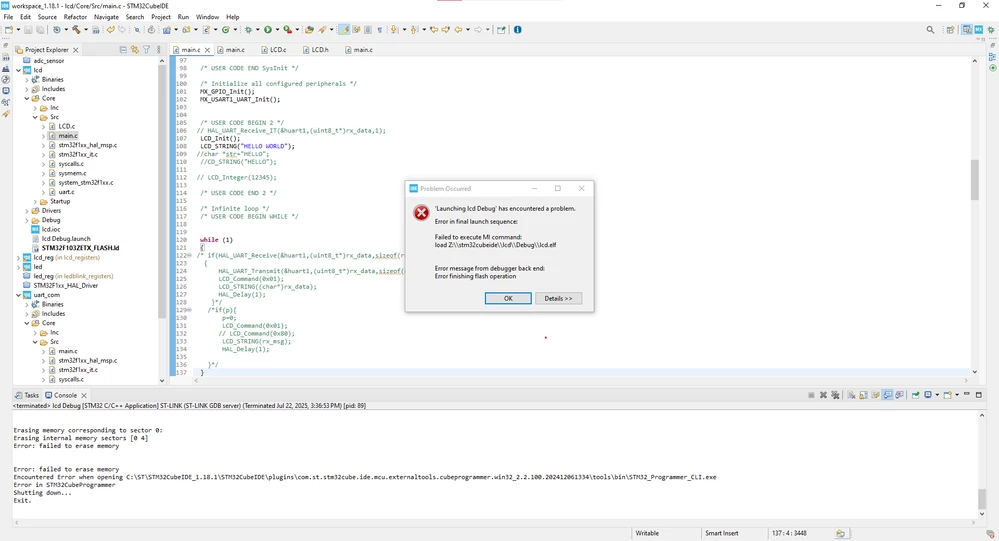
Code works in another board, but not in my custom board.

  • July 22, 2025
  • 4 replies
  • 466 views

Original title: Facing a debug issue. the code works in another board and gets firmware update. but its not working in my current stm32f103zet6 customized board.

Shortened in accordance with Posting Guidelines .

stm32f103zet6.png

4 replies

anuradhaAuthor
Associate
July 22, 2025

and i checked in st link utility ,the firmware is upgrading but in stm32cubeprogrammer its not even connecting when i try to upgrade it its started upgrading at the end its saying the st link connection is lost ..whyy??


Andrew Neil
Super User
July 22, 2025

Welcome to the forum.

Please see How to write your question to maximize your chances to find a solution  for best results.


@anuradha wrote:

 the code works in another board


Please give details of this board.


@anuradha wrote:

but its not working in my current stm32f103zet6 customized board.


And also details of this board - schematics, etc.


@anuradha wrote:

i checked in st link utility ,


Note that the ST-Link utility is long obsolete - STM32CubeProgrammer is the current tool.


@anuradha wrote:

in stm32cubeprogrammer its not even connecting when i try to upgrade it its started upgrading at the end its saying the st link connection is lost


Is this with the original board, or the "custom" board?

What CubeProgrammer version?

What ST-Link are you using? Is it a genuine ST-Link?

See: How to recognize a genuine ST-LINK/V2 versus a cloned one.

Please show the full log from CubeProgrammer; also a screenshot.


A complex system that works is invariably found to have evolved from a simple system that worked.A complex system designed from scratch never works and cannot be patched up to make it work.
anuradhaAuthor
Associate
July 22, 2025

It worked after erasing full chip. But i have a question In my stm32cube programmer whenever i connect my target board its showing the only message like "Ur connection mode is defined with HWrst reset mode .Iam using 2.20.0 stm32cube programmmer version

I put mode: under reset

reset mode: hardware reset 

and if i click option bytes option also its still sending the same message....


Andrew Neil
Super User
July 22, 2025

@anuradha wrote:

 message like "Ur connection mode is defined with HWrst reset mode....


Please show the actual message.

And a screenshot showing your settings.

You still haven't given any details of the boards you're using.

 How to write your question to maximize your chances to find a solution 

A complex system that works is invariably found to have evolved from a simple system that worked.A complex system designed from scratch never works and cannot be patched up to make it work.
anuradhaAuthor
Associate
July 22, 2025

I am using stm32f103zet6 board.

Not only this every board i connected its showing same message.


cube.png

Tesla DeLorean
Guru
July 22, 2025

Show picture of board and ST-LINK.

Show picture of STM32103ZET6 IC that's problematic, large, clear and in-focus if you can manage that.

Details so far suggest you are working with fake/counterfeit parts.

Tips, Buy me a coffee, or three.. PayPal VenmoUp vote any posts that you find helpful, it shows what's working..