Associate
June 11, 2025
Solved

Configuring CAN Drivers to the STM32L4R9I-EVAL board

  • June 11, 2025
  • 2 replies
  • 453 views

As I tried to find CAN drivers for " STM32L4R9I-EVAL" but I didn't find any, And I tried configuring CAN example of Stm32L476G-Eval board but it is not working.

Anyone who worked on CAN (Protocol )configuring on STM32L4R9I-EVAL board please Guide me in this
Best answer by mƎALLEm

Hello @sonic_solutions and welcome to the ST community,

Attached a preliminary configuration of CAN1 on STM32L4R9I-EVAL board: PB8 and PB9 are used for CAN communication.

But from hardware standpoint, you need to ensure: 

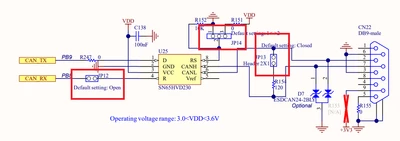
JP12 & JP13: fitted.

JP14 fitted in position 1-2:

mALLEm_0-1749630416433.png

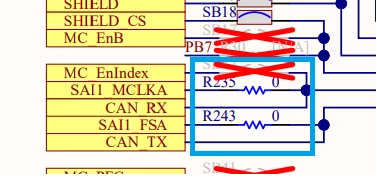
Remove R235 and R243:

mALLEm_1-1749630476114.png

You need to connect another CAN node to the board that has a 120ohm terminating resistor connected on it.

Hope that helps.


2 replies

mƎALLEm
mƎALLEmBest answer
Technical Moderator
June 11, 2025

Hello @sonic_solutions and welcome to the ST community,

Attached a preliminary configuration of CAN1 on STM32L4R9I-EVAL board: PB8 and PB9 are used for CAN communication.

But from hardware standpoint, you need to ensure: 

JP12 & JP13: fitted.

JP14 fitted in position 1-2:

mALLEm_0-1749630416433.png

Remove R235 and R243:

mALLEm_1-1749630476114.png

You need to connect another CAN node to the board that has a 120ohm terminating resistor connected on it.

Hope that helps.


"To give better visibility on the answered topics, please click on ""Accept as Solution"" on the reply which solved your issue or answered your question."
Associate
June 11, 2025

Thank you very much for the solution. However, I’m still unclear about the core point.

My main concern is that I need CAN files such that, when the code is flashed onto the STM32L4R9I-EVAL board, it should behave in the following way: upon receiving a CAN message, the board should either print a response or perform an action in response to that message.

Could you please help me with this

mƎALLEm
Technical Moderator
June 11, 2025

Please follow the new discussion in this post.

Thank you

"To give better visibility on the answered topics, please click on ""Accept as Solution"" on the reply which solved your issue or answered your question."
mƎALLEm
Technical Moderator
June 11, 2025

The new question moved to this post.

"To give better visibility on the answered topics, please click on ""Accept as Solution"" on the reply which solved your issue or answered your question."