
Associate
May 26, 2025
Question

fail to recognize nucleo board in cube programmer

  • May 26, 2025
  • 2 replies
  • 405 views

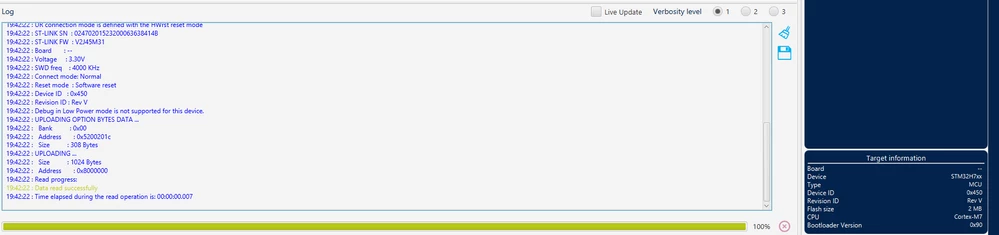
I have a nucleo H743ZI board and connect to cube programmer, the programmer can only recoginze it is a H7 based MCU but not a nucleo. If i plug in a F103RB and H745ZI (both are nucleo), the programmer can see it is a nucleo board.
is there any way to solve or my H743 is cooked.Screenshot 2025-05-26 194229.pngScreenshot 2025-05-26 194816.png
2 replies

mƎALLEm
Technical Moderator
May 26, 2025

Hello @6969Jan6969 and welcome to the ST community,

The question is not clear. 

According to the screenshot you shared, NUCLEO-H743 is detected and the data is read.

Could you please clarify?

"To give better visibility on the answered topics, please click on ""Accept as Solution"" on the reply which solved your issue or answered your question."
Associate
May 26, 2025

in first photo,cube programmer detects it is H7xx board, in the second photo the programmer stated the board name is nucleo-H745ZI-Q, where this is not happening when nucleo H743ZI is connected. May I ask how to fix it? this problem also happens in simulink.

mƎALLEm
Technical Moderator
May 26, 2025

Hello,

Agree with @Mike_ST statement.

As soon as the connection is established and you can flash your MCU there is no issue. 


"To give better visibility on the answered topics, please click on ""Accept as Solution"" on the reply which solved your issue or answered your question."
Mike_ST
Technical Moderator
May 26, 2025

Hello,

Please don't worry about the NUCLEO-H743, it is an older board, and at the time is was designed, the identification mechanism was not implemented.

You board is fully functionnal whithout it.


TDK
Super User
May 26, 2025

The identification mechanism works here. MB1364C, same rev as the OP, same bootloader. Not sure what else would be different.

TDK_0-1748299246973.png


Agree it's not worth thinking about provided everything else is working okay.

"If you feel a post has answered your question, please click ""Accept as Solution""."
