Associate
November 27, 2024
Solved

Failed to program STM32H743ZI2 board and Debug terminal also get hang with USB isolatorfrom Linear technology

  • November 27, 2024
  • 3 replies
  • 1061 views

I expected to connect my PC to a nucleo STM32H743ZI2 board via a USB isolator (Linear technology) but failed.

While, I can connect to the nucleo board directly without isolator and programme it.

Beside, the PC can recognize the STLink from nucleo board correctly, which means the device can be found in the 'Device Manager'.

Using zephyr openOCD for flashing the code but getting below error

Error: libusb_open() failed with LIBUSB_ERROR_NOT_SUPPORTED
Error: read version failed
in procedure 'init'

I also tried with IAR IDE but not getting code flash and also debug default terminal is also hang after some time


I'm wondering what's wrong, anyone can help?

Many thanks​

Best answer by Andrew Neil

@mƎALLEm wrote:

Is this what you are using?: https://www.analog.com/media/en/technical-documentation/user-guides/dc2092a_ltp2884fa.pdf


@DhirajThakur If so, pay attention to:

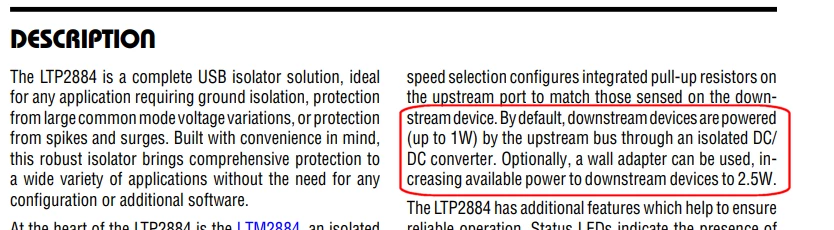
AndrewNeil_0-1732718754296.png

Are you sure that you have sufficient power for your Target?

3 replies

Andrew Neil
Super User
November 27, 2024

@DhirajThakur wrote:

I expected to connect my PC to a nucleo STM32H743ZI2 board via a USB isolator (Linear technology) but failed.

While, I can connect to the nucleo board directly without isolator and programme it.​


Which does suggest that the isolator is the problem.

Do any other USB devices work via this isolator?


@DhirajThakur wrote:

Beside, the PC can recognize the STLink from nucleo board correctly, which means the device can be found in the 'Device Manager'.​


Is that with or without the Isolator?


@DhirajThakur wrote:

Using zephyr openOCD for flashing the code but getting below error


Is that with or without the Isolator?

What about with STM32 CubeIDE and/or CubeProgrammer ?


@DhirajThakur wrote:

I also tried with IAR IDE but not getting code flash ​


Again, is that with or without the Isolator?


A complex system that works is invariably found to have evolved from a simple system that worked.A complex system designed from scratch never works and cannot be patched up to make it work.
mƎALLEm
Technical Moderator
November 27, 2024

Hello @DhirajThakur and welcome to the community,

Indeed you need to check that "USB isolator" first .. Try it with other USB devices ..

Is this what you are using?: https://www.analog.com/media/en/technical-documentation/user-guides/dc2092a_ltp2884fa.pdf

"To give better visibility on the answered topics, please click on ""Accept as Solution"" on the reply which solved your issue or answered your question."
Andrew Neil
Andrew NeilBest answer
Super User
November 27, 2024

@mƎALLEm wrote:

Is this what you are using?: https://www.analog.com/media/en/technical-documentation/user-guides/dc2092a_ltp2884fa.pdf


@DhirajThakur If so, pay attention to:

AndrewNeil_0-1732718754296.png

Are you sure that you have sufficient power for your Target?

A complex system that works is invariably found to have evolved from a simple system that worked.A complex system designed from scratch never works and cannot be patched up to make it work.
mƎALLEm
Technical Moderator
November 27, 2024

+ If so,

Check ILIM LED.

SofLit_0-1732719313436.png

Did you connect an auxiliary power supply (12V) to increase the power?

SofLit_1-1732719434261.png


"To give better visibility on the answered topics, please click on ""Accept as Solution"" on the reply which solved your issue or answered your question."