
May 26, 2025
Solved

Getting started working with STMCude IDE and use C++ for my Nucleo board

  • May 26, 2025
  • 5 replies
  • 910 views

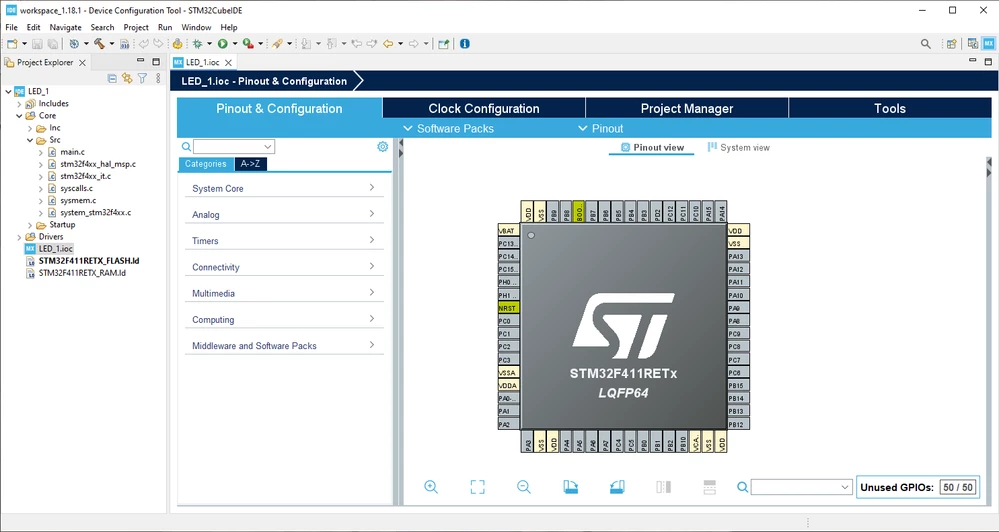
Installed STM32Cubde IDE on my machine and selected my board.
1.PNG

I was expecting some of the pins/peripherals are set by default but as shown in the screenshot they are not.
How to fix this issue please?
Best answer by TDK

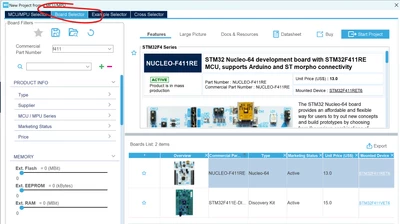
Use the Board Selector, not the MCU Selector.

TDK_0-1748299838962.png


You can use either one, but if you want peripherals auto-initialized, you have to use the board selector and select the board you have.

5 replies

STTwo-32
Technical Moderator
May 26, 2025

Hello @unknown and welcome to the ST Community.

I think you didn't click on the "Yes" button on the Initialize all peripherals with their default Mode message after clicking on the finish button.

Best Regards.

STTwo-32

May 26, 2025

Hello @STTwo-32  and thanks.
I guess I clicked on that button but since it's my first working project I may have got wrong. 

Is there any solution to fix that issue now or should I delete that project and create a new stm32 project from scratch please?

Also, why are the header and source files in C while I selected C++ as the target language?
I think there should exist the C++ version of the libraries. Not? 

Associate II
May 27, 2025

Regarding C/C++:


The header files coming from the various packages (LL, HAL, ...) are always the same, ignoring your wish to work in C++.

Unfortunately your main.c will be C as well and not switch to main.cpp.

But the setting to C++ makes changes on how the toolchain is used. So with C++ you can add own C++ files and these (and only these) will be compiled with g++, and the linker is aware of C++.

In your own C++ files you can use C++ as you like.

Since the main.c still is C I use C++ by adding one mainpp.cpp or something like that, add there an extern "C" function which is called from main.c before entering the main loop. And in this function I have one more loop like in main.c and besides of that I can declare C++ objects.


This is an annoying workaround, hoping ST will generate a main.cpp some time in the future.

But to be honest I believe this has low prio at ST...


May 26, 2025

Deleted the project and also checked "delete project contents on the disk", then created a new stm32 project named LED_2. Now the peripherals are properly initialized by default.
For the first step I'd like to play with the LED for which I aim at using modern C++ before and also after the while (1) loop, labeled First part of my code and Second part of my code as shown below: 


 /* USER CODE BEGIN 2 */
 // First part of my code 
 /* USER CODE END 2 */

 /* Infinite loop */
 /* USER CODE BEGIN WHILE */
 while (1)
 {
 // Second part of my code
 /* USER CODE END WHILE */

 /* USER CODE BEGIN 3 */
 }
 /* USER CODE END 3 */


What should I do? 

Do you agree with instructions offered in this video? https://youtu.be/7b0lupvzdjs?si=vRa1JM7gADvAHaXi

Associate II
May 27, 2025

> Do you agree with instructions offered in this video? https://youtu.be/7b0lupvzdjs?si=vRa1JM7gADvAHaXi


No, this is not useful in my opinion. If you change any settings and generate the code again this collides with your changes.

TDK
TDKBest answer
Super User
May 26, 2025

Use the Board Selector, not the MCU Selector.

TDK_0-1748299838962.png


You can use either one, but if you want peripherals auto-initialized, you have to use the board selector and select the board you have.

"If you feel a post has answered your question, please click ""Accept as Solution""."
May 27, 2025

Thanks, I will keep it in mind.


Associate II
May 27, 2025

Hi Andrew,

> But you can tell it to not generate the main.c file at all.

But I assume you lose the initialisations in main.c? Or where will they go?


Andrew Neil
Super User
May 27, 2025

Yes - you have to call them yourself.

A complex system that works is invariably found to have evolved from a simple system that worked.A complex system designed from scratch never works and cannot be patched up to make it work.
May 27, 2025

It is "Do not generate the main()".
"main.c" is always created apparently.